
You retired an old SKU. Or you merged three variant listings into one. Or you replaced last year's product with this year's better version. And then you looked at the new product page and the reviews were gone. All of them. Months or years of work, vanished from the page that needed them most.
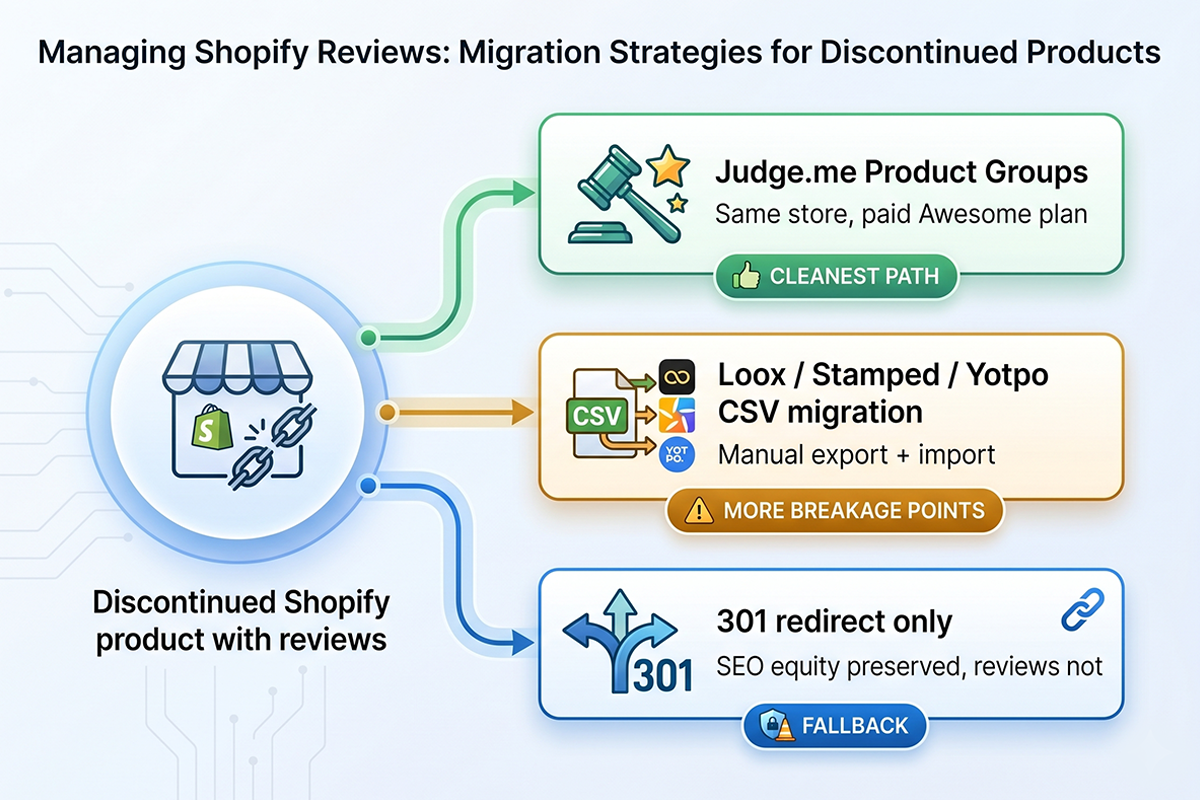
This is one of the worst feelings a Shopify owner can have, and it is almost always recoverable. The reviews still exist in the platform's database; what you lost is the visible connection to the live product. That connection can be rebuilt in most cases, using Judge.me Product Groups, a manual CSV migration on Loox, Stamped, or Yotpo, or a 301 redirect to preserve the SEO value.
Before any of that, one rule matters: the FTC has clear limits on which reviews you can migrate. Moving reviews from a discontinued product to a meaningfully different one is now a federal violation, not a gray area. We will start there, then walk through the working procedures.
What actually happens to reviews when you discontinue a Shopify product
When you delete a Shopify product, the product's database row disappears, and any review app matching reviews to that product ID has nothing to attach them to. The reviews stay in the review platform's database, but they no longer render on a live URL. Your accumulated star average for that product is gone from public view.
Softer changes behave differently. Most review apps key on the Shopify product ID, so archiving a product keeps the reviews intact in the database but hides them from the storefront. Merging variants typically creates a new master product with a new ID, which means the new master starts at zero reviews even if the old variants had hundreds between them.
The three scenarios where Shopify owners lose reviews most often are: retiring a seasonal product, replacing a 2024 version with a 2026 version, and consolidating five color variants that were originally listed as separate products into one product with a color selector. All three are common. All three are recoverable in most cases.
The SEO and conversion cost of doing nothing
If you let those reviews stay orphaned, two things happen at the same time, and both quietly cost you money for months.
The first is the loss of star snippets in Google. Product schema with review aggregate ratings is what triggers those golden star rows under product titles in search results. When the review count on a product page drops to zero, Google removes the star snippet, sometimes within a week. You can read more about how reviews shape SERP click-through rate; the short version is that star snippets typically lift organic CTR by 10 to 30 percent on commercial queries, and you lose all of that on the products you orphaned.
The second is the conversion drop on the product page itself. Baymard Institute research consistently shows that product reviews are among the most consulted elements on a product detail page, and shoppers reading a 4.7-star product with 200 reviews convert at a meaningfully higher rate than the same product showing zero reviews. The new product is identical in every way that matters to the buyer; the only difference is the missing social proof, and that shows up in the conversion rate within 30 days.
For a 2-year-old store with even modest review accumulation, the combined cost usually runs into thousands of dollars per quarter on the affected pages. This is why the migration is worth doing carefully.
The FTC rules you need to know before migrating anything
On October 21, 2024, the FTC's Rule on the Use of Consumer Reviews and Testimonials took effect. One of the practices it explicitly prohibits is called review hijacking, which the FTC defines as using or repurposing a consumer review written for one product so that it appears to have been written for a substantially different product.
This is the line you cannot cross. Migrating 300 reviews of last year's running shoe (V3) to this year's running shoe (V4) is fine if V4 is genuinely the successor product with similar materials, fit, and use case. Migrating those same reviews to a sandal, a hiking boot, or a "redesigned" shoe that is materially different in shape or construction is review hijacking. The FTC can issue civil penalties for this now, not just warning letters.
The practical test is simple: if the customer who wrote the review would still recognize the new product as the same product they bought and would still stand by their original words, the migration is legitimate. If they would say "that's not what I reviewed," you cannot move the review.
For more on the full rule, the FTC's official endorsements page is the authoritative source. Three other rules in that document also apply: you cannot suppress legitimate negative reviews on the old product, you cannot edit reviews to make them more positive on the new product, and you cannot remove the original purchase date metadata if it accompanies the review on the new page.
The Judge.me Product Groups workflow (the cleanest path)
If your store runs Judge.me, Product Groups is the right tool for this job. It is the only Shopify reviews platform that lets you officially share the same reviews across multiple products without creating duplicates, and it handles the live update of the aggregate star rating automatically.
One thing to flag honestly: Product Groups now requires Judge.me's paid Awesome plan. It used to be available on the free tier, and Judge.me changed that in 2025. The Awesome plan starts at $15 per month and gives you 15 days free to test the migration. If the value of your orphaned reviews is more than $15 (and for any 2-year-old store, it almost certainly is), the math is straightforward.
When Product Groups is the right tool
Product Groups is the right answer when: you are replacing one product with a clear successor, you merged variants into a new master product, you have multiple SKUs for what is functionally the same product (different color names, different sizes, same item), or you are running A/B variant tests across product pages and want the reviews to follow.
It is the wrong answer when: the products are genuinely different (FTC rule), you need to move reviews to a brand-new product that has no thematic relationship, or you only want to migrate some reviews (Product Groups shares all of them, not selected ones).
Step-by-step setup
From the Judge.me admin, go to Settings > Product groups. Click Create new group, give the group a clear internal name (something like "Running Shoe V3 to V4 migration"), and add both the old product and the new product to the group. If the old product is already deleted from Shopify, Judge.me usually still has the product record cached, and you can find it in the group's product picker by SKU or by review count.
Once the group is saved, give it about 2 to 5 minutes. Judge.me states that reviews may take at least 2 minutes to appear on a new group page, and in practice it is often closer to 5. Refresh the new product page on your storefront and you should see the combined review count and the merged star rating.
Each product can only belong to one product group, and each group can include up to 10,000 products. For 99 percent of Shopify stores, neither limit is a constraint.
What Product Groups won't do
Product Groups shares the reviews across the products in the group; it does not move them. The original review still lives on the old product in the database. If you ever delete the old product from Judge.me directly (not just from Shopify), the reviews are removed from the group. Always check that the old product is still present in Judge.me before cleaning up your Shopify admin.
It also does not work for cross-store migrations. If you are moving from a sunset store to a new store on a different Shopify domain, you need cross-store syndication (a separate Judge.me feature) or a CSV migration.
Finally, in 2024 Judge.me announced that to comply with Shopify, full review transfers between products are no longer permitted. They will move individual misrouted reviews on request, but bulk transfer between products is closed. Product Groups is the official replacement.
The manual CSV path for Loox, Stamped, and Yotpo
If your store runs Loox, Stamped, or Yotpo, you do not have a Product Groups equivalent. The path is a manual CSV export from the old product, careful field remapping, and a re-import to the new product. It is more work, more breakage points, and you should plan for a 30-minute to 2-hour effort depending on review count.
Loox export-import workflow
From the Loox admin, go to Manage Reviews, find the old product, and export the reviews. Loox exports a CSV with reviewer name, email, rating, title, body, photo URLs, and the Shopify product ID. To re-import to a new product, you need to edit the product ID column to match the new product's Shopify ID, then upload the file via Manage Reviews > Import Reviews. Loox lets you import up to 100,000 reviews per store via custom CSV, which is more than enough for almost any case.
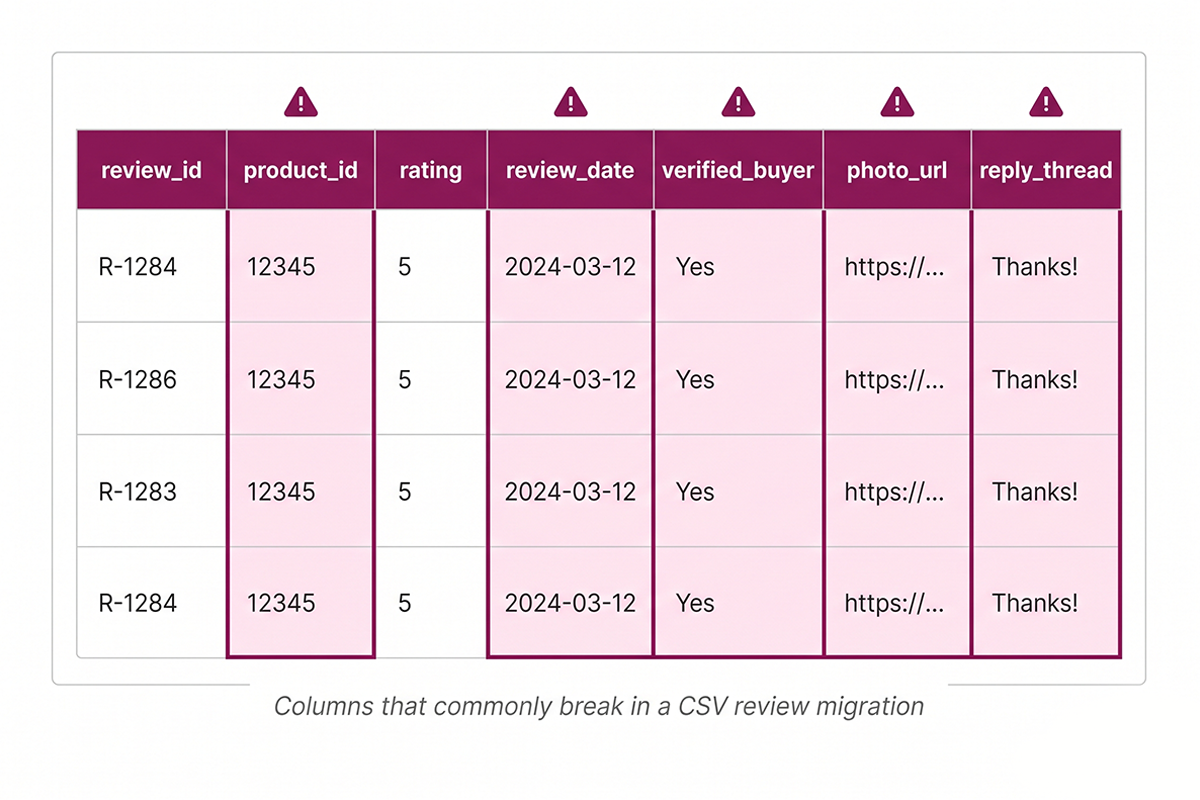
Two things break in this workflow that you have to fix manually: the verified buyer flag is usually lost (Loox tries to re-match against the order history but if the original orders are old, it will not always succeed), and the photo URLs sometimes 404 because Loox rotates its CDN. If photo reviews matter to you, plan to manually re-upload the photos after the import. The Loox custom file import documentation walks through the required column headers.
Stamped CSV workflow
Stamped works similarly. Export reviews from the old product, update the product handle and product ID, and import via the Stamped admin's review import tool. Stamped has stricter CSV format requirements than Loox, so download their import template first and match your file's column order to it exactly. A single mismatched header will cause Stamped to reject the whole file silently.
One detail specific to Stamped: their import preserves the original review date if you include it in the CSV. Many sellers leave this column blank by accident and the imported reviews all show today's date, which immediately flags the migration as suspicious to both Google and shoppers. Always include the original date in the import.
Yotpo CSV workflow
Yotpo's process is the most involved. Their CSV format includes more required fields (review type, source, sentiment tags), and they cap free-tier review imports more aggressively. If you are on Yotpo's free or Growth plan and migrating more than 200 reviews, expect to contact Yotpo support for a manual import on their end, typically within 3 to 5 business days.
Yotpo also separates star ratings, written reviews, and Q&A into different objects in their database. The export produces these as separate CSV files, and each must be imported independently and linked back to the new product ID.
The five things that break in a CSV migration
In every CSV migration I have done, the same five things break, and budgeting time to fix them is the difference between a clean migration and a half-done one:
(1) Verified buyer flags usually don't survive. If the new product ID has no matching past orders, the reviews come in as unverified. You can sometimes re-match by editing the customer email field to match the original order, but plan to lose this on some reviews.
(2) Photo URLs can 404 if the platform rotates its image CDN. Always download the photos before the export and prepare to re-attach them after the import.
(3) Review dates default to "today" if the date column is blank or formatted wrong, which is the single most common mistake.
(4) Reply threads (your store's responses to reviews) often come in detached from the parent review. You may need to manually re-link them.
(5) SEO snippets take 2 to 4 weeks to repopulate after the import, because Google has to re-crawl, re-parse the product schema, and re-evaluate the aggregate rating. Do not panic if the star snippet does not appear instantly.
Don't forget the 301 redirect (or you lose the SEO anyway)
This is the step almost every Shopify owner skips, and it is the one that quietly wastes half of the migration effort. If you discontinue a product, Shopify will start serving a 404 on the old URL. Any backlinks pointing to the old URL (Google's index, third-party blogs, your own past emails, social posts) will fail. Even if you successfully migrated the reviews to the new product, the SEO equity in those backlinks is lost unless you redirect the old URL to the new one.
In the Shopify admin, go to Online Store > Navigation > URL Redirects, click Create URL redirect, paste the old product handle in the "From" field and the new product URL in the "To" field. Shopify automatically applies a 301 redirect. You can find the full SEO checklist for new stores that walks through this step in more detail, but for migration purposes, the redirect is non-negotiable.
If you have done a deeper Shopify SEO and GEO setup, you may also want to update internal links to the old product and resubmit the sitemap. Most stores skip both. Both matter. If you want this done end-to-end, the Shopify SEO and GEO service covers the redirect mapping and sitemap resubmission as part of any structural change to product URLs.
When to migrate yourself versus hire it out
If you have 1 to 3 discontinued products with under 50 reviews each, and your store runs Judge.me, this is a 30-minute DIY task. Set up the Product Group, verify the live storefront, set the redirects, done. The Awesome plan free trial covers the whole project if you act inside 15 days.
If you have 5 or more discontinued products, any product with more than 100 reviews, or you are on Loox, Stamped, or Yotpo where the CSV path applies, the time cost rises sharply and so do the breakage points. This is where most stores either let the reviews stay orphaned (the expensive default) or hire help.
The Studio Niza reviews management service includes discontinued listing review migration as part of every recurring engagement: Product Groups setup, CSV imports on the other platforms, photo re-attachment, redirect mapping, and FTC-rule verification on every migrated review. Most reviews services do not do this. It is the specific reason Studio Niza's Reviews tier exists.
Whether you handle it yourself or have someone else handle it, do not let the reviews sit orphaned. Every week you wait is another week of lost star snippets, lost click-through, and lost conversion on the pages that were earning trust for you.
Want this done for you?
Studio Niza's Reviews Management service includes discontinued-listing review migration. Product Groups setup, CSV imports, 301 redirect mapping, and every star snippet recovered where the FTC allows it. From $199/month, no platform lock-in.
See pricing & services →Or email contact@studioniza.com if you have a specific question about your store. I read every one.
Frequently asked questions
If you're still unsure after reading these, just send the question.
Can I move all my reviews from a discontinued Shopify product to a new one? +
On Judge.me, no, full bulk transfers between products are no longer permitted. The official replacement is Product Groups, which shares the same reviews across multiple products. On Loox, Stamped, and Yotpo you can do a CSV export and re-import, but expect to manually fix verified buyer flags, photo URLs, and reply threads.
Does migrating reviews violate FTC rules? +
Only if the new product is substantially different from the old one. The FTC's Rule on Consumer Reviews, effective October 21, 2024, prohibits review hijacking, which is repurposing a review so it appears to be about a meaningfully different product. Migrating reviews from V3 of a running shoe to V4 is fine; migrating them to a sandal is not.
How long does it take Judge.me Product Groups to display merged reviews? +
Judge.me states reviews may take at least 2 minutes to appear after adding products to a group. In practice it is often closer to 5 minutes. Refresh the new product page in an incognito window to verify the merged star rating and review count are showing.
What happens to star snippets in Google when I delete a Shopify product? +
Google removes the star snippet from search results within roughly a week, because the product schema no longer reports an aggregate rating. After you migrate the reviews and republish the product schema, allow 2 to 4 weeks for Google to re-crawl, re-parse, and restore the snippet. The recovery is not instant even when the underlying data is fixed.
Is there a free way to migrate reviews on Judge.me? +
Product Groups now requires Judge.me's paid Awesome plan, which starts at $15 per month with a 15-day free trial. If you can complete the migration inside the trial window, the actual cost is zero. Outside that, $15 is usually trivial compared to the value of the orphaned reviews on a 2-year-old store.
Should I migrate reviews if the new product is meaningfully different from the old one? +
No. This is the line the FTC drew with the review hijacking ban. The practical test is whether the original reviewer would still recognize the new product as the same item they bought. If they would say "that's not what I reviewed," the migration is not legitimate and you should leave the old reviews on the discontinued product and start fresh on the new one.