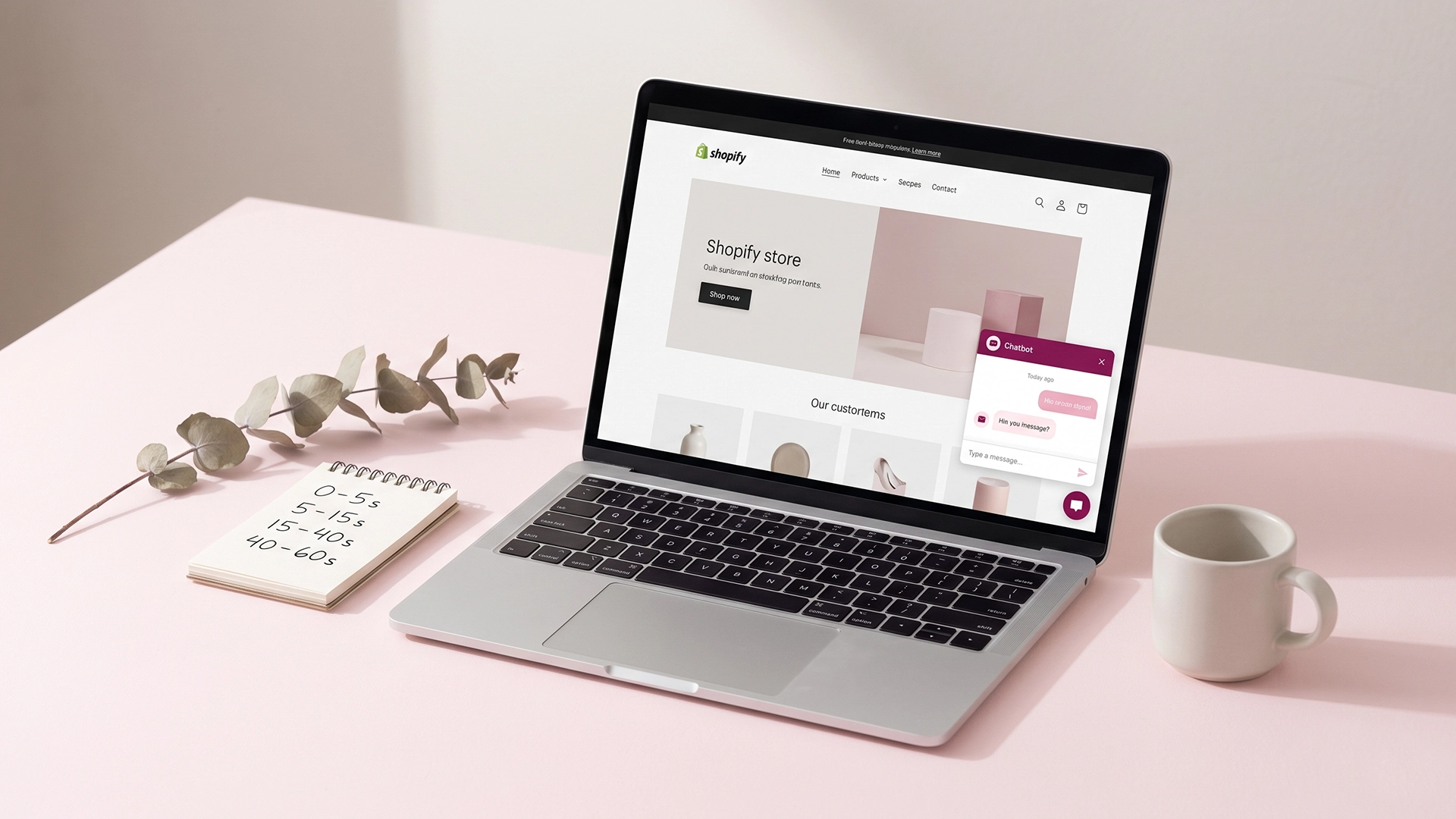
A new Shopify chatbot is sitting on your store right now with a welcome message that says some version of "Hi! How can I help?" It is not earning replies, it is not opening conversations, and you can feel it in the conversation count: a flat line on most days, the occasional accidental click. The problem is not the chatbot. The problem is the first 60 seconds.
The Shopify chatbot welcome flow is the most overlooked piece of conversion work on a small store. Owners spend hours picking a chatbot app, then leave the welcome message on its default setting and wonder why nothing happens. The default is written by a vendor who has never seen your customer. It is generic on purpose, because it has to fit every store. Yours does not.
This post is the four-message structure I use when I build Shopify chatbots for clients. It covers what to say in the first five seconds, the next fifteen, and what to do at the forty-second mark when most conversations either die or convert. It includes paste-ready scripts for the homepage, product page, collection page, and cart page, because one welcome message for the whole site is part of why the flat line exists.
Why the first 60 seconds of a chatbot conversation matter more than the next ten
A visitor lands on your store. The chat widget pulses in the corner. Within about a minute, one of three things happens: they ignore it, they click it and bounce, or they reply. The first 60 seconds decide which.
This is not a feeling. Baymard Institute pegs the average cart abandonment rate at 70.19%, which means roughly seven out of ten people who add a product to their cart never finish checking out. A lot of those abandonments are friction, but a meaningful share is unanswered questions. A welcome flow that opens a real conversation in the first minute is one of the few things that can intercept that friction before the visitor leaves.
Industry data backs this up. AI chatbots that are connected to product data and configured for pre-sale support tend to lift conversion rates by around 20%, according to recent ecommerce benchmark reporting. That number is not a guarantee for your store. It is what well-configured chatbots do, and the welcome flow is the door into the conversation that makes everything else possible.
The brutal version of the math: if your store gets 1,000 visitors a week and 2% convert, you have 20 orders. If a working welcome flow lifts conversion by even 10% (a fraction of the industry top end), you get 22 orders. That is two more orders a week for the price of writing four better messages. The reason most stores never see this lift is that they never get past the default greeting.
What most Shopify welcome messages get wrong
Before the four-message flow, it helps to name what is failing. Most of the welcome messages I see on Shopify stores break in one of four ways. Sometimes all four.
The "Hi, how can I help?" trap
"Hi, how can I help?" puts the burden on the visitor. They have to figure out what to ask, type it out on a phone, and trust that the bot will understand. Most do not bother. A good welcome message names something specific the bot can do, then offers options the visitor can tap instead of type. Quick-reply buttons are not optional on mobile. They are the difference between a click and a bounce.
Auto-opening the widget on mobile
This is the one that drives Shopify owners up the wall. The chat widget opens on its own when the page loads, and on a phone it covers the entire screen. Visitors who came to look at a product see a chat window instead. They tap the close button and never reopen it. There is a long-running Shopify Community thread full of owners trying to fix this and getting no good answer. The fix is to set the widget to open on user click, not on page load. Every reputable chatbot platform supports this. Find the toggle and turn it off.
Asking for the email before earning anything
"Welcome! Enter your email for 10% off." This is not a chatbot, it is a popup wearing a costume. It tells the visitor you want their data before you have given them anything useful. Save the email capture for after the visitor has gotten something out of the conversation: a product recommendation, a sizing answer, a shipping confirmation. The order matters.
One welcome message for the whole site
The homepage visitor and the cart-page visitor are not the same person. The homepage visitor is browsing. The cart-page visitor has a credit card out and one objection in the way. They need different welcome messages. Most stores use the same one for both, which means at least one of them is wrong.
The four-message Shopify chatbot welcome flow
This is the structure. Four messages, mapped to the first 60 seconds, designed to give the visitor a reason to reply by the end of the first minute. You can build it on Shopify Inbox, Tidio, or any modern chatbot platform that supports quick replies and branching.
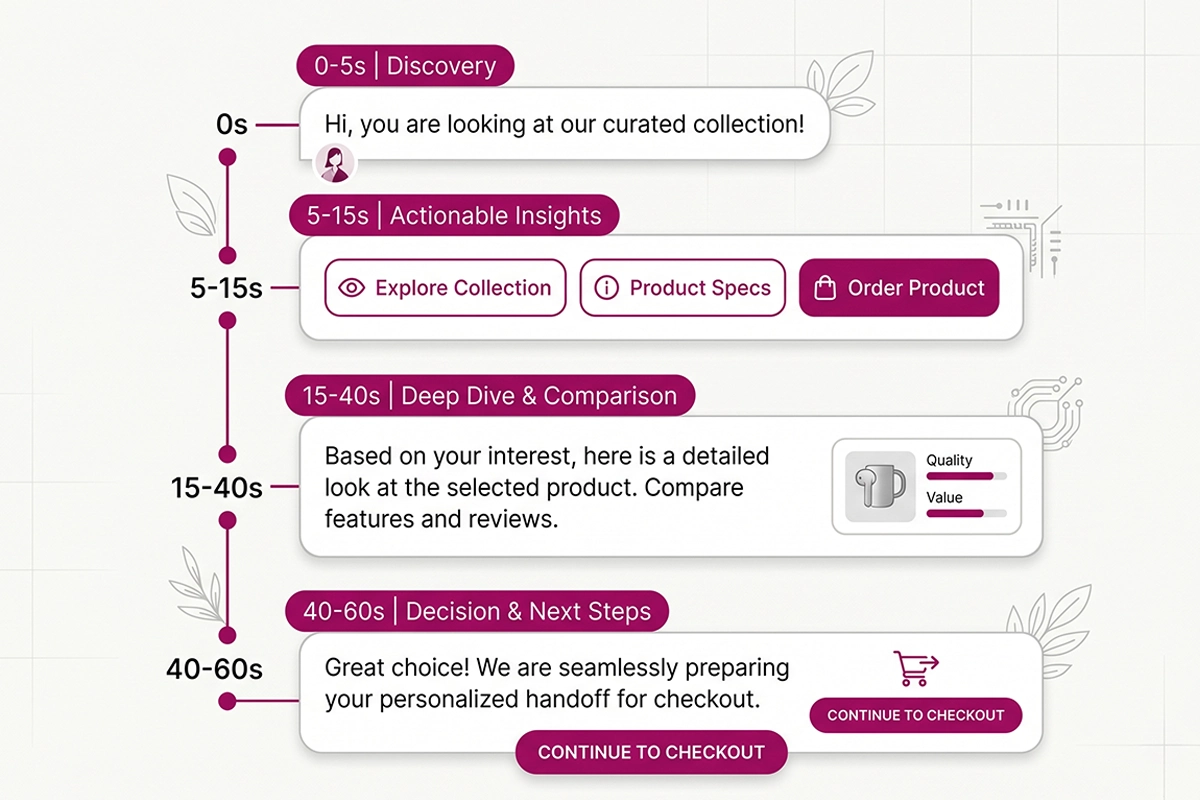
Message 1 (0 to 5 seconds): acknowledge the page, set expectations, disclose the bot
The first message confirms the visitor is in the right place and tells them what the chat can do. Google's own conversational design guidelines are clear on this: the first message should set expectations, identify the agent as a bot, and give a clear path forward.
A good first message reads: "Hi, you are looking at [product or category name]. I am the [Store Name] assistant. I can answer questions, help you find a size, or check stock. What can I do?" Under 30 words. Names the bot as a bot. Sets the scope. Ends with an open invitation that is immediately followed by buttons.
Message 2 (5 to 15 seconds): three quick-reply options tied to likely intent
Right under the first message, show three quick-reply buttons. Three is the right number. Two feels thin. Four feels crowded on a phone. The buttons should map to the three most common reasons someone on this page would chat with you.
On a product page, that might be: "Check stock" / "Sizing help" / "Ask a question." On the cart page, it might be: "Shipping costs" / "Return policy" / "Speak to a human." On the homepage, broader options work: "Help me find a product" / "Track my order" / "I have a question." Each button leads to a specific branch. None of them dead-ends.
Message 3 (15 to 40 seconds): the branched response
The visitor taps a button. The bot has fifteen to forty seconds to deliver something useful before they lose interest. This is where most chatbots fail, because the answer they give is either too generic ("Please check our shipping page") or too long.
The right answer is specific, short, and ends with a next step. If they tapped "Check stock," the bot should pull the actual stock count for the product they are on and reply with "[Product name] in [size/colour] is in stock. 7 left. Want me to drop a link to checkout?" That answer comes from connecting the bot to your Shopify product feed, which is the difference between a chatbot that converts and a chatbot that frustrates.
Message 4 (40 to 60 seconds): the handoff, fallback, or soft close
By the end of minute one, the conversation either keeps going, gets handed to a human, or closes well. The fourth message is the one that decides which. If the visitor's question is answered, the bot offers a soft next step: "Anything else I can check?" If the bot does not know the answer, it says so clearly and offers a handoff: "I do not have that one. Want me to email this to Niza? She replies in under 24 hours." If the visitor goes quiet, the bot does not nag. It logs the conversation and waits.
The comparison table makes the difference visible.
| Stage | Generic welcome message | Studio Niza welcome flow |
|---|---|---|
| 0 to 5 seconds | "Hi! How can I help?" | Names the page, identifies the bot, sets the scope |
| 5 to 15 seconds | Empty text box waiting for typing | Three quick-reply buttons tied to page intent |
| 15 to 40 seconds | "Please visit our FAQ page" | Specific answer pulled from product data, ends with a next step |
| 40 to 60 seconds | Conversation goes silent | Soft next step, clean handoff to email, or quiet close |
Welcome flow scripts by page type
Now the practical part. Below are four paste-ready scripts, one per page type. Drop them into whichever chatbot platform you are running, swap in your store name and product names, and you have a working flow by the end of the day. If you have already done the foundational work on your store (the Shopify SEO checklist for new stores covers the structural side), this is the next compounding piece.
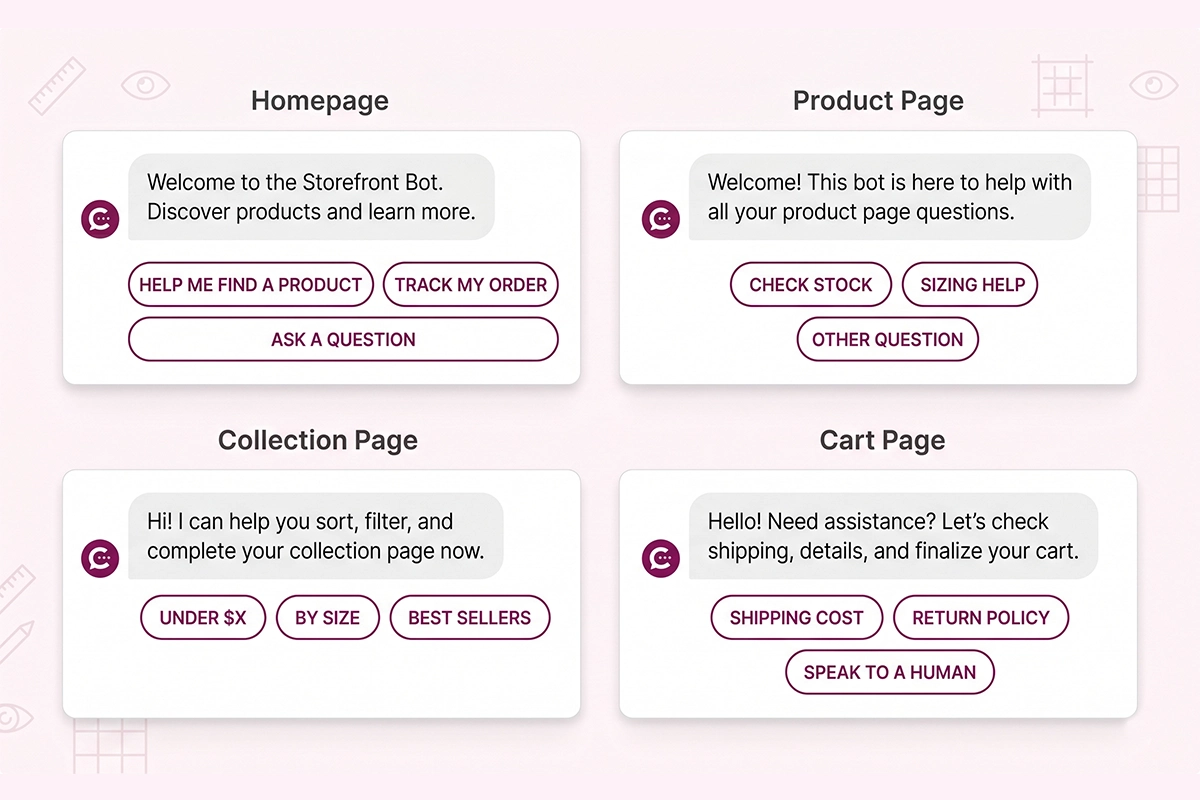
Homepage script
Broad intent, three wide options. The visitor on the homepage is browsing. Do not push them toward checkout. Help them find a starting point.
Message 1: "Hi, welcome to [Store Name]. I am the store assistant, here to help you find what you are looking for or answer a quick question. What can I do?"
Buttons: "Help me find a product" · "Track my order" · "Ask a question"
Branch examples: "Help me find a product" leads to a category prompt ("Are you looking for something for yourself, a gift, or just browsing?"). "Track my order" asks for an order number and pulls status from Shopify. "Ask a question" opens free text with a fallback to email handoff.
Product page script
One specific question, not three. The visitor is already interested. The chatbot's job is to remove the last objection.
Message 1: "Hi, you are looking at [Product Name]. I am the store assistant. I can check stock, help you pick a size, or answer a question about this product."
Buttons: "Check stock" · "Sizing help" · "Other question"
Branch examples: "Check stock" returns the live stock count for the variant. "Sizing help" pulls the size chart and asks for the visitor's usual size in a reference brand. "Other question" opens free text with a quick fallback to email handoff if the bot cannot answer.
Collection page script
Filtering aid. The visitor is comparing options and probably overwhelmed. Help them narrow down.
Message 1: "Hi, you are browsing [Collection Name]. I can help you narrow this down by price, size, or use case. Want me to filter for you?"
Buttons: "Under $[X]" · "By size" · "Best sellers"
Branch examples: "Under $[X]" applies a price filter and returns 3 products with images. "By size" asks for the size and filters. "Best sellers" returns the top 3 by units sold in the last 30 days.
Cart page script
One objection at a time. The visitor has a card out. Do not interrupt them with a long flow. Address the most common reason they would not check out.
Message 1: "Hi, almost there. Before you check out, anything I can clear up about shipping, returns, or payment?"
Buttons: "Shipping cost" · "Return policy" · "Speak to a human"
Branch examples: "Shipping cost" returns the shipping options for the cart total and destination if available. "Return policy" gives a one-line summary and links to the full policy. "Speak to a human" hands off to email or live chat. If your store carries social proof on product pages, the cart-page bot can also briefly mention that the items in the cart have strong customer feedback. Tying reviews into the cart conversation is a small but real lift, and it is part of why reviews management compounds with chatbot work rather than competing with it.
What to measure in week one and how to iterate
A welcome flow is not a set-and-forget thing. It needs to be measured weekly for the first month and monthly after that. The four metrics that matter are open rate, button-click rate, handoff rate, and conversation depth.
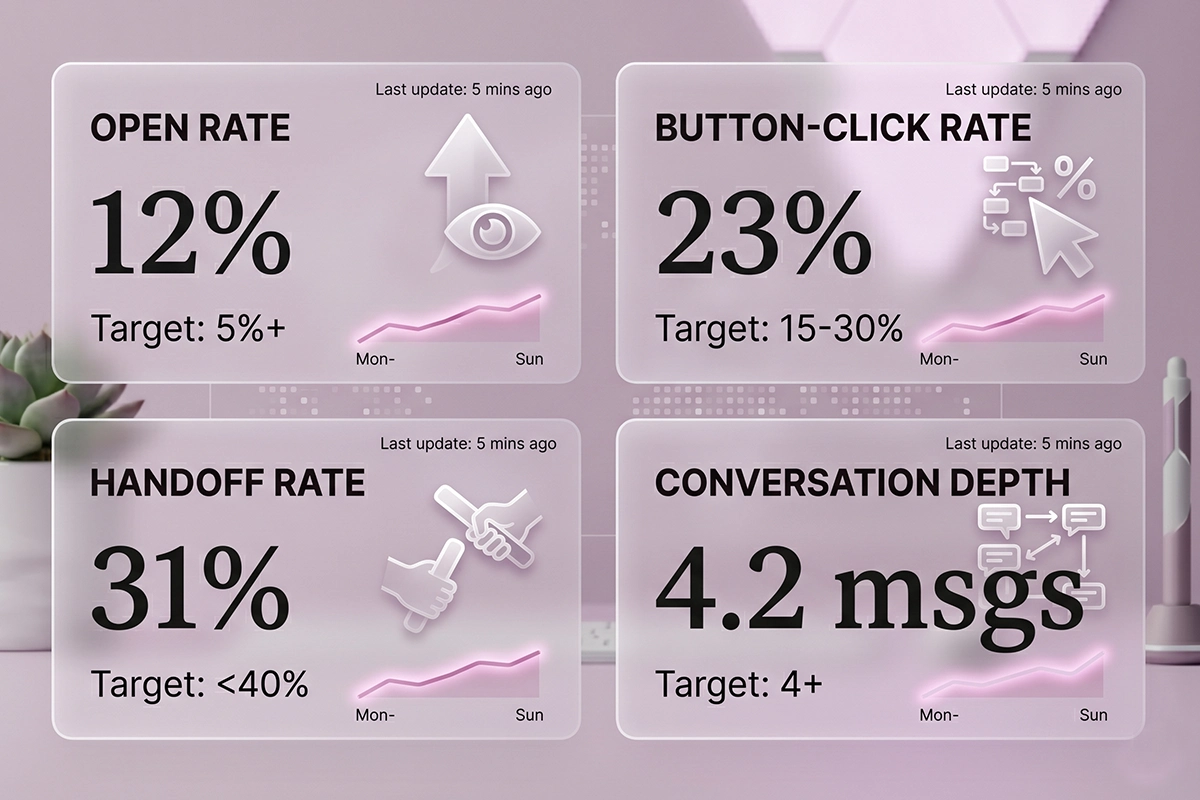
Open rate is the percentage of visitors who see and engage with the welcome message at all. If this is under 5%, your widget is hidden, your timing is off, or your first message is invisible on mobile.
Button-click rate is what percentage of people who see the welcome message tap a button. Healthy is 15% to 30% depending on traffic source. If it is under 10%, your buttons do not match the page's likely intent. Rewrite them.
Handoff rate is what percentage of conversations end with the bot escalating to email or live chat. A healthy chatbot handles 60% to 70% of conversations end-to-end. If handoffs are over 50%, the bot does not know enough about your products or policies. Add more training data.
Conversation depth is the average number of messages exchanged before the conversation ends. Two means the visitor opened, saw the buttons, and closed. Six or more means the bot is actually doing work. Aim for four as a floor.
Iterate one variable at a time. If button-click rate is low, change the button labels. Wait a week. Measure again. Do not change three things at once or you will not know what moved the number.
On the tooling side: Shopify Inbox is free and good enough if your chat volume is under 20 conversations a week and you are happy with rule-based replies. Once you cross that threshold, or once you want the bot to actually answer product questions on its own, you need an AI-trained chatbot. That is the bracket Studio Niza builds in, on Voiceflow, with weekly monitoring included in the monthly fee. If a free tool fits, the free tool is the right answer. Most stores under 100 weekly visitors do not need a paid chatbot yet.
Wrapping up
The Shopify chatbot welcome flow is four messages: an acknowledgement, three quick-reply buttons, a specific branched answer, and a clean handoff or close. Sixty seconds, structured. Different scripts for different page types. Measured weekly until the numbers settle, then monthly.
A good welcome flow is not going to multiply your traffic overnight. It is going to do something quieter and more valuable. It is going to earn the next reply, and the next reply earns the sale. The flat-line chatbot is not broken because the technology failed. It is flat because no one wrote the first message for the visitor on the page they actually landed on.
If you have a chatbot installed already, rewrite the welcome message tonight. Use the homepage script as a starting point. Check it on your phone. Watch the open rate for a week. The change will not be dramatic in week one, but it compounds, and by month three you will see the difference in the conversation count. That is the work.
Want this set up for you?
Studio Niza builds Shopify chatbots trained on your products, with welcome flows scripted per page type, weekly monitoring, and live agent handoff. Setup from $599, $99/month all-in.
See the AI Chatbots service →Or email contact@studioniza.com if you have a specific question about your store. I read every one.
Frequently asked questions
If you're still unsure after reading these, just send the question.
How long should a Shopify chatbot welcome message be? +
Keep the first welcome message under 30 words. Long greetings get skipped, especially on mobile where the chat window can cover the screen. The first message should name the page, identify the bot, and lead into quick-reply buttons. Anything longer belongs in the branched responses, not the welcome.
Should my Shopify chatbot open automatically when someone lands on the site? +
No. Auto-opening the chat widget is one of the most common Shopify chatbot welcome flow mistakes. On mobile, the open widget can cover the entire screen, and visitors close it and never reopen it. Set the widget to open on user click instead. Every reputable chatbot platform supports this toggle.
Should the welcome message ask for the visitor's email first? +
No. Asking for the email before you have given the visitor anything useful turns the chatbot into a popup in disguise. Save the email capture for after the bot has answered a product question, recommended a size, or confirmed shipping. The order matters and earns the data instead of demanding it.
What is the difference between a welcome message and a welcome flow? +
A welcome message is the single first line a chatbot says. A welcome flow is the full first 60 seconds of conversation: the greeting, the quick-reply buttons, the branched response, and the close or handoff. Most Shopify owners write a welcome message and stop there. The flow is what actually converts.
Do I need a different welcome message for every page? +
Yes, at minimum for four page types: homepage, product page, collection page, and cart page. The visitor's intent is different on each one, and so are the questions they would ask. A single welcome message that fits all four pages is the wrong message for at least three of them.
How do I know if my Shopify chatbot welcome flow is working? +
Track four metrics in the chatbot dashboard: open rate, button-click rate, handoff rate, and conversation depth. Healthy ranges are 5% or higher for open rate, 15% to 30% for button-click rate, under 40% for handoff, and four or more messages for conversation depth. Iterate one variable at a time, week by week.