
If you've already optimized your Shopify product pages and traffic is still flat, the page type you haven't touched yet is almost always the collection page. The category-level pages. The ones at /collections/your-handle/. The ones most Shopify owners build once, leave with an empty description field, and never look at again.
This is not a small oversight. Collection pages are where Shopify stores rank for the highest-volume commercial keywords in their niche. Not "organic cotton women's crew neck t-shirt size medium". That's a product page query. Collection pages rank for "organic cotton t-shirts", "women's running shoes", "gold stud earrings": category-level searches with real volume and real buying intent.
Most Shopify SEO guides bury this point. This post is the version I wish I could send to every store owner who tells me they've "done SEO" and traffic still isn't moving. We'll cover why collection pages are underused, how to diagnose your own, the split-description structure that does the heavy lifting, what Google's John Mueller actually said about text below the product grid, how to add FAQ schema at the collection level, and the three fields almost everyone skips. Shopify collection page SEO sits between technical SEO and content writing, and most stores never get it right. If you haven't done the foundation yet, start with the Shopify SEO checklist for new stores first.
Why collection pages are the page type most stores leave on the table
Here's the rough math that drives this whole post. A well-optimized product page might rank for 1 to 3 keywords: the product name and a couple of variants. A well-optimized collection page can rank for 10 to 50 keywords inside the same category cluster, all of them broader and higher-volume than product-level queries.
The reason is structural. Collection pages sit one rung above products in the catalog hierarchy. They target what searchers call category-level intent: someone who knows they want a thing in the category but hasn't picked the specific item yet. That's most ecommerce traffic. Shopify's own SEO guide covers the basics, but in practice, owners spend their optimization time on products because there are more of them and they feel more "real". The collection page sits there ignored, with an auto-generated title and an empty description.
The second reason is internal link equity. Every product card on a Shopify collection page links back to that collection. If you have 60 products in a collection, that page receives 60 internal links from the grid alone. That's significant authority, and most stores waste it on a page Google can't index meaningfully because there's no text on it.
"Optimized product pages, flat traffic" almost always traces back here
When a store owner tells me their product pages are clean and traffic still isn't moving, the first place I check is the collection pages. Nine times out of ten the description fields are empty, the titles are auto-generated, and there's no internal linking to the collections from anywhere except the main nav. That's the gap. Fixing it takes about 30 to 45 minutes per collection done carefully, and most stores have between 5 and 25 collections worth fixing.
How to tell if your collection pages are the problem
The 30-second audit: open three of your top collections in the Shopify admin. Look at the Description field. If it's empty, or one generic line like "Browse our latest arrivals", you've found the problem. Now check the title tag and meta description fields under "Search engine listing" near the bottom of the same edit screen. If those are also blank or auto-generated, Shopify is filling them with the collection name and nothing else. That's not optimization, that's a default.
Now audit from Google's side. Open Google Search Console, go to the Performance report, filter by Page, and look at how many of your collection URLs are showing up at all. If your top collection has fewer than 50 impressions over the last 28 days, the page isn't being shown to searchers because Google doesn't understand what it's for. That's a thin content problem, not a backlink problem.
What "thin content" looks like to Google
A thin collection page is one where Google can see the H1 (the collection name), the product cards (image, title, price), and almost no other text. Google has been consistent on this. The official Mueller position is that some context is required but there's no fixed word count. In practice, most stores need 150 to 300 words of unique text to give Google enough to rank the page confidently.
The other failure mode is the empty collection page. A "Sale" or "Black Friday" collection with no active products becomes a thin content liability. Google may deindex it entirely. The advice that holds up is to keep some products in every collection year-round, or unpublish the collection until you're ready to use it.
The split-description structure: short intro above, long-form below
This is the structural pattern most top-ranking Shopify collection pages use, and it's the part most posts either skip or get half-right. The idea is to split your collection description into two pieces.
Above the product grid: 50 to 100 words. A short, benefit-driven introduction that includes the primary keyword in the first sentence and tells the shopper what's in the collection. This is what they see immediately when they land, before they scroll.
Below the product grid: 200 to 300 words. The longer, more detailed section covering buyer questions, materials, sizing, care, or whatever the category-level decisions actually involve. This gives Google substantial text to index, and it's the section that does the heavy lifting for rankings.
Splitting works because it serves both audiences. Shoppers see products above the fold, not a wall of text. Google sees enough unique content to rank the page. Practitioners running collection pages consistently find that 150 to 300 words of well-written content above or below the grid makes the difference between a page that doesn't rank and one that does.
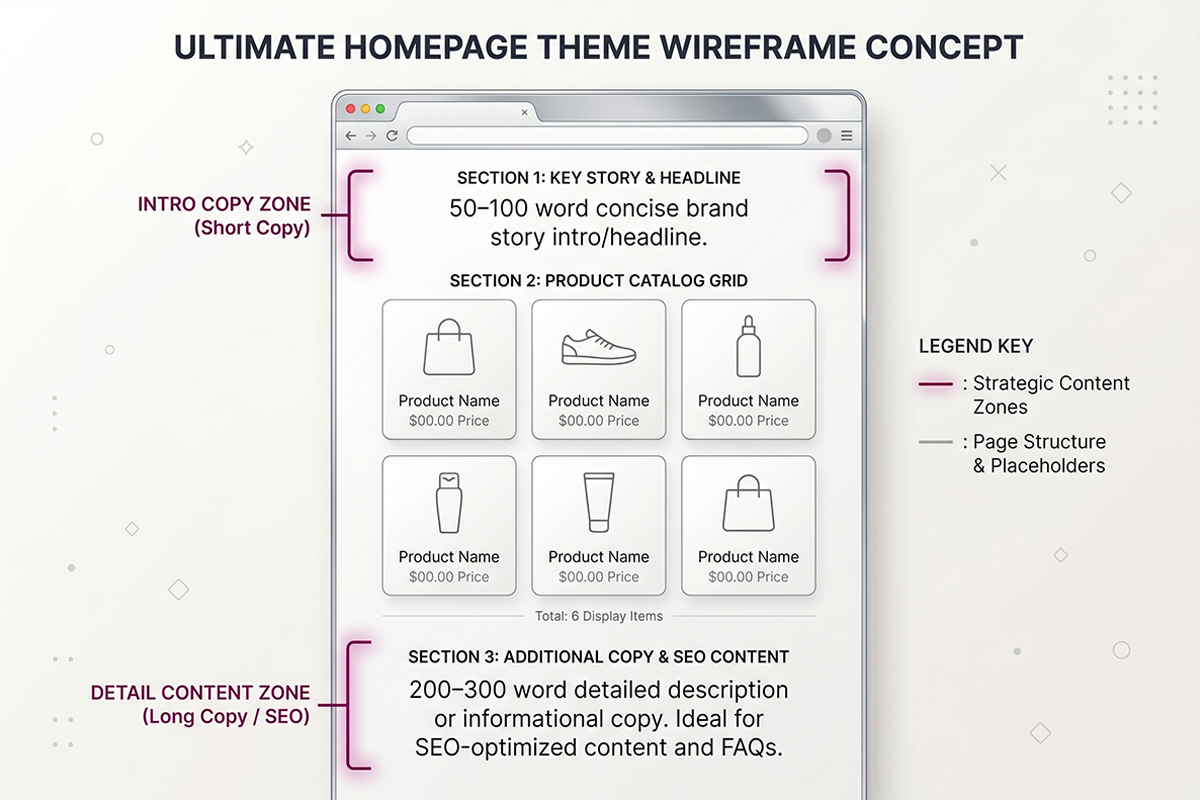
What goes above vs. what goes below
| Section | Word count | What to include |
|---|---|---|
| Above the product grid | 50 to 100 words | Primary keyword in the first sentence. What's in the collection. Who it's for. One thing that makes your selection worth looking at. |
| Below the product grid | 200 to 300 words | Buyer-decision content. Materials. Sizing. Care. Common questions. Related collections with internal links. |
The above-grid section is for the shopper who just landed. The below-grid section is for the shopper who's scrolled all the way through and is still deciding, and for Google's parser, which uses it to confirm what the page is about.
What John Mueller actually said about text below the product grid
Here's where most Shopify SEO posts go off the rails. The John Mueller warning gets cited as if Google said "don't put any text below the product grid". That's not what he said.
In a 2018 Google Webmaster Central hangout, Mueller addressed the practice of stuffing a giant Wikipedia-style block of text below the product listings, sometimes in tiny font, sometimes hidden behind a "read more" link. His actual concern was keyword stuffing: 500 to 2,000 words of low-quality text bolted on for the search engine's benefit, with no thought for the shopper. His 2019 follow-up was sharper, warning that text added purely for SEO often crosses into keyword stuffing territory.
What he warned against
A Wikipedia-style essay buried below the product grid, written in 8-point font, full of keyword repetitions, designed to be ignored by humans and parsed by bots. That's what Mueller called out, and that's what stops working over time.
What he didn't warn against
He never said collection pages shouldn't have content below the grid. He said the content needs to be useful and integrated, not stuffed. The practitioner response at the time: "I'll stop doing it when it stops working." Years later, the SEOs who switched from giant text walls to tight, buyer-useful sections of 200 to 300 words kept their rankings. The ones who kept stuffing slowly lost theirs.
The honest read: a 200- to 300-word section below the product grid that helps a shopper understand the category is fine. A 1,500-word keyword-stuffed wall is not. The pattern that works is useful content, integrated, written for the shopper first.
How to write a Shopify collection description that actually ranks
The mechanics are simple once the structure is clear. Open the collection in Shopify admin and scroll to the Description field. Write the above-grid intro first, the below-grid section second. Most themes display whatever's in the Description field above the grid by default. To split it, you'll need a theme edit that supports an HTML comment delimiter, or a rich-text metafield wired into the template. Both require a one-time change. After that, every future collection is edit-and-save in the admin.
The above-grid intro: 50 to 100 words
Lead with the primary keyword in the first sentence. State what's in the collection. State who it's for. Add one specific signal of curation or quality. Stop. Real example for a hypothetical "Gold Stud Earrings" collection:
"Shop our gold stud earrings collection: 14k and 18k solid gold studs in classic round, princess, and bezel-set styles. Designed for daily wear and made to keep their finish. Every pair ships in a gift-ready box with a hallmark certificate."
That's 41 words. It tells the shopper what's in the collection, hits the primary keyword naturally, and gets out of the way. Products are visible immediately.
The below-grid section: 200 to 300 words
Structure it around the questions a shopper in this category actually asks. For the gold studs example, the below-grid section might cover the difference between 14k and 18k for daily wear, what bezel vs. prong settings mean, how to choose stud size by ear lobe, and care and cleaning. Add a short "related collections" list linking to relevant adjacent categories: silver studs, hoop earrings, drop earrings, bridal jewelry.
The goal is content a shopper at the consideration stage would genuinely read. If you wouldn't read it, neither will they, and Google's increasingly good at telling the difference.
What NOT to include
No store-history monologues. No "welcome to our store" paragraphs. No keyword stuffing. No content that belongs in a blog post: when the topic deserves a real article, write it as a proper blog post and link from the collection. Don't pad the collection footer with it. No duplicated text across multiple collections. Each collection page needs its own unique description. Template-fills are what most cheap SEO services produce, and they don't rank.
Adding FAQ schema to collection pages
This is the part almost every Shopify SEO post skips, and it's one of the few remaining unfair advantages on the platform. Most Shopify owners think FAQ schema is for blog posts. It's not. Collection pages support FAQ schema, and pages with structured data are significantly more likely to be cited in Google's AI Overviews than pages without.
The schema you want is FAQPage, with a list of Question objects, each containing the question text and a single acceptedAnswer. The visible FAQ section on the page should match the schema word for word.
What questions actually work on a collection page
Collection-level FAQs differ from blog FAQs. They focus on category-level shopping questions: sizing, materials, care, what's the difference between X and Y, returns policy on this category, what's included. Stick to questions a shopper at the consideration stage would ask. Aim for 4 to 8. Avoid padding the schema with low-value questions just to hit a count. Google has gotten better at flagging FAQ schema that isn't genuinely useful.
How to add the schema in Shopify
Two options. The first is metafield-based: define a rich-text metafield on collections, write the questions and answers there, and have the theme render both the visible FAQ section and a JSON-LD FAQPage block from the same source. The second is a one-off theme edit that hardcodes the JSON-LD into the collection template using Liquid. The metafield approach scales better past a handful of collections. Validate with the Google Rich Results Test after deployment.
Title tag, meta description, and URL handle
Three fields under "Search engine listing" in the collection edit screen. Almost nobody fills them in deliberately. Doing so is half the work of collection SEO.
Title tag
Shopify recommends titles under 55 characters. The formula that works for collections: [Primary Keyword] | [Brand or Differentiator]. Example: "Gold Stud Earrings | 14k and 18k Solid Gold". Primary keyword first, brand or modifier second. Avoid stuffing multiple keywords into a single title. Pick the one with the highest commercial volume and write to it.
Meta description
Under 150 characters, written for the shopper mid-comparison. Don't summarize the page. Pitch the click. "Solid 14k and 18k gold stud earrings. Hallmarked, gift-boxed, made to keep their finish. Free shipping on orders over $75." That's a click. "Browse our gold stud earrings collection" is not. Consistent review collection also pays off here, because rich snippets pulled from product reviews show up under the meta description and pull clicks.
URL handle
The URL handle is the slug at the end of the collection URL: /collections/your-handle. Shopify generates it from the collection title. Customize it to include your primary keyword, keep it short, and use hyphens. Once a collection URL is live and indexed, do not change it without a 301 redirect. Changing handles without redirects loses the page's rankings and any backlinks pointing to it. This is one of the most common preventable SEO mistakes on Shopify, and it happens because the admin makes it look like a harmless edit.
Wrapping up: the order I'd fix this in
If you've read this far and you're staring at 12 empty collection pages, here's the order I'd actually work through them. First, list your collections by traffic potential, not by alphabet. The two or three covering your highest-volume category keywords go first. Don't try to fix them all at once. Fix three, look at rankings after four to six weeks, then do the next three.
For each collection, write the above-grid intro first (50 to 100 words, primary keyword in sentence one), then the below-grid section (200 to 300 words, buyer-decision content), then the title tag, then the meta description. FAQ schema is a second pass after the descriptions are stable. The URL handle is the last thing you touch, and only if it's clearly wrong, because the cost of changing it without a clean redirect is high.
This work won't show up in Google for four to twelve weeks, depending on recrawl speed and existing internal linking. That's normal. Shopify collection page SEO compounds: once the pages rank, they rank for dozens of related keywords without new work, and they feed traffic into the product pages underneath them. It's the highest-leverage SEO work most Shopify stores haven't done yet. Honest scope beats impressive scope here too: twenty-five well-written collection pages will beat two hundred templated ones every time.
Want collection pages that actually rank?
The Studio Niza Starter SEO tier covers up to 25 priority pages, with custom-written collection descriptions, per-page schema, image SEO, and indexing follow-up. Pricing starts at $499 one-time, no calls required.
See pricing & services →Or email contact@studioniza.com if you have a specific question about your store. I read every one.
Frequently asked questions
If you're still unsure after reading these, just send the question.
How many words should a Shopify collection page description have? +
Aim for 50 to 100 words above the product grid and 200 to 300 words below it, for a total of 250 to 400 words. Google has stated there's no fixed word limit, but in practice this range gives the page enough unique content to rank without burying products or crossing into keyword stuffing.
Should the collection description go above or below the product grid? +
Both, split into two parts. A short intro above the grid (50 to 100 words) gives shoppers immediate context without pushing products below the fold. A longer section below the grid (200 to 300 words) covers buyer-decision content and gives Google substantial unique text to index. This is the structure most top-ranking Shopify collection pages use.
Do empty Shopify collection pages get deindexed? +
Yes, eventually. A collection page with zero products and no description is treated as thin content and Google may drop it from the index. Either keep at least a few products in every collection year-round, or unpublish seasonal collections until they're ready to be used again.
Is the John Mueller warning about text below product listings still valid in 2026? +
Partly. Mueller's warning was about stuffing giant walls of keyword-heavy text below the grid, often in tiny font or hidden behind "read more" links. That practice still doesn't work. A tight 200- to 300-word section that genuinely helps shoppers understand the category is a different thing, and Google has consistently treated it as fine. Useful content, integrated into the page, written for the shopper first.
Do I need a unique description for every Shopify collection? +
Yes. Templated or near-duplicate descriptions across multiple collections give Google very little new context for each page and weaken the ranking signal for all of them. Each collection page needs its own unique description aligned with the specific category-level keyword it targets. This is the work most cheap SEO services skip.
Can I add FAQ schema to a Shopify collection page? +
Yes. Collection pages support FAQPage structured data the same way blog posts do. Add 4 to 8 buyer-stage questions (sizing, materials, care, returns), match the visible HTML to the JSON-LD word for word, and validate with the Google Rich Results Test. Pages with structured data are significantly more likely to be cited in Google's AI Overviews than pages without.
Should I change a collection URL handle to add my keyword? +
Only with a 301 redirect from the old URL to the new one. Changing a collection handle without a redirect loses the page's existing rankings and any backlinks pointing to it, which can cost a meaningful chunk of organic traffic overnight. If the existing handle is decent, leave it alone. If it's clearly wrong, plan the redirect before you change it.
How long until collection page SEO changes start to show in rankings? +
Typically 4 to 12 weeks. Google needs to recrawl the page, reindex the new content, and re-evaluate its position in the results. Pages with stronger existing internal linking tend to move faster. Don't expect changes inside the first month, and don't keep editing the page every week while you wait; let the changes settle.