Most new Shopify owners spend hours tweaking meta titles and dollars chasing backlinks, then skip the one SEO lever they fully control: internal linking. It's free, it's entirely under your roof, and on Shopify specifically it does more heavy lifting than on almost any other platform.
This post is the practical version of a Shopify internal linking strategy. The actual five layers of internal linking on a Shopify store, the anchor text rules that hold up in 2026, the mistakes that orphan your product pages without you noticing, and how to audit your whole store in about an hour using free tools. It's a follow-up to the Shopify SEO checklist for new stores. The checklist tells you which pages to optimize first. This post tells you how to wire them together so Google actually finds and ranks them.
Why internal linking matters more on Shopify than on other platforms
Internal linking matters on every platform. On Shopify, it matters more. Three structural quirks make it so.
One: Shopify has a flat URL structure. You can't build a nested URL like /clothing/shirts/blue-tee. Every page lives under a mandatory prefix: /products/, /collections/, /pages/, or /blogs/. On platforms with nested URLs, the path itself signals hierarchy. On Shopify, internal links are the only way to tell Google which pages sit above or below others.
Two: the same product page often gets reached through multiple URLs. If a product belongs to three collections, Shopify generates three different paths to it before the canonical tag deduplicates them. Most internal links naturally point to one of the "collection-prefixed" paths instead of the canonical one. Ahrefs flags this as "canonical URLs have no incoming internal links" and it's surprisingly common.
Three: product pages get orphaned by default. Shopify's Dawn theme (and most others) doesn't automatically link product pages from anywhere except their parent collection. If you delete or sunset a collection, products in it can lose every inbound link. The Shopify Community forums are full of store owners running an Ahrefs audit and discovering half their catalog has zero internal links pointing to it.
Internal linking isn't a "nice to have" on Shopify. It's a structural workaround for what the platform doesn't give you for free.
How internal links actually help rankings (in plain language)
Skip this section if you already know how internal links work. If you don't, this is the version without the link-juice metaphors.
Internal links do four specific things, in this order of impact:
1. They help Google find your pages. Google's crawler discovers pages by following links. A product page with zero inbound internal links may never get indexed, no matter how good the meta title is. Pages that are buried more than three or four clicks deep from the homepage get crawled less often and tend to rank worse.
2. They distribute authority across your store. When another site links to your homepage or a popular blog post, that page becomes "authoritative" in Google's eyes. Internal links pass a fraction of that authority to the pages they point to. A product page that's linked from your homepage and three popular blog posts has a meaningful authority advantage over an identical product page that's only linked from one collection.
3. They build topical authority. When you link a "How to choose linen sheets" blog post to your "Linen Bedding" collection and to three specific linen products, Google reads that pattern as: this store is about linen bedding. The collection page becomes more likely to rank for the head term, and the products become more likely to rank for the long-tails.
4. They guide buyers. Most "internal linking improves SEO" advice forgets this part. Internal links also keep shoppers moving through your store. Shopify's own analysis cites a seoClarity case study where a retailer expanding internal links to underperforming product pages saw a 23% lift in organic traffic. Engagement signals (time on site, pages per session) feed back into rankings.
The five-layer Shopify internal linking system
Every Shopify store has five places where internal links live. Most stores optimize one (navigation), neglect three (collections, products, blog), and over-stuff the fifth (footer). Here's the order they should actually be tackled in.
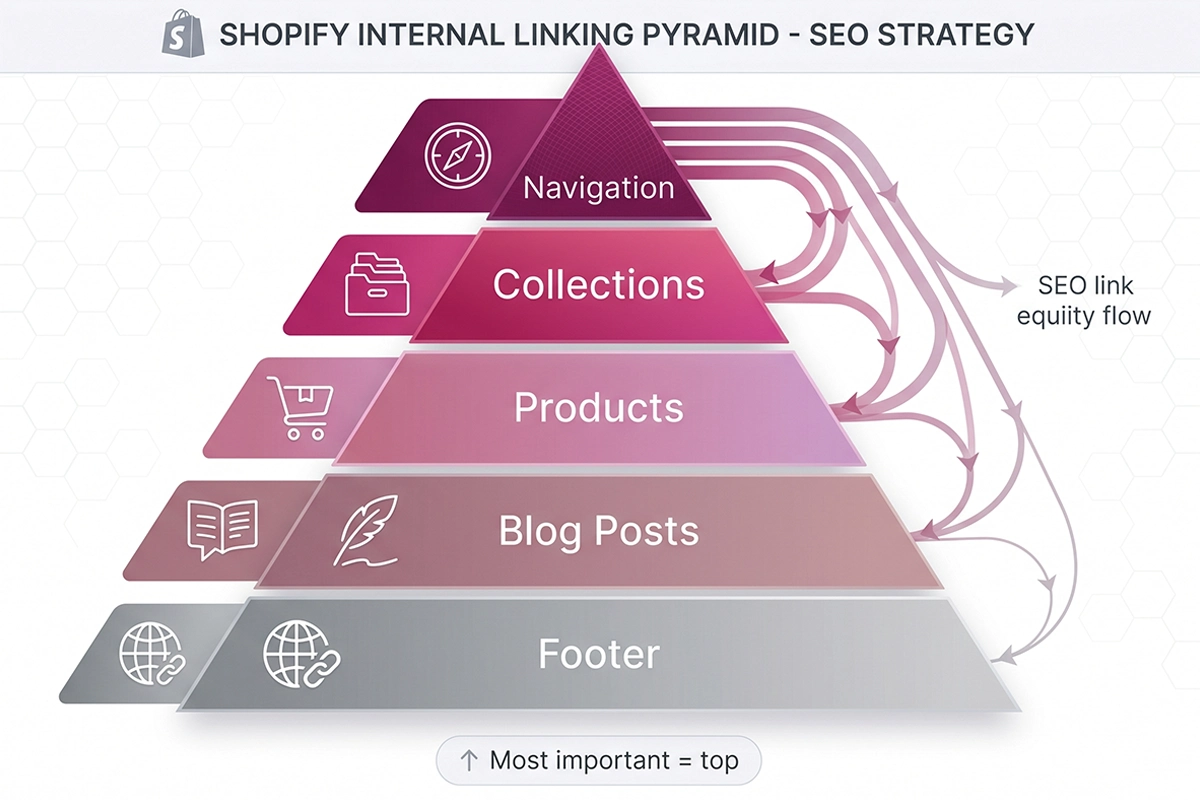
Layer 1: Main navigation (the most powerful link on your site)
Every link in your header menu appears on every page of your store. That makes them the most powerful internal links you can build. They're not contextual, which limits their topical-authority value, but they pass crawl signal and authority to every page they point to.
The rule: only put pages in your main navigation that you want to rank. Not "About," not "Shipping Policy," not your blog. Your top three to five collections. That's it. Push everything else to the footer.
A common mistake: linking the blog from the main nav. The blog is a hub for content; it shouldn't compete with revenue pages for nav real estate. Link to it from the footer and from contextual mentions inside content. Save the nav for collections that need to rank.
Layer 2: Collection pages (the hub)
Collection pages are your most important commercial SEO assets. They target head terms ("women's linen dresses," "wireless earbuds," "ceramic planters") and they're the natural landing page for high-intent searches.
What most Shopify stores miss: collection pages can have body content. Shopify gives you a description field at the top, and most themes also support a description block below the product grid. Use both. Write 150 to 400 words per collection. Inside that content, link to two or three related collections, two or three featured products, and one or two relevant blog posts. That's six to eight contextual internal links per collection page.
This is the highest-impact internal linking move on Shopify. Most stores leave their collection descriptions empty, which is the SEO equivalent of leaving a fifty-dollar bill on the sidewalk.
Layer 3: Product pages (related products, breadcrumbs, descriptions)
Product pages need three kinds of internal links.
First, breadcrumbs. They should read Home › Collection › Product, and they should be visible at the top of the page. Most themes ship with breadcrumbs disabled. Enable them. They give every product an inbound link from its collection and help Google understand hierarchy.
Second, related products. "You may also like" modules link each product to four to six related products. This is the workhorse of product-to-product internal linking on Shopify. If your theme doesn't support related products natively, add a section that does.
Third, contextual links inside the product description itself. This is the part most stores skip. If you sell a linen dress, the product description can link to "linen care guide" (blog post), "linen accessories" (collection), and "matching linen tops" (collection). Two to four contextual links per product description. Done.
Layer 4: Blog posts (the contextual bridge to collections)
This is where most Shopify stores leak SEO value. They publish blog posts, those posts attract informational traffic, and none of that traffic ever sees a product page. The blog gets traffic, the products don't. Sound familiar?
The fix is mechanical. Every blog post should link to at least one collection and one or two specific products with descriptive anchor text. A post called "How to style linen in summer" should link to your linen collection, two specific linen products, and one related guide. Four contextual links per post, all moving readers toward purchase paths.
This is why Studio Niza's SEO blog content service treats internal linking as a non-negotiable part of every post, not an afterthought. Two thick, well-linked posts per month outperform thirty thin, isolated posts. The link structure is half the work.
Layer 5: Footer (utility, not SEO)
The footer is where you put what doesn't belong in the main nav. Privacy policy, shipping policy, refund policy, contact, about, social links, blog. These links appear on every page, but they're treated as boilerplate by Google. They have utility value (users expect them) and they prevent orphan-page issues for legal pages, but they don't carry meaningful ranking signal.
One use the footer is genuinely good for: linking to "All Collections" and "All Products" pages. These two links alone can resolve most orphaned-product issues on a Dawn-theme store, because every product becomes reachable through the all-products listing.
Anchor text rules that work for Shopify
Anchor text is the visible, clickable text of a link. For internal links, Google expects it to be descriptive, not generic. Google Search Central explicitly recommends concise, descriptive anchor text over things like "click here" or "read more."
The rules are simple. Anchors should be two to five words. They should describe what's on the destination page. They should include the destination page's primary keyword where natural, but not exact-match every single time. And they should never read like SEO-engineered phrases dropped into prose.
| Good anchor text | Bad anchor text | Why |
|---|---|---|
| linen care guide | click here for our guide | Descriptive, keyword-aware, 3 words |
| our women's linen dresses | shop now | Names the destination, not the action |
| Shopify SEO checklist for new stores | read this article | Tells Google and the reader what's on the other side |
| related linen accessories | linen, linen, linen accessories | Natural phrasing, not stuffed |
One more rule worth saying out loud: vary your anchors. If you link to the same collection ten times across your blog, ten identical exact-match anchors look engineered. Mix it up. Use the head term, a related long-tail, and a natural-language variant. Google reads natural variation as a positive signal.
The five internal linking mistakes new stores make
Most newer Shopify stores share the same five blind spots. None of them are difficult to fix once you know to look.
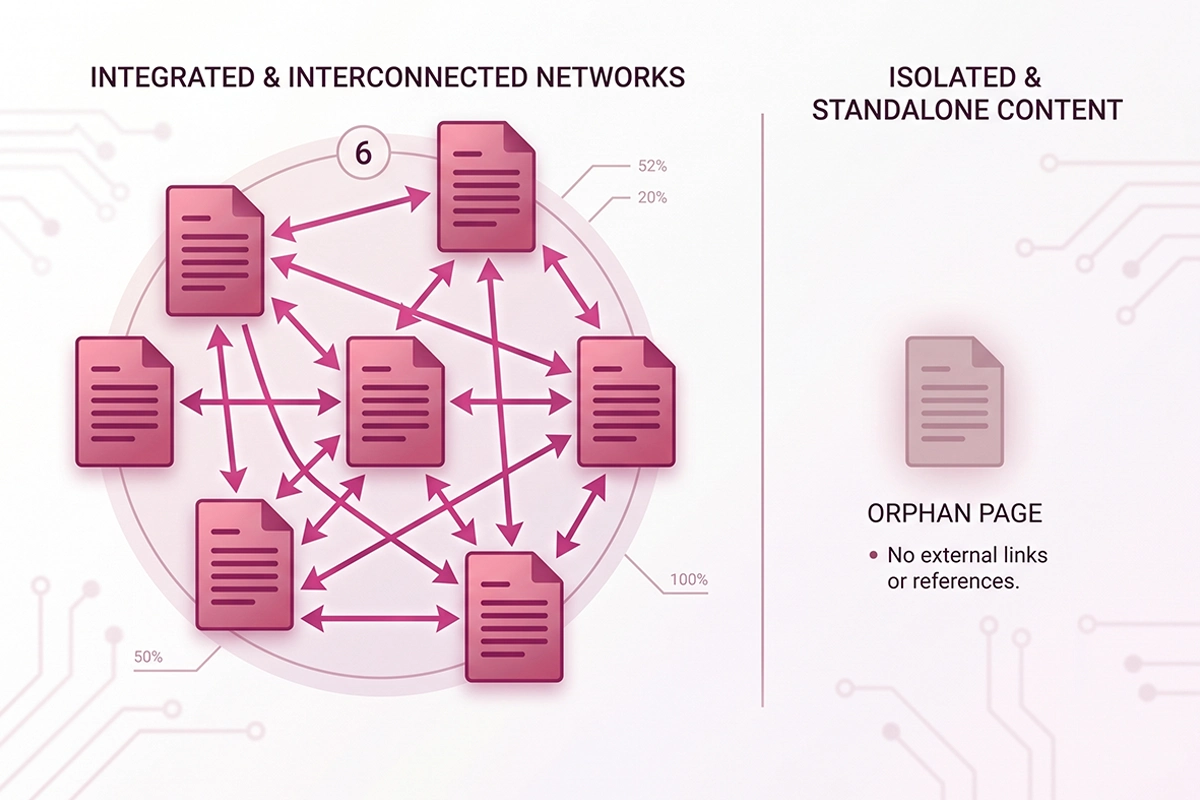
1. Orphaned product pages. A product page with zero inbound internal links is invisible to Google. The fix is usually a "related products" section, a "Featured products" block on the collection page, and an "All Products" link in the footer. These three together prevent almost every orphan-product issue.
2. Blog posts that don't link to products or collections. The blog gets informational traffic, that traffic bounces, the products stay invisible. Audit every published blog post and add two to four contextual links to collections and products. Use descriptive anchors. Do this once, gain compounding value forever.
3. Exact-match anchor text overuse. Linking to the same collection thirty times using the identical exact-match keyword looks engineered. Google has been ignoring or devaluing this pattern since the Penguin update. Use natural variation. The 2024 Google Search Central guidance is still current: descriptive, varied, and concise.
4. Broken internal links after product deletion or collection retirement. Sunsetting an old SKU usually breaks five to fifteen internal links across the store, plus accumulated review references and external backlinks. Set up 301 redirects from the old URL to the closest replacement product (or to the parent collection). Same applies when collections are retired.
5. Ignoring breadcrumbs. Most Shopify themes ship with breadcrumbs disabled. Enable them. They're a free, theme-driven internal linking layer that gives every product two extra inbound links and reinforces hierarchy for Google. They also show up in search results as structured data, which can improve click-through rates.
How to audit your Shopify internal linking in an hour
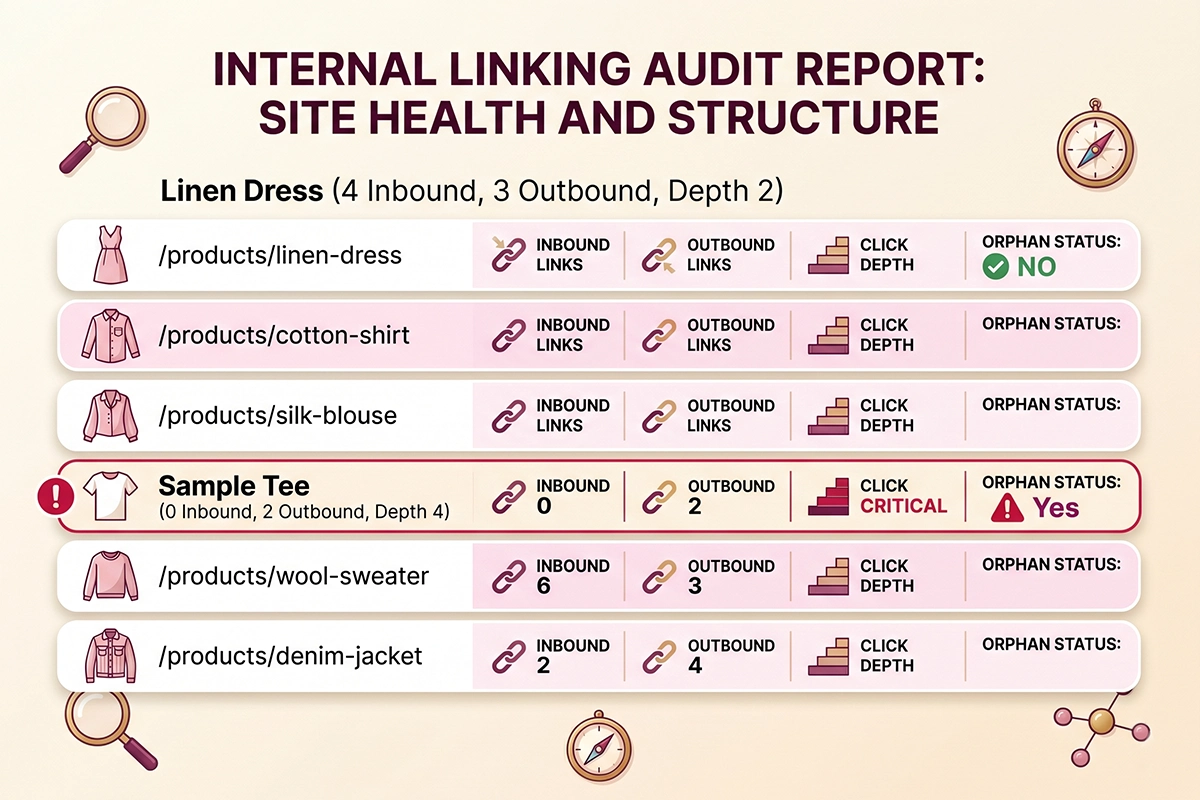
You don't need a paid tool to audit your internal linking. You need Google Search Console, a free Ahrefs Webmaster Tools account (it's free for site owners who verify the property), and a spreadsheet. Allow one hour for a store under 200 pages.
Here's the order.
Step 1: Pull your URL inventory. In Google Search Console, go to Pages, then export the full list of indexed pages. Cross-check against your Shopify export of active products and collections. Anything in Shopify but not in Search Console is either not yet indexed or potentially orphaned.
Step 2: Run an Ahrefs Webmaster crawl. In Ahrefs, go to Site Audit, run a free crawl. Filter Internal Pages by "Inbound internal links: 0." That's your orphan list. For most newer Shopify stores, this list is longer than expected.
Step 3: Pull your collection page link counts. For each collection, count how many internal links point inbound and how many point outbound. Collections with fewer than three inbound or fewer than three outbound contextual links are the priority for the next pass.
Step 4: Spot-check your top five blog posts. Open each one. Count the contextual links to collections and products. Fewer than two and the post is leaking traffic. Add the missing links.
Step 5: Check your breadcrumbs. Open any product page on your live site. If you don't see Home › Collection › Product at the top, breadcrumbs are disabled. Enable them in your theme settings.
That's the audit. Five steps, about an hour, no paid tools. Most new stores find three to five fixes that take another two hours to implement. Results show up in improved crawl coverage within two to four weeks and in ranking shifts within eight to twelve weeks.
Do you need a Shopify internal linking app?
Probably not, at least not yet.
For stores under 150 products, manual internal linking is fine. The work is finite. You can map your collections, products, and blog posts in a spreadsheet, plan the links, and add them once. After that, you only revisit when you add new products or publish new blog posts.
For stores over 300 products with multiple overlapping categories, manual maintenance starts breaking down. There are too many "could link to" combinations for a human to track. This is where automated internal linking apps start to earn their monthly fee. Look for apps that let you set rules (link "linen" mentions in any blog post to the linen collection, for example) rather than apps that auto-link based on keyword density. Rule-based is predictable. Density-based gets noisy.
For stores between 150 and 300 products, it depends on how complex your category overlap is. Honest answer: most stores in this range still don't need an app. They need a one-time systematic pass and a habit of adding links at publish time.
If you'd rather not figure this out yourself, the Studio Niza Shopify SEO and GEO service includes a complete internal linking audit and execution across your store, with custom anchor text, real schema markup, and indexing follow-up. No app required. From $499 one-time.
Wrapping up: where to start this week
Internal linking is the most underrated SEO lever for Shopify stores. It's free, it's entirely within your control, and on Shopify specifically it does structural work that no other platform asks of it. Most stores skip it because nothing about Shopify forces the issue. The crawler quietly fails to find products. The blog quietly fails to sell. The collections quietly fail to rank.
If you want one thing to do this week, do this: open your three best collection pages, write 200 words of description for each, and inside that description link to two related collections, two specific featured products, and one relevant blog post. That's twenty-five internal links added in about ninety minutes. It's the highest-impact internal linking move you can make on a Shopify store.
If you want to go further, work through the five-step audit above. Most new stores find one or two orphaned products, three or four blog posts that aren't linking out, and disabled breadcrumbs. Three hours of work usually moves the needle visibly in organic traffic within two months.
The work isn't glamorous. That's why most stores never do it, which is exactly why the ones that do, rank.
Want this done for you?
The Studio Niza SEO and GEO service includes internal linking across every product, collection, and blog page on your store. Custom anchor text, real schema, indexing follow-up. From $499.
See SEO services & pricing →Or email contact@studioniza.com if you have a specific question about your store. I read every one.
Frequently asked questions
If you're still unsure after reading these, just send the question.
How many internal links should a Shopify product page have? +
Three to eight contextual internal links is the sweet spot for a Shopify product page. Fewer than three and the page risks being orphaned or under-supported. More than eight and you're diluting the page authority you're trying to concentrate. This count is in addition to navigation, breadcrumb, and footer links, which are theme-driven and don't count toward your contextual link budget.
Does Shopify create internal links automatically? +
Partially. Navigation, footer, related products, and breadcrumbs are theme-driven and appear automatically once enabled. Contextual links inside product descriptions, collection descriptions, and blog posts are entirely manual and have to be added by you. Most stores get the theme-driven layer for free and skip the manual layer, which is where most of the SEO value lives.
What is an orphan page on Shopify and why is it bad? +
An orphan page is any page on your store with zero inbound internal links. Google's crawler may never find it, which means it may never get indexed and can't pass or receive authority. On Shopify, orphan product pages are common when a store retires collections or deletes related-products sections from its theme. The fix is usually adding the product back to a collection, enabling related products, and linking to "All Products" from the footer.
Should I use exact-match anchor text for internal links? +
Yes for internal links, but vary the phrasing so it reads naturally. Unlike external backlinks, Google expects internal anchor text to be descriptive and often keyword-rich. The risk to avoid is using the identical exact-match phrase thirty times across your store; that pattern looks engineered. Mix the head keyword with related long-tails and natural-language variants so the link profile stays clean.
Do I need a paid app for Shopify internal linking? +
Usually not for stores under 150 products. Manual linking with a spreadsheet is enough at that scale. Apps start earning their fee when a store has 300+ products with multiple overlapping categories, where human tracking of "could link to" combinations breaks down. If you do use an app, prefer rule-based linking over density-based, since rule-based is predictable and easier to audit.
How long until internal linking improves my rankings? +
Most Shopify stores see improved crawl coverage in two to four weeks after a systematic internal linking pass, with new pages getting indexed faster and previously orphaned pages appearing in Search Console. Ranking shifts typically show up between week eight and week twelve, depending on category competitiveness and how thin the previous linking structure was. A new store fixing orphans and adding contextual links to collections usually sees the most visible improvement.