You launched your Shopify store. You added products. You wrote a few lines under each one, maybe pasted the manufacturer's blurb for the rest, and moved on. Now you're checking Google Search Console and the product pages you spent a weekend on aren't ranking, aren't showing in AI Overviews, and aren't converting the trickle of traffic they do get.
That gap between "I wrote a description" and "the description does its job" is what shopify product description seo is actually about. It isn't keyword density. It isn't word count. It's a small set of fields, written in a specific structure, marked up with the right schema, that makes the page legible to Google, to AI search engines, and to a human buyer deciding whether to click Add to Cart.
This post is the drilldown on pages 7 to 21 of the Shopify SEO checklist for new stores. If you only have time to optimize fifteen product pages, this is what to do on each one. Plain, opinionated, and tested across the last twelve years of working on small ecommerce stores.
Why most product descriptions fail at both SEO and conversion
Most product descriptions on new Shopify stores fall into one of three patterns. The manufacturer paste. The one-line throwaway. The keyword-stuffed wall of text. Each one fails for a different reason, and each one is fixable in under twenty minutes per product.
The manufacturer paste. The dropshipping default. You copy what the supplier gave you and call it a description. Google sees the same paragraph on five hundred other stores and treats yours as duplicate content. Technical SEO consultants writing for Shopify in 2026 still list this as the single most common reason new stores get fifty impressions and two clicks. It's the easiest fix on this list and the one most owners skip.
The one-line throwaway. "Beautiful ceramic mug. Holds 12 oz." That's not a description, that's a label. Google has nothing to index, AI engines have nothing to cite, and the buyer has no reason to trust you over the next tab.
The keyword-stuffed wall. The opposite mistake. Someone read that keywords matter and wrote "ceramic mug, coffee mug, best ceramic mug, ceramic mug for coffee" three times into one paragraph. Google penalizes this. Buyers bounce. Both signals push the page down.
The fix isn't writing more. It's writing the right things in the right places.
The seven fields that make up a Shopify product description (and why most founders only edit two)
When founders say "product description," they almost always mean the big text box in the middle of the Shopify product editor. That's one field out of seven. The other six are where most of the SEO weight actually lives. Edit only the big box, and the page will read fine on your store and still be invisible to Google.
Here's what to fill in, with the limits that matter.
| Field | What it does | Length / rule |
|---|---|---|
| Product title (H1) | The headline buyers and Google read first. | Under 70 characters. Specific. Includes the primary keyword. |
| Meta title | The clickable blue link in Google search results. | Shopify allows up to 70 characters. Keep it under 60 to avoid truncation. |
| Meta description | The grey snippet under the blue link. | 150 to 160 characters. Unique per product. |
| URL handle | The slug at the end of your product URL. | 3 to 5 words, lowercase, hyphens, no dates, no SKU numbers. |
| Product description (body) | The main copy buyers and Google read. | 150 to 300 words. Unique. Never pasted from the manufacturer. |
| Image alt text | What screen readers and Google Images see. | Under 125 characters. Describes what's in the image, includes the keyword once. |
| Product type / tags | How Shopify organizes the product internally. | One specific product type. 3 to 6 relevant tags. |
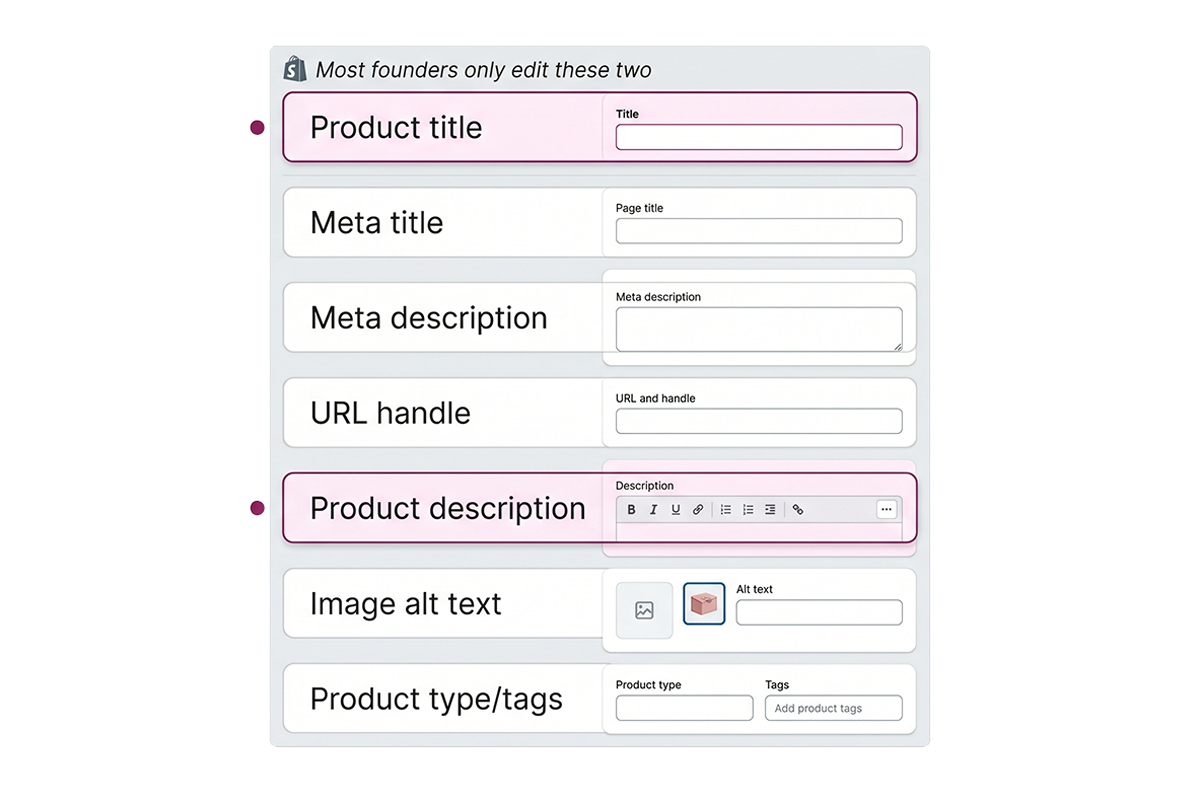
Most founders edit the title and the body. The other five fields keep their Shopify defaults, which are often the product name repeated five times or auto-generated handles like product-copy-of-blue-mug-2. Cleaning up the other five is usually a bigger SEO win than rewriting the body copy.
The structure that works for both Google and buyers
Once the fields are in place, the body copy itself follows a pattern that performs well on both fronts. It's not clever. It's a sequence that puts the buyer's questions first and gives Google enough indexable content to understand what the page is about.
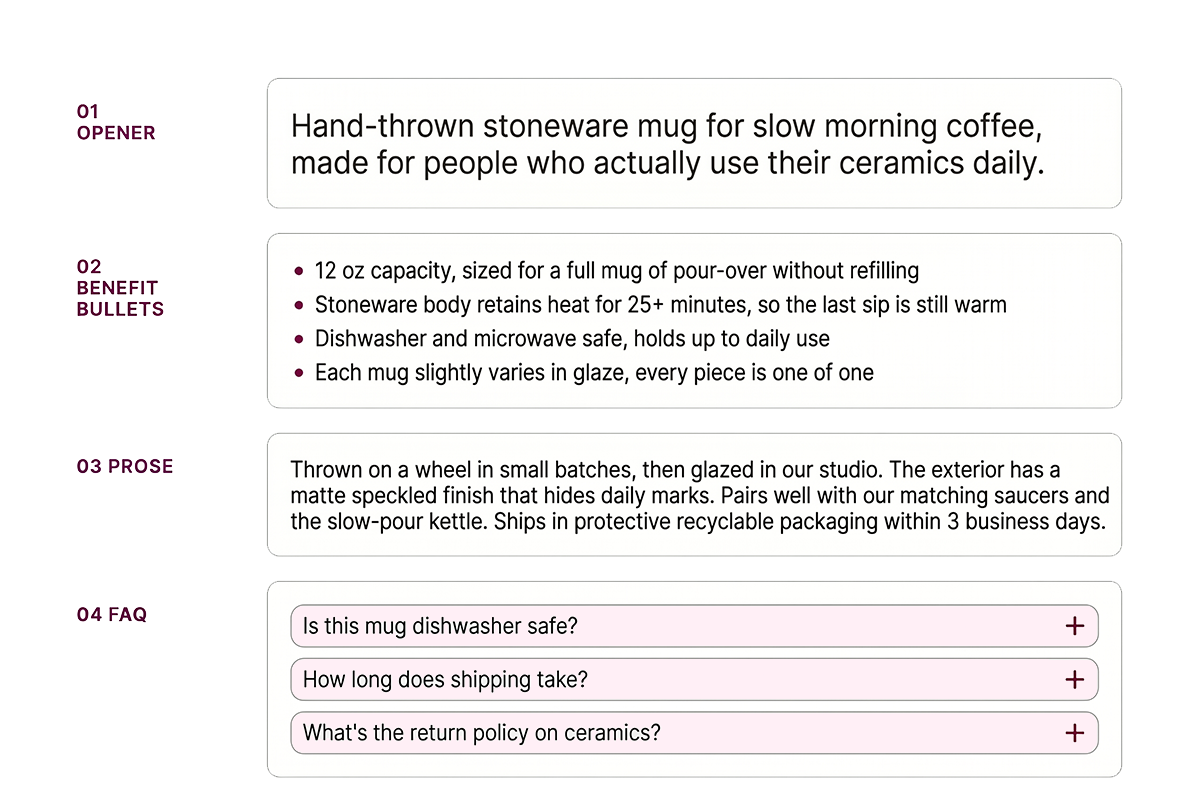
One opening line that names what it is and who it's for
The first sentence should answer two questions in plain language. What is this product? Who is it for? "Hand-thrown stoneware mug for slow morning coffee, made for people who actually use their ceramics daily." That sentence carries your primary keyword, your buyer profile, and a hint of voice in one breath.
Three to five benefit-led bullets
Features are what the product is. Benefits are what the product does for the buyer. The cheap version is a bulleted spec sheet. The version that converts translates each feature into the outcome it produces.
Instead of "Made with organic cotton," write "Soft organic cotton that's gentler on sensitive skin and softens further with every wash." Same feature, but the buyer can now picture wearing it. Three to five bullets is usually enough. More than that and people stop reading.
A short prose paragraph for context and keywords
Below the bullets, write two to four sentences of prose. This is where your secondary keywords live. Materials, dimensions, use cases, comparisons to alternatives the buyer might be considering. Plain sentences. No marketing voice. This paragraph is what gives Google real indexable content beyond the bullets, which it often skims past.
An FAQ block for the three questions every buyer asks
Three to five questions every buyer of this category asks before checkout. Sizing. Shipping. Returns. Care. Compatibility. Real questions in the buyer's actual language. Each answer is two to four sentences. This block doubles as FAQ schema (more on that below) and as a conversion booster for buyers who would otherwise bounce to email support or just leave.
Keywords without the stuffing: where they actually belong
The fastest way to ruin good copy is to think about keywords first. The fastest way to lose ranking is to ignore them entirely. The middle path is to write the description for the buyer, then place one primary keyword in five specific spots.
For a single product, you need one primary keyword and two or three secondary keywords. Find them the way buyers actually search. Shopify's own SEO guidance points to Google autocomplete and the "People also ask" section as the cheapest possible keyword research tool. Type your product category into Google. Read what autocomplete suggests. Read the questions in the People Also Ask box. Those are your keywords. You don't need a paid tool for your first fifty products.
Once you have them, place the primary keyword in these five spots:
The product title (H1). The meta title. The first sentence of the body copy. One bullet, where it reads naturally. One image alt text on the main product photo.
That's it. Keyword density between 1 and 2 percent is plenty. The Shopify Community consensus from SEO professionals advising store owners in 2026 lands on the same number. Higher than that and Google starts treating the page as spam. Lower than that and the page reads naturally but may not rank.
One trap to avoid: cramming five keywords into one product because you want to rank for all of them. Pick one primary per page. The other keywords get their own products, their own collection pages, or their own blog posts. A single product page can't rank for everything and shouldn't try.
Product schema and the AI search angle most stores are sleeping on
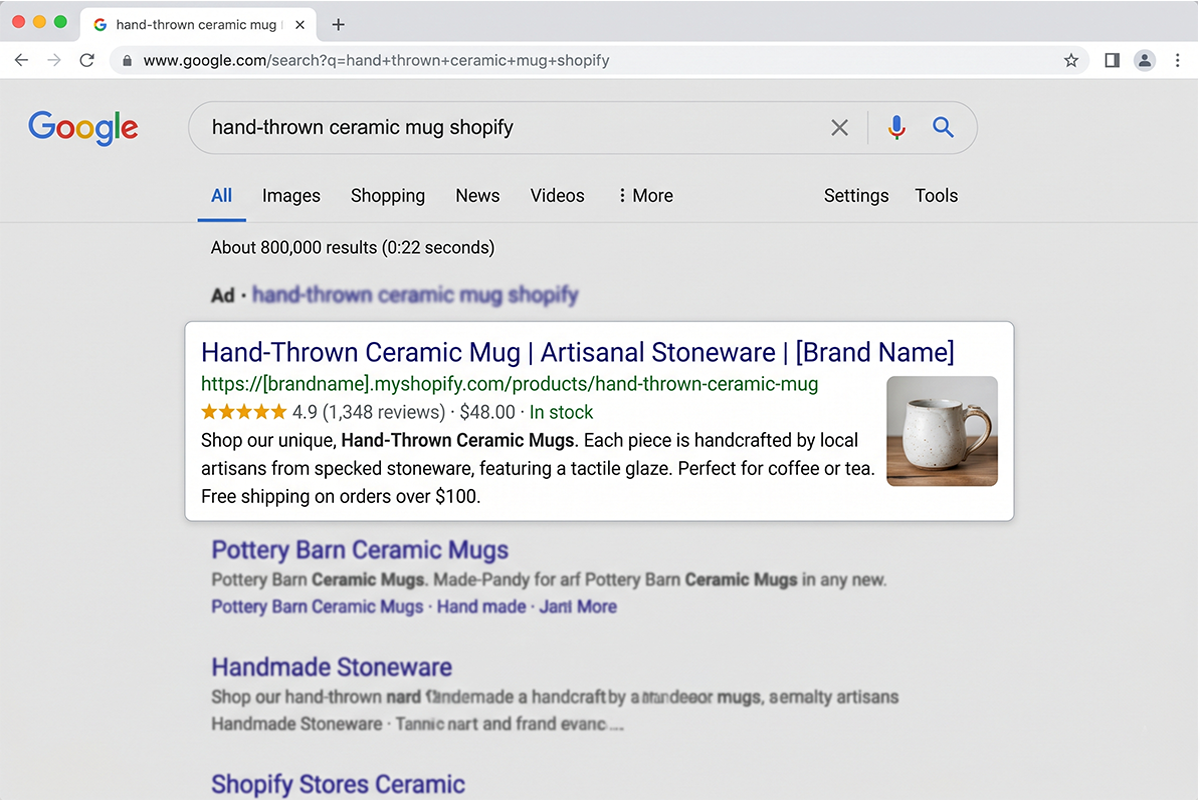
Schema markup is the part of shopify product description seo that small stores skip and bigger stores quietly use to pull ahead. It's invisible to the buyer. Google reads it. AI engines read it. And in 2026, it's the difference between showing up with stars, prices, and stock status in search results versus showing up as a plain blue link.
Shopify's modern themes ship with basic Product schema in the page source. That covers name, image, price, and availability. Google's official Product structured data documentation lists what's required to be eligible for product rich results: name, image, and either an offer with price and availability or a review with rating. Most Shopify themes give you the first three out of the box.
What they don't ship with, and what you usually have to add through a small theme edit or a reviews app, is the rest. aggregateRating with star count from your real reviews. brand. gtin or mpn when you have them. shippingDetails and hasMerchantReturnPolicy for the Merchant Center side of things.
The AI search angle is the new layer. Google's documentation on AI features in Search confirms that AI Overviews pull from the same structured data and content signals as regular search results. ChatGPT, Claude, Gemini, and Perplexity behave similarly: they cite pages with clear, structured product data and direct buyer-language answers. A product page with proper Product schema, an FAQ block with FAQ schema, and a clean Organization reference is meaningfully easier for an AI engine to quote than a page with none of those.
Most Shopify stores haven't started this yet, which is exactly why a solo founder who does it now has six to twelve months of head start over their category. The Studio Niza Shopify SEO and GEO service bakes this into every product page, but it's also something you can do yourself with Shopify's free Rich Results Test tool and an afternoon of careful work.
Should you use Shopify Magic or ChatGPT to write product descriptions?
Honest answer: yes, as a first draft. No, as the final copy.
Shopify Magic, ChatGPT, Claude, and similar tools are useful for getting past the blank page when you have fifty products to write and one weekend to do it. They're fast, they're free or close to it, and they produce a workable shape. The problem is when the output ships unedited.
Google's spam guidance has been clear for two years: AI-generated content isn't penalized for being AI-generated. It's penalized when it's unedited, generic, and indistinguishable from the same prompt run by ten other stores. A pasted ChatGPT description sounds like a pasted ChatGPT description. Buyers feel it. So does Google.
The honest workflow that works: use AI to draft. Read the draft out loud. Rewrite the opening line in your own voice. Replace generic phrases with specifics from your product (real materials, real dimensions, real use cases). Cut anything that could appear word-for-word on a competitor's product page. That last step usually cuts the draft in half, which is the right outcome. Short and specific beats long and generic on both fronts.
The same logic applies to blog content for Shopify stores, which is why Studio Niza posts use AI in the research and outlining phase and then run every paragraph through human editing. The shortcut is the draft, not the final.
Wrapping up
Shopify product description seo isn't complicated, it's just specific. Write a real description (not a manufacturer paste). Fill all seven fields, not just the body. Use the four-part structure: opener, bullets, prose, FAQ. Place one primary keyword in five spots and stop. Add Product and FAQ schema so Google and AI engines can read your page properly. Use AI for first drafts only, and edit hard.
Honest scope beats impressive scope. If you have eighty products, don't try to rewrite all of them this week. Pick the top fifteen by sales or by uniqueness, do those properly, and watch what happens in Search Console over the next eight to twelve weeks. That's how shopify product description seo actually compounds for a new store.
If you want more posts like this, the rest of the Studio Niza Journal drills into the surrounding pieces: the full SEO checklist, the collection page side of the work, and what to do when product pages still aren't ranking after the foundational work is done.
Want this done for you?
The Studio Niza Growth SEO tier covers 50 pages of custom product description rewrites, real schema markup, and keyword research per product. Pricing starts at $899 one-time. Smaller stores under 25 products can start with the Starter tier at $499.
See pricing and tiers →Or email contact@studioniza.com if you have a specific question about your store. I read every one.
Frequently asked questions
If you're still unsure after reading these, just send the question.
How long should a Shopify product description be for SEO? +
Between 150 and 300 words for most products. That's enough for Google to understand what the page is about and for buyers to get their questions answered without scrolling forever. Higher-consideration products (furniture, jewelry, technical gear) can justify 400 to 600 words. Anything under 100 words is usually too thin for either purpose.
Do I need to write a separate meta description for every product? +
Yes. Duplicate meta descriptions across products can hurt your shopify product description seo, and they look identical in search results so buyers can't tell your products apart. Keep each one unique, between 150 and 160 characters, and lead with what makes that specific product different from the others in your catalog.
Can I use the same product description on Shopify and Amazon? +
You can, but you shouldn't. Duplicate content across platforms makes it harder for either store to rank, and Amazon and Shopify have different rules for what works (Amazon caps descriptions at 2,000 characters and bans HTML formatting, Shopify gives you full freedom). Write two versions of the same product if you sell on both.
How often should I update my Shopify product descriptions? +
Review them every three to six months, and update sooner if a product gets the same customer question repeatedly or its rankings drop in Search Console. Customer reviews are the best source of update ideas: the questions and objections buyers raise are usually the gaps in your current description.
Will keyword stuffing hurt my Shopify product page rankings? +
Yes. Google has been actively penalizing keyword stuffing since the early 2010s, and modern algorithms catch it easily on product pages. Aim for one primary keyword used in five specific spots (title, meta title, first sentence, one bullet, one image alt) and let secondary keywords appear naturally. Density above 2 to 3 percent usually signals spam.
Do I need a Shopify SEO app to write good product descriptions? +
No. Shopify's native SEO fields cover everything in this post: page title, meta description, URL handle, image alt text, and body copy. SEO apps become useful when you're editing 100+ products in bulk or want broken-link detection, but they aren't required for foundational product description SEO work on a new store.