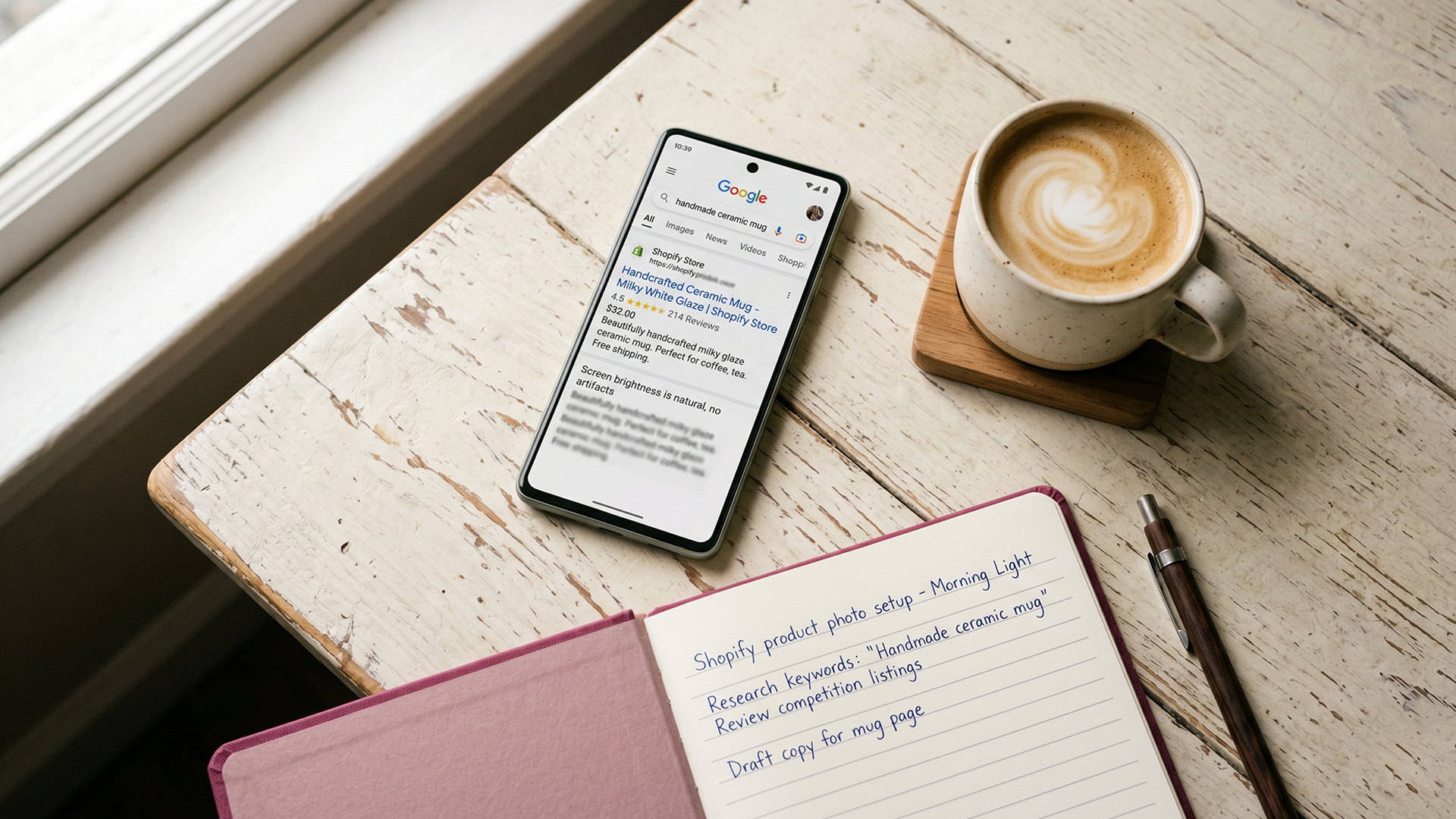
You launched your Shopify store. You added products, wrote descriptions, set up shipping. Reviews were on the "I'll get to it later" list. Six months in, your traffic is flat, your product pages look bare next to competitors with star ratings, and you've just discovered that 40 percent of online shoppers refuse to buy from a product page with no reviews or customer photos at all.
That number is from a 2026 roundup of ecommerce conversion data, citing PowerReviews research. It's the cleanest way to describe what ignoring reviews actually costs you. Not abstract "trust signals." Real shoppers leaving real product pages because they have nothing to evaluate.
This post covers two things. First, what reviews actually do for Shopify product reviews SEO and conversion, with real numbers. Second, the recovery playbook for owners who already lost reviews to an app migration, a discontinued product, or a theme change. If you ever ran Shopify's native Product Reviews app, the May 2024 shutdown affected you. You're not alone, and not all the data is gone.
What Shopify product reviews actually do for SEO
Two things, both measurable.
Reviews add fresh, keyword-rich content to your product pages. Google treats product pages as static unless something keeps changing them. Reviews are the cheapest, most natural way to add new text. Customers describe your products in language you'd never write yourself, which usually includes long-tail search phrases you'd never think to target. A skincare brand selling a "hydrating serum" gets reviews mentioning "dewy finish," "doesn't pill under sunscreen," and "good for combination skin." Each of those phrases is a real search query.
Reviews unlock rich snippets in search results. If you have proper review schema markup connected to your product pages, Google can show star ratings and review counts directly in the search result. This doesn't move you up in rankings, but it dramatically increases your click-through rate. A blue link with no stars sits next to a result with a 4.7-star average and 248 reviews. The shopper clicks the one with stars almost every time.
Shopify's default themes ship with basic product schema, but the review schema piece often needs to be connected through whichever review app you use. Judge.me, Stamped, and Yotpo all handle this if configured correctly. Default Shopify alone usually doesn't.
This is the same structured data conversation that drives the 25-page Shopify SEO checklist. Reviews aren't a separate SEO project. They're part of the same on-page foundation.
The cost of ignoring reviews, in numbers
The data on what reviews do for conversion is some of the most consistent in ecommerce. Three numbers worth memorizing:
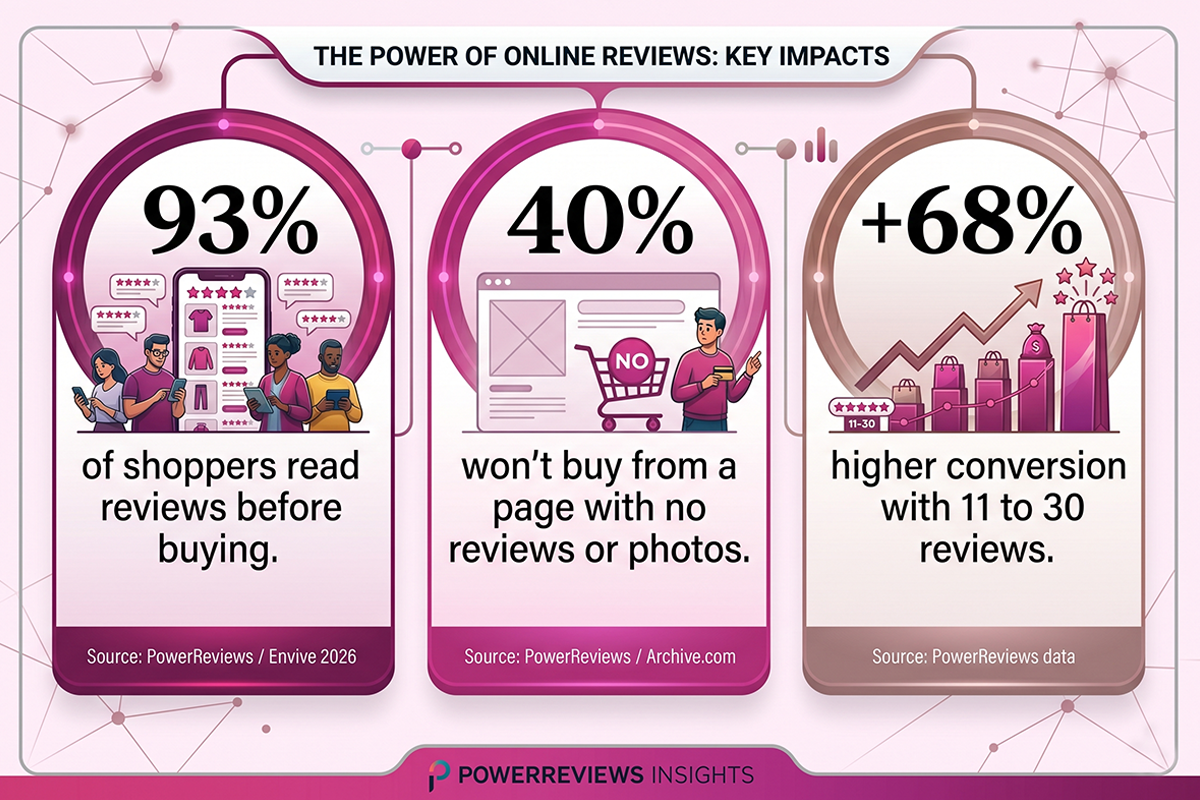
93 percent of online shoppers actively read reviews before buying. This is the floor of buyer behavior in 2026. If your product page has nothing for them to read, they leave and look at a competitor's page.
Products with 11 to 30 reviews convert approximately 68 percent higher than products with zero reviews. This is from PowerReviews data referenced widely across ecommerce conversion research. The sweet spot is 26 to 50 reviews, where social proof has weight but the page still feels authentic.
Visitors who interact with user-generated content (reviews, photos, Q&A) convert 102 percent higher than average. That's not "browsing reviews helps a little." That's a doubling of conversion rate among the shoppers who actually engage with the social proof on your page.
Run the math on your own store. If your current conversion rate is 1.5 percent and your average order value is $60, every 1,000 product page visitors generates $900 in revenue. A 68 percent conversion lift moves that to $1,512 from the same traffic. No additional ad spend, no SEO work, just reviews doing what reviews do.
That's the cost of having zero or few reviews. The cost of losing reviews you already earned is worse, because you've already paid for the customer experience that produced them.
The three ways Shopify stores lose reviews without realizing it
Most Shopify owners assume reviews are permanent once they're collected. They aren't. There are three loss patterns, and stores running for two or more years have usually been hit by at least one of them.
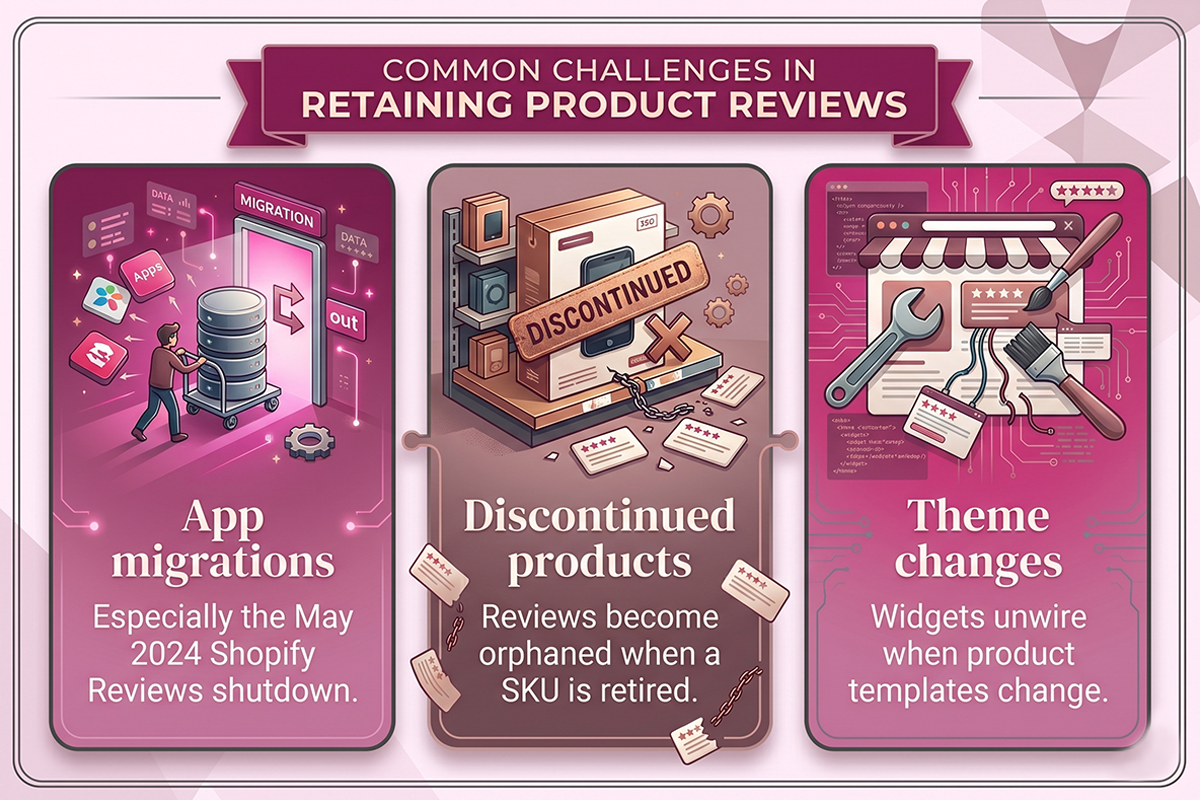
App migrations (especially the May 2024 Shopify Product Reviews shutdown)
On May 6, 2024, Shopify permanently removed its native Product Reviews app. Stores that didn't export their review data before that date lost access entirely. Star ratings sometimes still display on storefronts because of cached widget code, but the actual review records are gone from Shopify's backend.
The Shopify Community forums in early 2024 filled with owners realizing this after the fact. The pattern was consistent: store owner assumed Shopify would preserve the data, didn't export, and discovered weeks later that there was nothing to migrate.
If this happened to you and you still have a CSV export from before May 2024, the recovery path is simple. Most third-party apps (Judge.me, Stamped, Yotpo, Reviews.io) support CSV import with product matching via SKU, handle, or URL. If you don't have a CSV, those specific reviews are unrecoverable. The action item then is preventing it from happening again with future migrations.
Product discontinuations and SKU merges
This is the loss pattern most owners never see coming. When you discontinue a product, retire an old SKU, or merge two variant listings into one, the reviews attached to the old product don't automatically follow to the new one. They become orphaned. The new replacement listing starts at zero stars, zero reviews, and no schema-eligible social proof.
A two-year-old store with 500 reviews across a discontinued product line loses every one of those trust signals when the old listings come down. Conversion drops on the new replacement products. Rich snippets disappear from search results. And because the loss is invisible (the new product was never going to have the old reviews to begin with), most owners never trace the cause back to the discontinuation.
This is the loss pattern that the Studio Niza Reviews Management service exists to prevent. The discontinued listing review redirect is the part of the workflow most reviews services don't offer, because it requires manual work that has to be done carefully. More on the recovery playbook below.
Theme changes and missing schema
You change your Shopify theme. The new theme's product page template doesn't include the same review widget hooks, or the review schema isn't wired into the new layout. The reviews still exist in your review app's backend, but they no longer display on the product page, and Google's crawlers don't see the structured data they used to see.
Rich snippets disappear from search results within a recrawl cycle (typically 2 to 4 weeks). The reviews aren't gone, but they're functionally invisible. This is recoverable in minutes once you spot it, but most owners don't spot it for months, because the reviews "exist" in the dashboard.
How to recover lost reviews
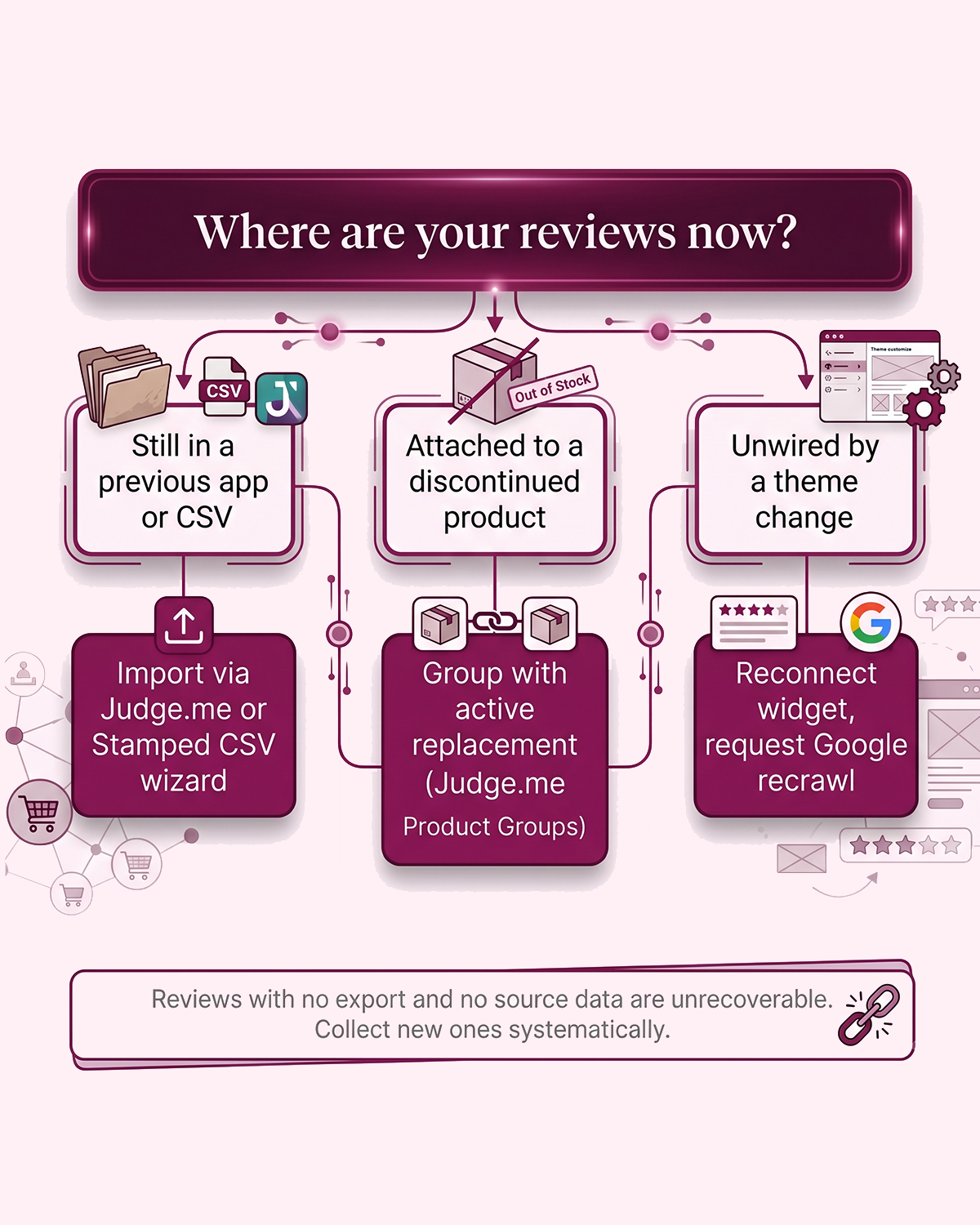
Three loss patterns, three recovery paths. The good news: most lost reviews aren't actually destroyed. They're misplaced, orphaned, or unwired. The bad news: a small subset are permanently gone, and the only fix is preventing future losses.
If your reviews still exist in a previous app or a CSV export
This is the easiest recovery. Export the reviews from the old app (or your CSV) as a file containing at minimum: review text, star rating, reviewer name, date, and a product identifier (SKU, URL, or handle). Then import into your current review app using its CSV migration tool. Judge.me, Stamped, and Reviews.io all support this. The original timestamps and reviewer attribution are preserved if your export includes them.
One caveat from Judge.me's own documentation: imported reviews from outside a verified Shopify order will display as unverified, even if they were verified in the original platform. This is a Shopify policy, not a Judge.me choice. Unverified reviews still show on your product pages, but they don't appear in the Google Shopping product ratings feed unless re-verified through Shopify metaobjects. Worth knowing before you migrate.
If your reviews are attached to a discontinued or merged product
The mechanism depends on your review platform. Judge.me supports a feature called Product Groups (on their Awesome plan), which lets you group multiple products so they share the same review pool. Reviews submitted on a discontinued product can display on the active replacement, because the two products are grouped together.
The setup is straightforward: in Judge.me admin, create a static or dynamic product group, add both the discontinued listing and the active replacement to it, and the reviews flow to both pages. The reviews keep their original timestamps, photos, and reviewer attribution. Per Judge.me's recent policy update, you can no longer "move" all reviews from one product to another wholesale (a Shopify-side restriction), but grouping accomplishes the same outcome on the storefront.
For Stamped, Yotpo, and most other platforms, the equivalent is a manual CSV export from the discontinued product, edit the product identifier to point to the active replacement, and re-import. More steps, same result.
If your reviews are unwired (theme change, missing schema)
The reviews are fine. The display is broken. Open your review app's storefront settings and reconnect the widget to your current theme's product page template. Most apps offer a "verify installation" or "test schema" tool that confirms whether the review markup is being read correctly. Run that, fix anything flagged, and request a recrawl in Google Search Console for your top product pages.
Star ratings typically return to search results within 2 to 4 weeks of the recrawl. If they don't, the schema isn't being detected. Test specific product URLs in Google's Rich Results validator to see exactly what Google is or isn't parsing.
What you can't recover, and what to do instead
Reviews that existed only in the discontinued Shopify Product Reviews app with no CSV export are permanently gone. Reviews from a customer who later requested data deletion under GDPR or similar regulations are also gone, legally. Both are rare cases, but real.
When recovery isn't possible, the only path forward is collecting new reviews systematically. That means automated post-purchase review requests (email and SMS where you have permission), timed for after the customer has actually received and used the product, with branded follow-up sequences. Done consistently, even a store starting from zero rebuilds a meaningful review base within 90 to 120 days.
What not to do (the FTC fake reviews rule, in plain English)
This section exists because a meaningful slice of "review services" advertised online still offer the things below. They're not just sketchy, they're illegal in the United States and most of Europe.
On October 21, 2024, the FTC's final rule on consumer reviews and testimonials went into effect. It carries civil penalties of up to $51,744 per violation. The FTC issued its first round of enforcement warning letters in December 2025. Five practices are now expressly prohibited:
- Buying or selling fake reviews, including AI-generated reviews from people who never used the product.
- Paying for reviews conditioned on positive sentiment. Offering a discount in exchange for a five-star review is now illegal. You can incentivize a review. You cannot specify what it should say.
- Suppressing or threatening reviewers to remove negative reviews. If a review violates a platform's policy (personal information, threats, illegal content), you can request removal through the platform. You cannot threaten the customer.
- Insider reviews without disclosure. If an employee, founder, or family member writes a review, the relationship must be disclosed clearly.
- Misrepresenting that displayed reviews represent all reviews when you've actually filtered out negative ones.
The short version: collect honest reviews, reply to all of them (including the bad ones), and never pay for a sentiment. Studio Niza's Reviews Management service follows these rules by default. If a prospect asks me to help them get fake reviews, the answer is no. The short-term boost isn't worth the platform bans, the legal exposure, or the trust damage when it gets caught.
One nuance worth noting: negative reviews aren't the threat most owners think they are. A product page with a small percentage of three-star and four-star reviews actually converts better than a page with all five-stars, because shoppers read "perfect" review profiles as suspicious. A thoughtful reply to a negative review (acknowledging the issue, explaining what's being done) builds more trust than the review itself damages.
A 30-minute reviews audit for any Shopify store
If you're not sure how exposed your store is, run this audit. It takes about half an hour and surfaces every loss pattern above.
| Step | What to check | What you're looking for |
|---|---|---|
| 1 | Current review app dashboard | Total review count, average rating, and which products have zero reviews |
| 2 | Google Search Console | Are review rich snippets appearing on product page impressions? Filter by appearance type |
| 3 | Discontinued products (last 12 months) | List every product you've sunset. Were their reviews migrated to active listings? |
| 4 | Theme change history | If you changed themes in the last 6 months, spot-check 5 product pages for visible reviews |
| 5 | Rich Results test | Run 3 top product URLs through Google's Rich Results validator. Reviews schema should pass cleanly |
| 6 | Old CSV exports | Check your downloads folder and email archives for any review CSV from 2023 or 2024 |
If steps 3, 4, or 6 turn up orphaned reviews, you have a recovery project worth doing. If everything is clean, you have a baseline you can defend. Either outcome is useful.
Wrapping up
Customer reviews are not a "nice to have" on a Shopify store. They're the second-cheapest source of fresh content on your product pages (after your own product descriptions) and the single biggest driver of conversion among the trust signals you control. Ignoring them costs measurable revenue. Losing them through app migrations, discontinued products, or theme changes costs even more, because you've already paid for the customer experience that produced them.
The recovery work is mostly mechanical: export, import, group, re-verify, recrawl. The prevention work is mostly disciplined: collect systematically, respond to all reviews, migrate before you discontinue, and never break the FTC rule. None of it requires a $300 a month software subscription. Most of it can be done with Judge.me's free plan and an afternoon of focused work.
The harder part is doing it consistently, month after month, while you're also running everything else.
Want this done for you?
The Studio Niza Reviews Management service runs automated review requests, replies to every review, and migrates accumulated reviews when you discontinue products. Setup from $299, $199 per month all-in.
See Reviews Management pricing →Or email contact@studioniza.com if you have a specific question about your store. I read every one.
Frequently asked questions
If you're still unsure after reading these, just send the question.
Do customer reviews affect SEO rankings on Shopify? +
Yes, in two ways. Reviews add fresh, keyword-rich content to product pages, which Google rewards. And reviews connected through proper schema markup unlock star ratings in search results, which boost click-through rate even without changing your ranking position.
What happens to my reviews if I discontinue a Shopify product? +
By default, nothing. Reviews stay attached to the discontinued product and become orphaned when the listing comes down. To preserve them, use a feature like Judge.me's Product Groups (on the Awesome plan) to link the discontinued product with an active replacement so reviews display on both pages. The reviews keep their original timestamps and reviewer attribution.
Can I delete a negative review on Shopify? +
Only if the review violates the platform's content policy (personal information, threats, illegal content, spam). Deleting a legitimate negative review because you don't like it is now restricted under the FTC's 2024 final rule on consumer reviews, with civil penalties of up to $51,744 per violation. A thoughtful public reply outperforms suppression every time.
Why aren't my star ratings showing up in Google search results? +
Three common causes. Your review schema isn't connected to the product page (test in Google's Rich Results validator). Your theme change broke the schema markup. Or your product has too few reviews for Google to display them, which is typically resolved once a product accumulates 3 to 5 verified reviews.
How many reviews does a Shopify product need before they help with SEO? +
Star ratings can appear in search results with as few as 3 to 5 verified reviews, though Google's exact threshold varies. For meaningful Shopify product reviews SEO and conversion impact, the sweet spot is 11 to 30 reviews per product, which research consistently links to a 68 percent conversion lift over zero-review listings.
Is it worth paying for a review app, or is the free Judge.me plan enough? +
For most Shopify stores under $200K per year revenue, Judge.me's free plan is genuinely capable. Unlimited reviews, automated requests, rich snippets, and CSV import are all included. Paid plans become worthwhile when you need Product Groups (to preserve reviews across discontinued listings), photo review incentives, or cross-platform syndication. Don't pay for a review app in your first 90 days.