
If you're a Shopify owner doing 30 to 200 orders a month and you've started shopping for a chatbot, you've already noticed the problem: every comparison post pitches a different tool, the pricing is hidden behind usage tiers, and "best Shopify chatbot 2026" returns ten articles that all rank the same five vendors in different orders.
The decision is simpler than the search results suggest. How to choose a Shopify chatbot doesn't start with features. It starts with two numbers (your monthly chat volume and your support budget) and one question: do you want to run this thing yourself, or do you want someone else to run it for you?
This post walks through the actual decision. You'll see what self-serve and managed mean in plain terms, a decision tree by chat volume, the honest cost math for the two most common price points ($19 self-serve and $99 managed), and the traps that catch new store owners. By the end you'll know which category fits your store and which specific vendor to look at first.
What "self-serve" and "managed" actually mean
Almost every Shopify chatbot on the market falls into one of two categories. Most comparison articles blur the line, so it's worth being precise.
Self-serve means you install the app from the Shopify App Store, you log into the dashboard, you train the bot on your products and policies, you tweak the responses, and you monitor what happens. The software is yours to operate. Tidio, Shopify Inbox, Zipchat, Chatty, SmartBot, and most of the App Store's chat category sit here. Pricing ranges from free (Shopify Inbox) to $19 to $499 per month, depending on tier and usage.
Managed means someone else operates the bot for you. They build the flows, sync the catalog, write the responses, watch the transcripts every week, fix what's broken, and tune what isn't converting. You get a report. You don't log into the dashboard unless you want to. Gorgias' AI Agent is partly this (the platform is managed; the configuration is still yours). True end-to-end managed services start around $299/month at the cheapest and run to $2,000+ for agency-style contracts.
The middle ground is hybrid: you pay for self-serve software, then pay a freelancer or small studio to maintain it. Studio Niza's chatbot tier sits in this hybrid bucket, which is why it costs $99/month instead of the $300-$600 that pure managed services charge.
Once you know which category you want, picking the specific vendor inside it is almost an afterthought. Most owners get this backwards. They compare Tidio against Gorgias against Zipchat without first deciding whether they want to operate it themselves.
Start with your chat volume, not the feature list
The single biggest predictor of which chatbot is right for you is how many chats you handle per month right now. Not how many you expect after the bot is installed. The current number.
If you don't know your current volume, that's actually your first answer (more on that in a minute). For everyone else, here's the decision tree most Reddit threads and serious comparison guides keep arriving at:
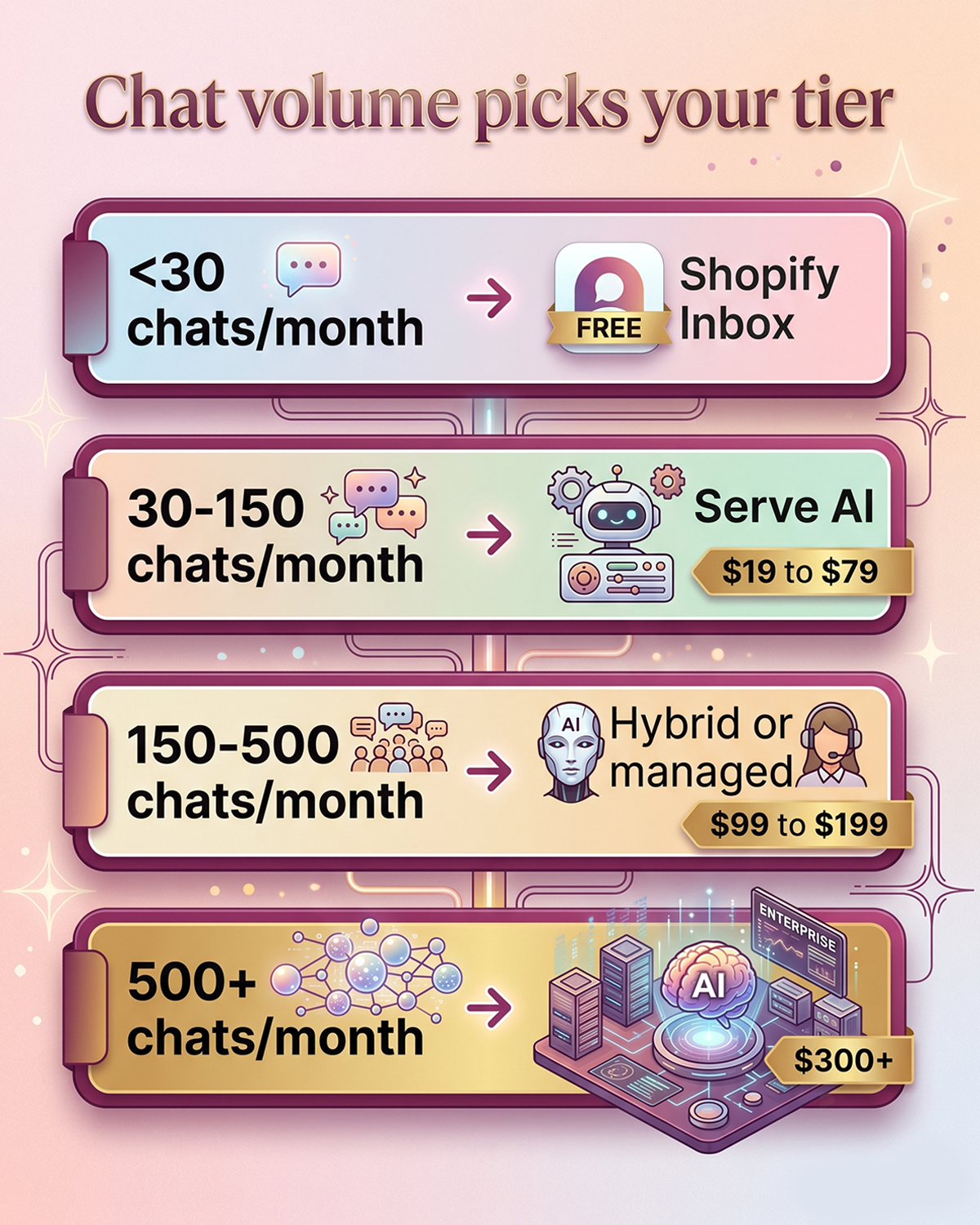
Under 30 chats/month. You don't need a paid chatbot yet. Shopify Inbox is free, native, and includes basic AI-assisted replies. Install it, write five or six saved replies for your most common questions (order status, shipping, returns), and revisit this decision when volume doubles.
30 to 150 chats/month. This is where self-serve AI starts to earn its keep. Tidio's base plan plus the Lyro AI add-on, Zipchat's Starter tier, or one of the Built for Shopify-badged free-tier-plus-paid-upgrade apps. Budget $19 to $79/month all-in. You'll spend three to six hours setting it up properly and an hour every two weeks tuning it.
150 to 500 chats/month. This is the band where the self-serve vs managed question gets real. You're hitting the usage caps on the cheaper self-serve plans (more on this in a minute), the math starts favoring paid AI agents, and the monitoring burden starts eating real hours. Either jump to a higher self-serve tier and commit to actively maintaining it, or hand it to a managed or hybrid service.
500+ chats/month. You're past the small-store band this post is written for. Gorgias' AI Agent, Intercom Fin, Zipchat Pro, or a real managed service is probably worth it. The deflection economics make the spend defensible.
Read your number, pick your row, and you've narrowed the choice from forty apps to three or four.
The honest math: $19 self-serve vs $99 managed
Here's where most comparison posts fall apart. They show you a sticker price and stop. The real number is sticker price plus your time plus the cost when something breaks. Let's walk through it.
The $19 self-serve scenario
You install Tidio. The base plan is $29/month for 100 live chat conversations, though entry-tier chatbot-only plans start lower around $19 elsewhere in the category. Lyro AI (Tidio's AI agent) is a separate add-on. The free tier gives you 50 Lyro conversations a month. The first paid Lyro tier costs around $39/month for an additional 50, and prices climb sharply from there. Some published comparisons put 300 Lyro conversations at roughly $226/month.
So your real Tidio cost at the 100 to 300 chat band is somewhere between $68 and $255/month, not $19. Then add your time:
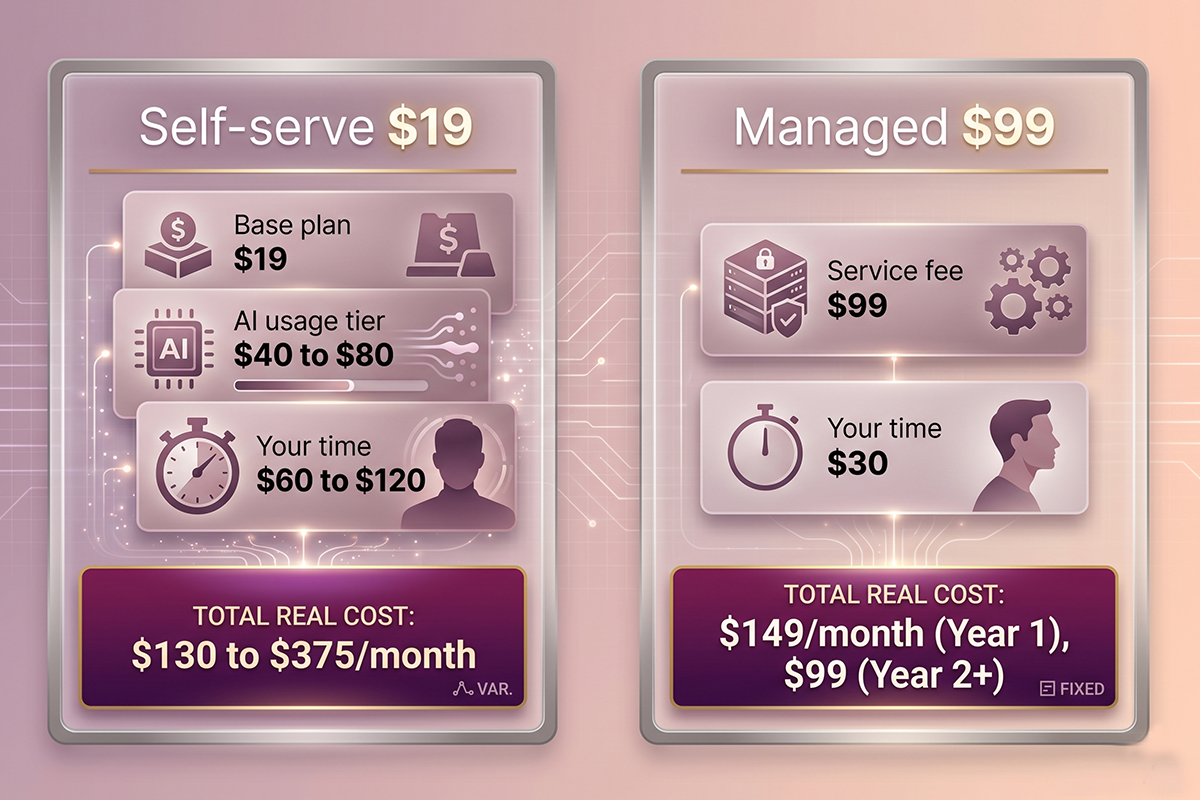
Initial setup: 4 to 8 hours. Monthly maintenance (reading transcripts, tuning answers, fixing what the bot got wrong): 2 to 4 hours. If your time is worth $30/hour to your business, that's another $60 to $120/month in opportunity cost.
Real $19 self-serve cost: $130 to $375/month including time. The $19 was the marketing number.
The $99 managed scenario
A hybrid managed service like Studio Niza's chatbot tier is $599 one-time setup plus $99/month. The $99 covers the AI platform license, the AI credits the bot uses, weekly monitoring, retraining when products or policies change, and live agent handoff configuration. The setup work (catalog sync, flow design, FAQ training, brand voice tuning, testing) happens before launch.
Your time investment after launch: maybe an hour a month reviewing the monthly report. Setup cost amortized over a year: $50/month. Real $99 managed cost: $149/month for the first year, $99/month after. Your time stays free for everything else you have to do.
When $19 actually beats $99
The honest take: $19 self-serve genuinely beats $99 managed in two cases.
First, when your chat volume is so low (under 50/month) that the bot mostly sits idle, and you enjoy tweaking the responses yourself. Second, when you have a technical or marketing-trained co-founder who actually wants to own the chatbot as their domain. If neither is true, the time math usually flips.
What each tier actually buys you
Here's the breakdown that most "best Shopify chatbot" lists won't give you in one place, because each article is usually sponsored by one of the vendors. (This one isn't sponsored by anyone. I run a chatbot service, so I have an obvious interest in the managed side, but the goal here is to help you pick what fits, not to push you into something you don't need.)
| Tier | Examples | Real monthly cost | Best for |
|---|---|---|---|
| Free native | Shopify Inbox | $0 plus your time | Under 30 chats/month, want chat plus basic AI reply suggestions |
| Self-serve entry | Tidio Starter, Chatty, SmartBot | $19 to $79 | 30 to 150 chats/month, founder is comfortable in dashboards |
| Self-serve sales-focused | Zipchat Starter / Growth | $49 to $189 | Pre-purchase questions are your bottleneck, not support |
| Hybrid managed | Small studios (including Studio Niza) | $99 to $199 | 150 to 500 chats/month, no time to maintain |
| Pure managed / helpdesk AI | Gorgias AI Agent, Intercom Fin | $300 to $1,000+ | 500+ chats/month with a real support queue |
A few notes on this table. Tidio is the default self-serve recommendation because of breadth, not because it's the best at any one thing. Zipchat is genuinely sharper at converting pre-purchase chat into checkout, which is a different job from deflecting support tickets. Gorgias AI Agent is priced per automated resolution, roughly $0.90 to $1.00 each, on top of the Gorgias base plan, so the real cost scales with your volume.
If you want to go deeper on what a chatbot actually does well versus what it can't, the journal entry on what Shopify chatbots actually do and don't do covers the use-case fit before any of the vendor comparison even matters.
Five questions to ask before you sign up
Before you put a credit card down on any of these, write down answers to these five. If a vendor's site doesn't answer them clearly, that's a signal.
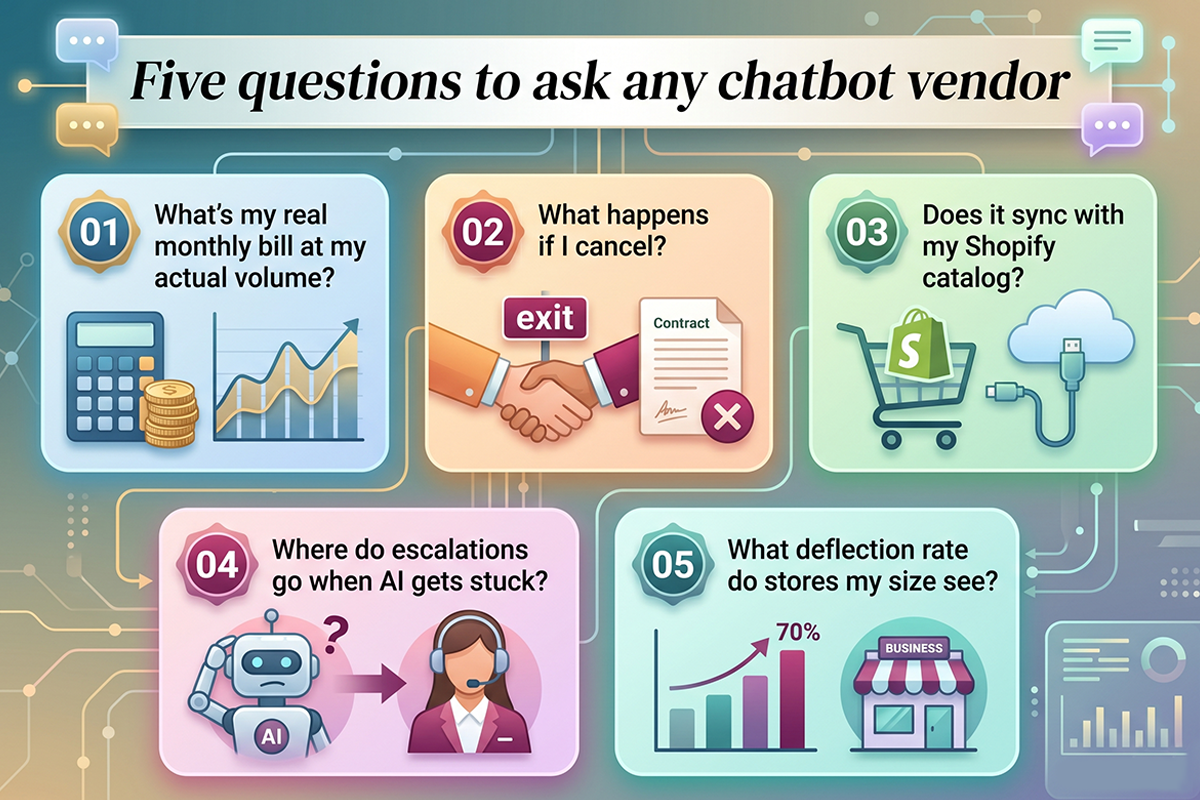
1. What does my real monthly bill look like at my actual chat volume? Not the entry tier. The tier you'll be on once the bot is actually running. Add the AI add-on. Add the agent seat fees. Add any per-resolution charges. The number should be one specific dollar figure for your store, not a range.
2. What happens if I cancel? Self-serve apps usually let you keep your workspace but stop the bot from running once payment lapses. Managed services vary widely. Some hand over the bot, some keep the configuration as part of the service. There's no right answer here, but you need to know which one you're buying.
3. Does the bot integrate with my Shopify catalog? Auto-syncing products, prices, and stock levels is the difference between a chatbot that helps customers and one that quotes wrong prices. Every major Shopify app does this. Some plug-in chatbots from outside the App Store don't. Check.
4. Where does the conversation go when the AI gets stuck? "Live agent handoff" should be a question, not an assumption. Some plans don't include it. Some route to an email inbox you'll never check. The honest answer for a small store is usually: handoff to your support email with the chat transcript attached, so you can reply on your schedule.
5. What's the actual deflection rate on stores like mine? Vendor case studies tend to highlight stores doing 5,000+ chats a month. Ask for stores in your size band. If they can't show you, it doesn't mean the tool is bad. It means you'll need to test it yourself.
Three traps that catch new owners
These are the patterns I've seen most often when stores rip out a chatbot after three months. None of them are obvious from the marketing pages.
Trap one: the usage-cap surprise
Self-serve AI chatbots almost always price on conversation volume, not on a flat fee. The entry tier looks affordable, then you exceed the cap in week three and the bill jumps. Tidio's Lyro is the textbook example: 50 free conversations, then steep increases as you climb tiers. Plan for the third month, not the first.
Trap two: the "build" that doesn't include maintenance
Some agencies sell a one-time chatbot build for $1,500 to $4,000 and hand you the dashboard. Six months later your product catalog has changed, three of your shipping policies are different, and the bot is confidently giving customers wrong answers. A chatbot is a maintained system, not a deliverable. If you're paying for a build, ask who maintains it and what that costs.
Trap three: optimizing for features you'll never use
Multi-language support, A/B testing on chatbot flows, advanced sentiment analysis, dynamic discount triggers. All of these are real features and all of them are useless to a store doing 100 chats a month. Compare on what you'll actually use in the first ninety days. The advanced features can wait until you have data to feed them.
If you're earlier in the question of whether you even need a bot yet, the journal entry on when to add a chatbot vs hire customer support walks through that diagnostic.
When you don't need a chatbot yet
Honest answer most chatbot vendors won't give you: a chunk of stores asking this question don't need a paid chatbot yet. Here are the three signals.
Your monthly chat volume is under 30 and steady. A chatbot will sit idle. Shopify Inbox plus a few saved replies will handle what comes in, for free.
You don't know your current chat volume. This means you're not measuring it yet, which means you'll have no way to evaluate whether the bot is working after you install it. Install Shopify Inbox for ninety days, measure, then decide.
Your support questions are 80% "where is my order." That's a tracking-page problem, not a chatbot problem. Add a real order tracking page or improve your shipping confirmation emails. The chat questions will drop, and so will the case for paying $99/month.
The chatbot economy depends on stores buying chatbots before they need them. The internet will pitch you a bot the day your store launches. Don't take the bait. Add the bot when the volume justifies the cost.
How to pick in twenty minutes
Here's the playbook. Set a timer.
Minute 0 to 5: Find your chat volume. Check your current chat tool (or your support email if chat isn't installed yet) for the last 30 days. Count anything that looked like a real customer question, not order confirmations or spam. Write the number down.
Minute 5 to 10: Decide self-serve or managed. If you have time and a slight technical bent, self-serve. If you'd rather buy back your hours, managed or hybrid. There's no wrong answer; the wrong move is not deciding.
Minute 10 to 15: Match your volume to the tier table above. One row. One or two specific vendors. Don't comparison-shop beyond what's in the table; this post already did that work.
Minute 15 to 20: Confirm pricing with the five questions. Open the vendor's pricing page and answer the five questions from earlier. If anything is unclear, email them and wait for a real answer before you commit. Honest scope beats fast scope.
That's the whole decision. Most store owners spend a week comparing twelve vendors and end up exhausted. The actual choice is two variables and a tier table.
Wrapping up
Picking a Shopify chatbot is one of those decisions that's harder than it should be because the entire vendor ecosystem benefits from making it confusing. Most Shopify chatbot comparison posts anchor sticker prices low, quote real costs by usage tier, and rotate the same five tools depending on who paid that week.
The clean version of how to choose a Shopify chatbot: your monthly chat volume picks your tier. Your appetite for operating the bot picks self-serve or managed. The rest is just finding the specific vendor inside that intersection. If you walk away from this post knowing your chat volume, knowing whether you want to operate the bot or have someone else do it, and knowing what one specific vendor to look at first, this article did its job.
If you don't have an answer yet on volume, install Shopify Inbox today (it's free), let it run for a month, and you'll have your number. Almost every other question gets easier from there.
Want someone to run the bot for you?
Studio Niza's managed chatbot tier is $599 setup and $99/month all-in. Trained on your products, monitored weekly, with live agent handoff included. The $99 covers the AI platform, AI credits, my monitoring time, and a buffer. See the full breakdown on the service page.
See chatbot tiers and pricing →Or email contact@studioniza.com if you have a specific question about your store. I read every one.
Frequently asked questions
If you're still unsure after reading these, just send the question.
Is a $19/month chatbot good enough for a new Shopify store? +
For most stores under 30 chats a month, yes. The $19 tiers usually cover live chat plus simple automation, which is enough for low-volume support. Once you cross 100 to 150 chats a month, the AI add-on usage caps start pushing the real bill toward $70 to $200, and the time math starts favoring a managed or hybrid option.
Can I run Shopify Inbox and a paid chatbot at the same time? +
Technically yes, but you'll create a confusing double widget on your storefront. The cleaner setup is to use one as primary and turn the other off. Most stores that switch to a paid chatbot disable the Shopify Inbox widget on the storefront while keeping the Inbox app installed for the Shopify-native message routing it does in the background.
What happens to my chatbot data if I cancel a managed service? +
It depends on the service. Some hand over the configuration on cancellation; some keep the build as part of the ongoing license; some pause the bot but retain the workspace if you return later. There's no industry standard, so ask before you sign. Studio Niza's policy is honest disclosure: if you cancel, the bot stops running, because the monthly fee covers the platform license that hosts it.
Do AI chatbots actually replace customer support staff? +
Not for small stores. For stores doing 30 to 500 chats a month, the chatbot deflects 40 to 70 percent of routine questions (order status, shipping, returns, sizing), which means you spend less time on the basics. Complex issues, complaints, and edge cases still need a human. The right framing is "augments your hours" not "replaces a hire."
How many monthly chats do I need before paying for a chatbot makes sense? +
Around 30 to 50 chats a month is where paying for a self-serve AI chatbot starts to earn its keep. Below that, Shopify Inbox with a few saved replies covers the same ground for free. Above 150 chats a month, the time cost of operating self-serve usually tips the decision toward managed or hybrid.
Which is better for a Shopify store: Tidio, Gorgias, or Zipchat? +
They solve different problems. Tidio is the default all-in-one for small-to-mid stores wanting live chat plus an AI agent. Gorgias is built for stores with a real support queue and at least one human agent reading tickets. Zipchat is sharper at converting pre-purchase chat into checkout, which is a sales job, not a support job. Pick by what your bottleneck actually is.