
You turned on Shopify Markets because selling to more countries felt like the obvious next step. A week later, Google Search Console is showing a stack of pages flagged as duplicates, your traffic chart has a dip you can't explain, and you're not sure whether Markets caused it or whether you broke something yourself.
This is the most common Shopify international SEO problem, and it almost always traces back to the same thing. Markets quietly changed your URL structure, and the technical signals that are supposed to keep those new URLs sorted out, hreflang and canonical tags, either weren't set up the way you assumed or are now fighting each other.
The reassuring part: Markets handles most of this automatically when it's configured correctly. The risk isn't the feature. The risk is switching it on without knowing what it did, then layering an app or a manual fix on top that undoes the part that was already working.
This post covers what Markets does to your URLs, what hreflang is for (and what it isn't), the specific ways it breaks on Shopify, how canonical tags and hreflang interact, and a rollout order that protects the rankings you already have. None of it requires writing code. Most of it requires understanding what you're looking at before you change anything.
What Shopify Markets does to your URLs
Markets lets you sell to different countries with their own languages, currencies, and pricing. When you assign a domain, subdomain, or subfolder to a market and give it a language, Shopify generates a new set of URLs for that market and serves the localized version there.
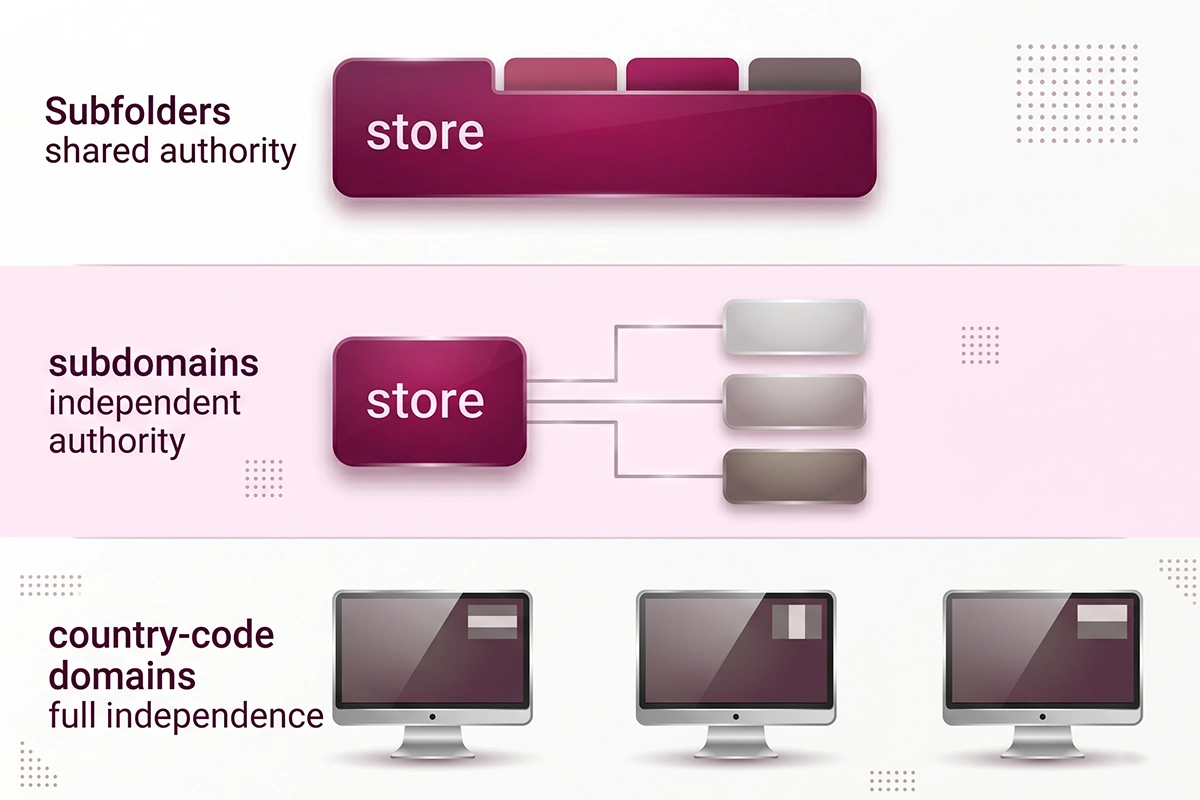
That single decision is the root of most international SEO confusion, because one product page can suddenly exist at several addresses. You have three URL structures to choose from, and the choice affects how much SEO value carries over and how much work you take on.
| URL structure | Example | Domain authority | Best for |
|---|---|---|---|
| Subfolders | yourstore.com/fr/ | Shared with your main domain | Most stores |
| Subdomains | fr.yourstore.com | Independent, starts from zero | Clear separation between markets |
| Country-code domains | yourstore.fr | Independent, strongest local signal | A real, committed presence in one country |
For most stores, subfolders are the right answer. Shopify recommends them too, because they're the easiest to manage and they share the authority your main domain has already earned. Country-code domains give the strongest local signal, but each one starts its authority from scratch and needs its own registration and upkeep, so they only pay off when you're genuinely invested in that market.
Whichever structure you pick, the number of crawlable URLs goes up fast, especially across your collection pages, where one collection can multiply into a version per market. The diagram below shows the basic branching.
What hreflang does, and what it doesn't
An hreflang tag tells search engines which version of a page to show to which audience, based on language and region. Without it, Google might serve a French shopper your English page, or flag your translated pages as duplicates of each other.
Markets adds these tags automatically. When you assign a market a domain, subdomain, or subfolder with a language, the matching hreflang tags are created for every page, plus an x-default tag pointing at your primary domain for visitors who don't match any specific version.
Is hreflang a redirect?
No, and this trips up a lot of store owners. Hreflang does not move anyone anywhere. It's a hint to the search engine about which version is the best match for a given searcher. Google itself describes it as a signal, not a directive, which means it can decide to ignore your tags if other signals on the page contradict them.
This matters because people expect hreflang to "fix" their international setup the way a 301 redirect fixes a moved page. It doesn't work like that. It improves the odds of the right version showing up in the right place. It doesn't force the outcome.
Does hreflang handle currency?
No. Hreflang only covers language and region. Currency is a separate Markets setting, and Markets can show local pricing on the same URL without a new address. So you never need to create a separate URL just to display a different currency, and doing so usually creates duplicate pages for no benefit.
How hreflang breaks on Shopify
When hreflang fails, it's rarely dramatic. The tags just get quietly ignored, your country targeting stops working, and the symptom shows up later as duplicate warnings or the wrong version ranking. Here are the breaks that come up most often on Shopify stores.
Missing return tags. Hreflang has to be reciprocal. If your UK page points to your US page, the US page has to point back. When one direction is missing, Google may discard the whole group. This is usually what happens when a store mixes automatic and manual tags.
No self-reference. Each page's hreflang set should include the page itself, not just its alternates. A set with no self-referencing tag can be misread or ignored entirely.
Invalid language or region codes. The codes follow a strict format: language first, then region, like en-gb. Common invented codes such as en-uk, en-eu, or en-intl are not valid, and Google ignores them without telling you.
x-default misuse. The x-default tag is meant for a neutral fallback, like a homepage with a language picker or a global entry point. It does not mean "the default for every other country," and treating it that way weakens the signal you're trying to send.
Pages blocked from indexing. Hreflang on a page that's set to noindex or blocked in robots.txt is wasted, because search engines skip those pages and the tags never get read.
App and Markets double tagging. This is the Shopify-specific one. If Markets is generating hreflang and you also run a separate hreflang app or edited your theme to add tags manually, you can end up with two competing sets. They disagree, Google gets confused, and the targeting you were trying to fix gets worse. For most stores, the cleanest setup is to let Markets handle it and remove anything that duplicates the job.
The canonical and hreflang interaction
This is where Shopify international SEO gets genuinely risky, and it's worth slowing down for. A canonical tag tells Google which URL is the real, primary version of a page. Hreflang tells Google which version to serve to which audience. When these two signals contradict each other, Google doesn't ask you. It picks one, and usually not the one you'd have chosen.
The rule that matters: Google discards hreflang on any page whose canonical points somewhere else. If your French page canonicalizes to your English page, Google treats the French page as a copy of the English one and throws away the French hreflang. Because hreflang has to be reciprocal, one broken page can break the return tags for the entire group.
The most damaging version of this mistake is pointing every country's canonical at the US or English version. It feels tidy. It quietly tells Google your local pages aren't worth indexing on their own, and they can drop out of local results. That's often why some Shopify pages stop getting indexed after a store goes international.
The correct setup is a self-referencing canonical on every version: the French page is its own canonical, the UK page is its own canonical, and hreflang connects them. Shopify does exactly this automatically. Each market version gets its own self-referencing canonical, and the hreflang tags link them as related-but-distinct pages rather than duplicates. The before-and-after below shows the difference.
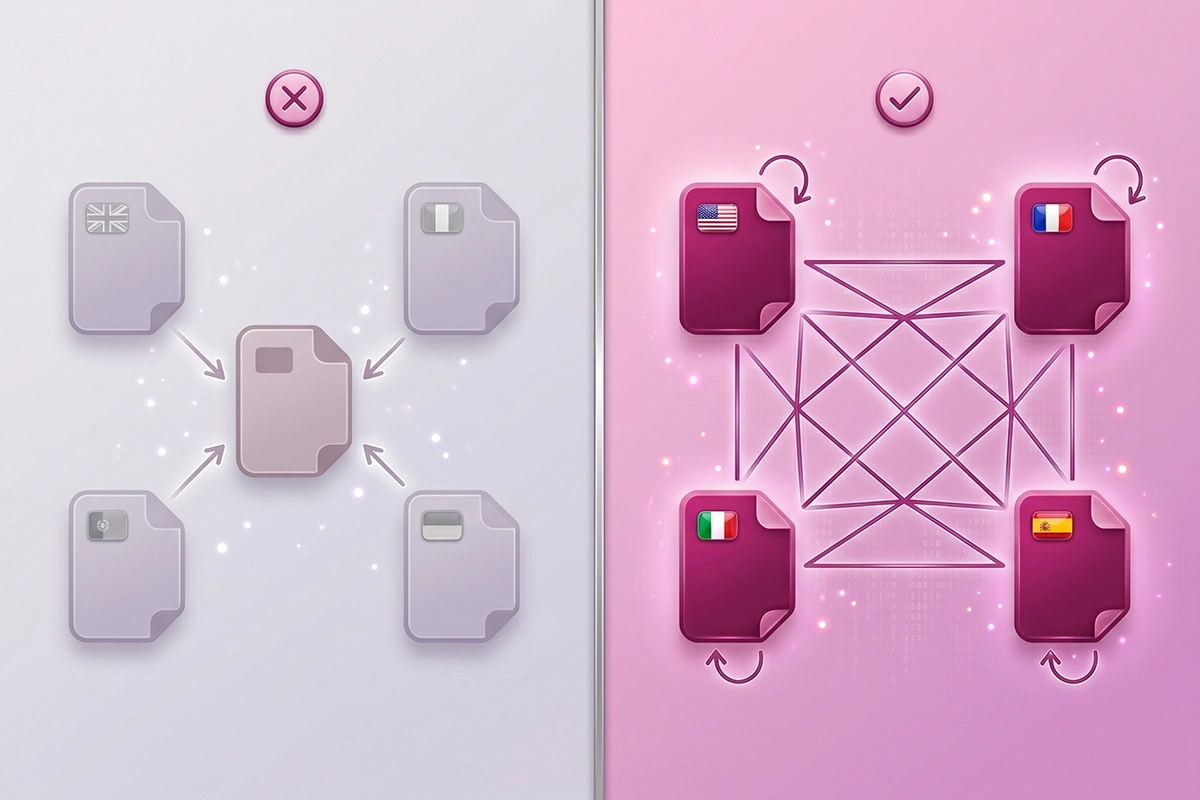
The practical takeaway is to leave the automatic canonicals alone. The trouble almost always starts when someone overrides them, usually through an app or a theme edit, in an attempt to "consolidate" duplicate content that Markets was already handling.
The duplicate-English problem most stores hit
Here's the scenario that fills up Search Console. You sell in English to the US, UK, Australia, and Canada. You turn on a market for each, Markets generates a URL set, and now you have four near-identical English pages for every product. Nothing on them differs except the address.
Google looks at four pages that read word for word the same, decides one is the real version, and reports the rest as "Duplicate, Google chose different canonical than user." Your intended country targeting gets ignored, because from Google's side there's nothing to target. The pages are the same.
Do you even need separate country URLs?
Often, no. This is the part most "go global" advice skips. If the only thing changing between your US and UK shoppers is the currency and maybe the shipping estimate, Markets can handle that on a single URL with local pricing. Spinning up separate language and region URLs earns its place when the content actually differs: British spelling, country-specific shipping and returns, local legal text, region-specific offers, or genuinely translated copy.
If you can't point to a real difference between two versions, you've created duplicates that cost crawl budget and add confusion without adding rankings. The honest move is to add real local differences where they help your shopper, or to skip the extra URLs entirely. More market URLs is not the same as more international visibility.
A safe rollout order that protects your rankings
Most ranking damage from going international comes from doing everything at once and changing automatic settings before understanding them. This order keeps the risk low. It's also close to how Markets is designed to work, so you're mostly confirming defaults rather than fighting them.

1. Confirm your primary domain and canonicals first. Make sure your main domain is set as primary and that pages canonicalize to themselves. This is the Shopify default. You're checking it, not changing it.
2. Pick subfolders unless you have a real reason not to. Subfolders keep your accumulated authority working for the new markets. Choose subdomains or country domains only when you have committed, market-specific plans.
3. Turn on one market at a time. Adding markets one by one lets you watch how each affects indexing before you stack the next. If something goes wrong, you know which change caused it.
4. Let Markets generate hreflang. Don't add an app on top. The automatic tags are reciprocal and self-referencing by default. Removing a redundant hreflang app prevents the double-tagging conflict described earlier.
5. Add real differences where they matter. Translate or adapt content for markets that need it. For English-to-English markets, decide honestly whether separate URLs earn their place before keeping them.
6. Submit your sitemap and add every market to Search Console. Markets includes all market URLs in your sitemap with hreflang annotations automatically. Add each domain or property to Google Search Console so you can actually see how each version is being indexed.
7. Watch the coverage report for two to four weeks before judging. Indexing changes take time. Run a quick SEO audit and check the canonical and coverage reports before concluding anything broke. A short dip while Google reprocesses is normal, not a verdict.
If this is more than you want to manage yourself, the Studio Niza SEO and GEO service sets up international markets in this order and does the Search Console follow-up that catches duplicate-canonical issues early, which is the unglamorous part most cheap services skip.
Wrapping up
Going international on Shopify is genuinely close to one click. The SEO underneath isn't, but it's also not as fragile as the duplicate warnings make it feel. Three things carry most of the weight.
First, Markets does the hard parts automatically: hreflang, self-referencing canonicals, and sitemap entries. Your job is mostly to avoid overriding them. Second, the canonical and hreflang signals have to agree, and the worst mistake is pointing every country's canonical at one master page. Third, more market URLs only help when the content behind them actually differs, so duplicate-English pages are a problem to avoid, not a milestone to hit.
If you've already turned Markets on and Search Console looks messy, you haven't necessarily broken anything. Start by confirming your canonicals are self-referencing, remove any hreflang app that duplicates what Markets is doing, and give Google a few weeks to catch up. Most multi country Shopify SEO problems are configuration issues, not permanent damage, and they're fixable once you can see what each signal is actually telling Google.
Want someone to roll this out for you?
Studio Niza's SEO and GEO service handles international setup the careful way: correct hreflang, self-referencing canonicals, sitemap submission, and the Google Search Console follow-up that catches duplicate-canonical issues before they cost you traffic. Pricing starts at $499.
See pricing & services →Or email contact@studioniza.com if you have a specific question about your store. I read every one.
Frequently asked questions
If you're still unsure after reading these, just send the question.
Does turning on Shopify Markets hurt my SEO? +
No, not on its own. When Markets is configured correctly it adds hreflang tags, self-referencing canonical URLs, and sitemap entries automatically, which is what keeps your country versions sorted out. The damage usually comes from turning it on without checking what it did, then adding an app or a manual fix that conflicts with the automatic setup.
Do I need an hreflang app if I use Shopify Markets? +
Usually no. Markets generates hreflang tags for every market that has its own domain, subdomain, or subfolder, so a separate app is redundant for most stores. Running both at once is one of the most common ways hreflang breaks on Shopify, because the two sets of tags can disagree.
Why does Search Console show duplicate, Google chose different canonical than user after I enabled Markets? +
It usually means you have near-identical pages across country URLs with nothing different on them except the address. Google sees the same content, decides one URL is the real version, and ignores the one you wanted to rank. The fix is to either add genuine differences to each version or stop creating separate URLs for markets that do not need them.
Should I use subfolders or separate domains for Shopify international SEO? +
Subfolders like yourstore.com/fr/ are the right choice for most stores because they share the authority your main domain has already built and need no extra domain registration. Country-code domains like yourstore.fr give a stronger local signal but start their authority from zero, so they only make sense when you have a real, committed presence in that country.
Does hreflang control which currency a customer sees? +
No. Hreflang only signals language and region to search engines. Currency is handled separately by Markets, which can show local pricing on the same URL, so you should not create separate URLs just to show a different currency.
Can I sell to the US, UK, and Australia in English without duplicate content problems? +
Yes, but only if the versions are connected with correct hreflang and ideally differ in small ways such as spelling, shipping details, or pricing. If the pages are word-for-word identical, Google is likely to treat them as duplicates and pick one itself, which defeats the purpose of having three.
How long does Google take to process hreflang changes? +
Plan for two to four weeks for Google to recrawl and reprocess the changes, and sometimes longer for larger stores. Indexing and serving changes propagate slowly, so a dip in the first couple of weeks is not proof that something is still broken.
Should I let Shopify generate hreflang automatically or add it manually? +
Let Markets generate it automatically. Manual or app-based hreflang only makes sense if you deliberately opted out of the automatic version for a specific reason, and even then it adds ongoing maintenance. For almost every store doing multi country Shopify SEO, the automatic tags are the safer default.