
Your Shopify theme already outputs Product schema. Every product page tells Google the name, price, and availability of what you sell. That part is handled. What most stores never add is the schema that says who is doing the selling. That gap is what Shopify Organization schema fills, and in 2026 it matters more than it used to.
Here is the short version. Search has shifted from matching keywords to recognizing entities: real things in the world, like a person, a place, or a brand. Google and the AI tools people now use to shop (ChatGPT, Perplexity, Gemini, Claude) are trying to figure out whether your store is a real, distinct brand or just another page of products. Organization and Brand schema is how you answer that question in a language they read directly.
This sits one level deeper than marking up your products or your FAQs. It is the layer that ties everything together: this store, this founder, these social profiles, all one brand. Get it right and you influence how your name, logo, and description show up. Skip it and you leave that to guesswork.
This post covers what an entity actually is, why Product schema alone leaves a hole, the difference between Organization and Brand schema, the exact JSON-LD block to use on Shopify, what it can and cannot do for a knowledge panel, and how to validate it. Nothing you cannot act on. You will be able to start this week.
What an entity means in 2026 search
An entity is a specific thing search engines can identify and tell apart from everything else: a person, a company, a product line, a place. Your brand is an entity. So is your founder. So is each product you sell.
For years, ranking was mostly about keywords on a page. That changed. Google now reads a query, works out which entities it refers to, and maps how they relate to each other. SEO people call this entity SEO, and it is the foundation of what gets called topical authority.
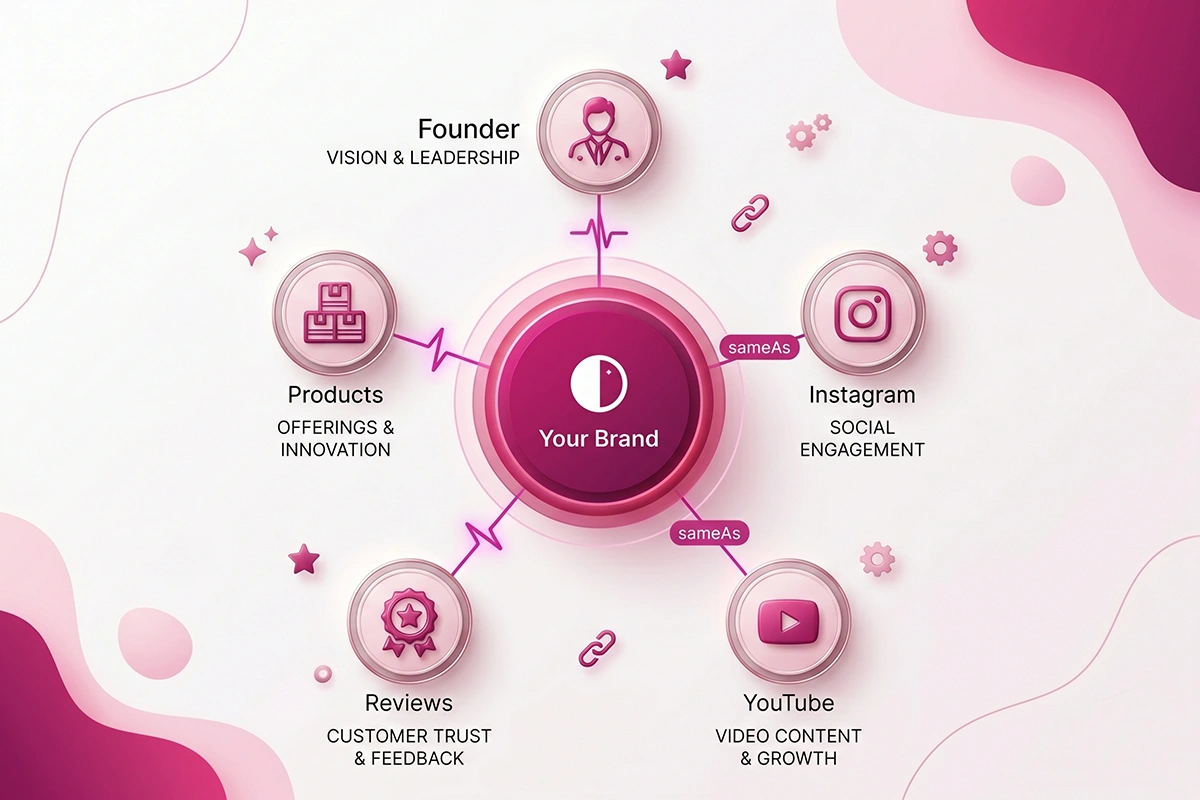
Picture it as a graph. Your brand sits in the middle as one node. Lines run out from it to your founder, your products, your social profiles, your reviews. Each confirmed connection makes the brand more legible. The more clearly those lines are drawn, the more confident a search engine is that your store is a real, known thing and not a lookalike.
AI shopping assistants work the same way, just with a different output. When a buyer asks an AI tool where to buy what you sell, the tool is choosing between entities it recognizes. A store it can resolve cleanly to a real brand is easier to mention than one it has to guess about. Entity recognition is quietly becoming the next decade of organic traffic, and most Shopify stores have not started on it.
Schema markup is how you draw those lines on purpose instead of hoping Google infers them. That is the whole job of Organization and Brand schema.
Why Product schema isn't enough on its own
Product schema describes things you sell. It tells Google this page is a product, here is its price, here is its rating, here is whether it is in stock. That earns you merchant listings and the occasional rich result. It is necessary, and you should keep it.
But Product schema never describes the seller. It says nothing about who you are as a business, where you operate, what your brand is called, or how to reach you. A search engine reading only your product pages sees a pile of items with no clear owner.
That is the hole. You can have perfect Product markup on 80 listings and still be invisible as a brand. The same is true for FAQ markup. FAQ schema on Shopify helps AI engines quote your answers, but it does not tell them who is answering.
Organization schema closes the gap by naming the business itself as an entity and pointing to everything that proves it is real. It is the one block that says, in machine-readable terms: this whole store belongs to this one brand, run by this person, reachable here, and also present on these other sites.
If you have ever wondered why your store isn't showing up in ChatGPT even though your products are indexed, a missing entity layer is often part of the answer. The AI has your products. It just is not sure they add up to a brand worth naming.
Organization schema vs Brand schema
These two get confused constantly, so here is the plain distinction.
Organization schema describes the business entity that operates your website: the company, the studio, the shop. It carries your name, logo, contact details, founder, and the links that prove you exist elsewhere on the web.
Brand schema describes the label behind a product. On a product page, the brand property says which brand made or sells this item. It is most useful for retailers that carry many brands, or for a company that sells under several brand names.
For most readers here, you run a single-brand, direct-to-consumer store. Your company and your brand are the same name. In that case, Organization schema does the heavy lifting, and Brand mostly shows up as a small property inside your Product schema, naming your own brand as the maker. You do not need an elaborate separate Brand entity. You need a complete Organization entity, plus your brand named consistently on your products.
| Schema type | What it describes | When a Shopify store needs it |
|---|---|---|
| Organization (or OnlineStore) | The business that runs the store: name, logo, contact, founder, profiles | Every store. Place it once, sitewide. |
| Brand | The label behind a product | Named inside Product schema. A separate entity only if you sell multiple brands. |
| Product | A single item for sale: price, availability, rating | Every product page. Your theme usually handles this. |
The practical rule: get Organization right first. Add the brand property to your products so each item points back to your brand by name. Only build out a distinct Brand entity if you actually sell multiple brands and need to keep them apart.
The Organization and sameAs JSON-LD block
Here is the block. Google recommends using the most specific type that fits, so for an online store, use OnlineStore, which is a subtype of Organization. Replace the example values with yours.
<script type="application/ld+json">
{
  "@context": "https://schema.org",
  "@type": "OnlineStore",
  "@id": "https://yourstore.com/#organization",
  "name": "Your Store Name",
  "url": "https://yourstore.com/",
  "logo": "https://yourstore.com/cdn/shop/files/logo.png",
  "description": "A short, true description of what you sell, who you sell to, and where you ship.",
  "email": "hello@yourstore.com",
  "foundingDate": "2024",
  "founder": {
    "@type": "Person",
    "name": "Founder Name"
  },
  "contactPoint": {
    "@type": "ContactPoint",
    "contactType": "Customer Service",
    "email": "hello@yourstore.com"
  },
  "sameAs": [
    "https://www.instagram.com/yourstore",
    "https://www.tiktok.com/@yourstore",
    "https://www.linkedin.com/company/yourstore",
    "https://www.youtube.com/@yourstore"
  ]
}
</script>
A few notes on the properties that carry the most weight.
name and url identify the brand and its home. Use the same name you use everywhere else, exactly. Consistency is the signal.
logo is the image Google may show in search results and a knowledge panel. Per Google's Organization documentation, it must be at least 112 by 112 pixels, crawlable, and readable on a white background.
sameAs is the property most stores skip, and it is the one that does the most for entity recognition. It is an array of URLs to other pages about the same brand: your Instagram, your TikTok, your LinkedIn, your YouTube, and any Wikipedia, Wikidata, or Crunchbase entry if you have one. Google and AI systems use these links to merge information from different sources into one entity record. Without sameAs, Google has to guess that your Instagram and your store are the same brand, and that guess often goes wrong.
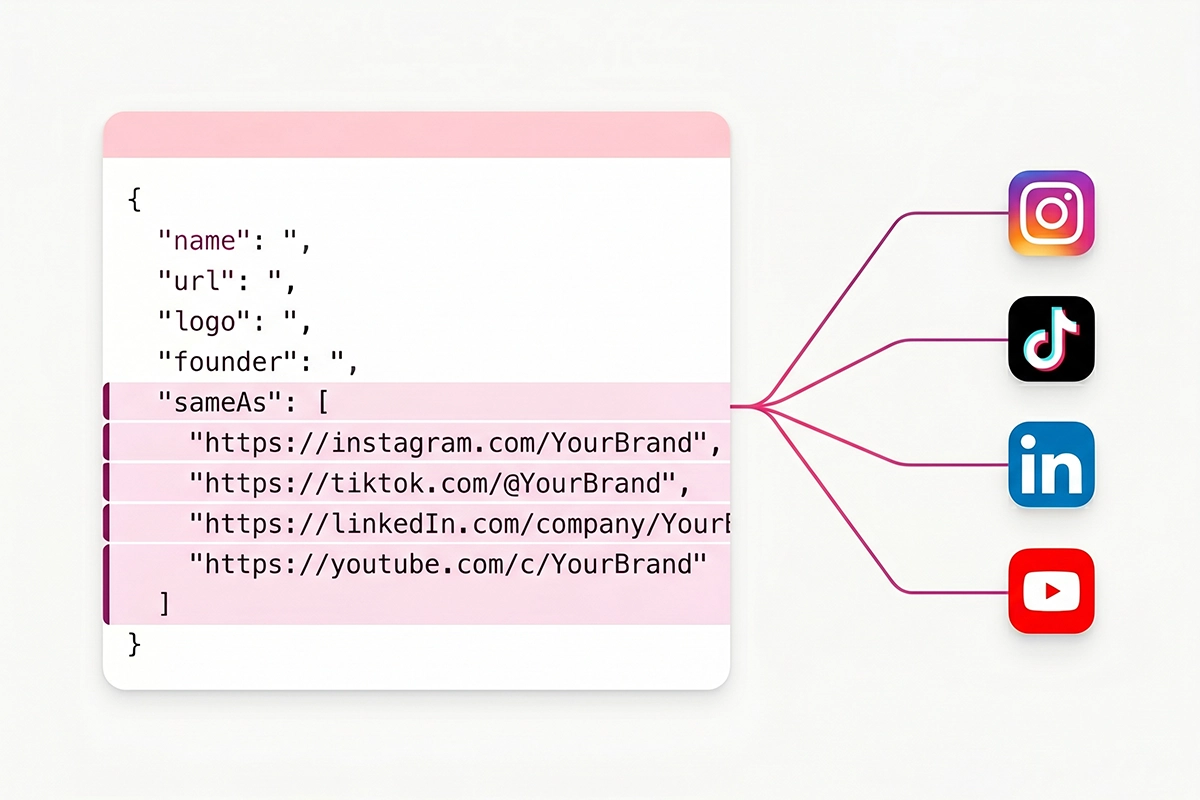
contactPoint and founder add real-world detail. A contact email and a named founder make the entity look like what it is: a real business run by a real person. If you sell your own products, you can also name your brand inside your Product schema using the brand property, which ties the two together.
One caution before you paste anything. Your schema must match what is actually visible and true on your site. Google's structured data guidelines are explicit that markup has to be a true representation of the page, and content that misleads can draw a manual action. Do not invent an address you do not have or a founder who does not exist.
Knowledge panels and AI brand recognition
Here is where I have to be straight with you, because a lot of posts are not.
Adding Organization schema will not, by itself, summon a Google knowledge panel. That is the box that appears on the right of search results for a brand name. A panel only shows up when Google already treats your brand as a known entity in its Knowledge Graph, and that recognition is earned mostly off your own site: mentions across the web, coverage from publishers, a Wikipedia or Wikidata entry, awards. A brand-new store with no press is unlikely to get one yet, and that is normal. As Shopify notes, small stores usually get a Google Business Profile in that spot instead.
So what does the schema actually do? It controls the details. When Google does build an entity record for you, your Organization markup is how you influence which logo, which name, and which description it uses, and which social profiles it ties to you. It is the difference between Google guessing and Google reading.
For AI search, the payoff is more immediate. Google has said structured data gives pages an advantage in results, and Microsoft has confirmed that schema helps its AI understand content for Copilot. The exact mechanics are not public, but the pattern is consistent: a clean, complete entity is easier for an AI to recognize, trust, and mention than one it has to assemble from scraps. AI engines also lean on your description almost word for word, so write a real one.
This is the same groundwork behind getting your store cited in ChatGPT, Perplexity, and Claude. Entity schema does not guarantee a citation. It makes you legible enough to be a candidate.
Where to put it on Shopify and how to validate
Organization schema belongs in one place, not on every page. Google recommends putting it on your home page or a single page that describes your business, like your About page. You do not repeat it across every product.
On Shopify, the clean way is to add the JSON-LD block once to your theme's main layout file, theme.liquid, just before the closing head tag, wrapped so it loads only on the homepage. If editing theme code is not your thing, several SEO apps will inject Organization schema for you, though many ship a thin version without sameAs.
Watch for duplicate schema
Here is the most common mistake. Many themes and apps already output a basic Organization block. If you add a second one, you now have two entity records that may disagree on name, logo, or URL, and conflicting entity data confuses search engines more than no data does. Before you add anything, check what your store already outputs, then either edit the existing block or remove it before adding yours. One clean Organization entity beats two competing ones.
How to validate it
Once it is live, test it. Three checks, in order.
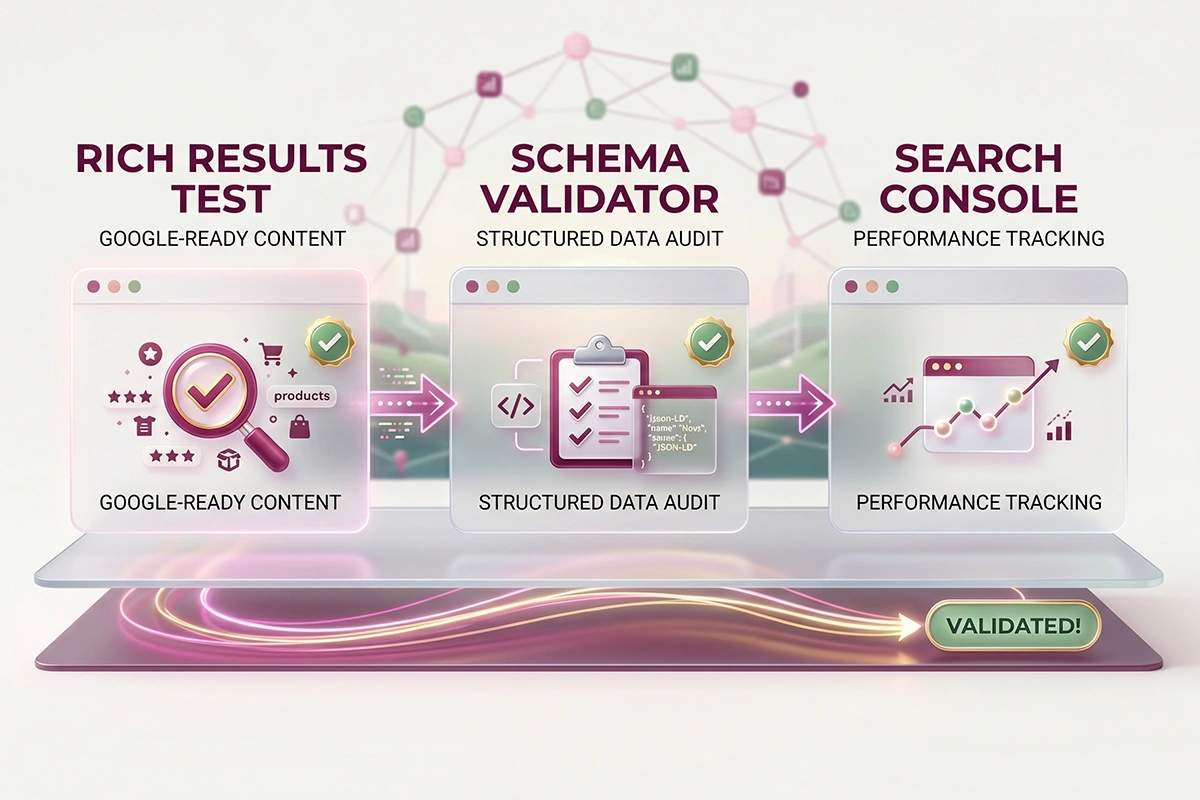
Run Google's Rich Results Test on your homepage URL to confirm Google can read the block with no critical errors. Then run the same page through the Schema.org Markup Validator, which checks your markup against the full vocabulary. Finally, watch the Enhancements and structured-data reports in Google Search Console over the following weeks, since Google can take days to recrawl and reflect changes.
If all three are clean and your details match what is visible on your site, you have done the part that is in your control. The rest is time and real-world signals. This is also one line item on a wider Shopify SEO audit, so if you are wiring this in, it is worth checking the rest while you are in there.
Where to start this week
You do not need to do all of this at once. The order that matters:
First, check what Organization schema your store already outputs, so you do not create a duplicate. Second, write a real one-paragraph description of your brand: what you sell, who you serve, where you ship. AI engines read it closely, so make it accurate and specific. Third, gather your sameAs URLs, every official profile you actually control, and build the OnlineStore block above. Fourth, place it once on your homepage and validate it with the two testing tools.
That is a focused afternoon of work, and it is the kind of foundational SEO that keeps paying off quietly. It will not transform your traffic overnight, and any post that promises that is selling you something. What it does is make your store legible as a brand, to Google and to the AI tools more buyers reach for every month.
The honest limit: schema is the part you can control. A knowledge panel and AI citations also depend on the web talking about you, which takes real-world traction you build over time. Wiring the entity layer correctly just means that when that traction comes, the recognition lands on a clean, accurate record instead of a guess.
If you would rather not hand-edit theme.liquid and chase validation errors, that is a reasonable place to bring in help.
Want the entity layer wired in for you?
Studio Niza's SEO work includes real Organization, Brand, and sameAs schema, validated and placed once across your store, not template fill-ins. Pricing starts at $499 one-time.
See SEO & GEO pricing →Or email contact@studioniza.com if you have a specific question about your store. I read every one.
Frequently asked questions
If you're still unsure after reading these, just send the question.
Does Shopify add Organization schema automatically? +
It depends on your theme. Many Shopify themes output a basic Organization block with your store name and logo, but it is often thin and rarely includes the sameAs links that matter most for entity recognition. Check your homepage source or run it through a validator before adding your own, so you do not end up with two conflicting blocks.
Do I need Brand schema if I only sell my own products? +
Usually not as a separate entity. For a single-brand store, your Organization schema already represents the brand, and you can name your brand inside your Product schema using the brand property. A distinct Brand entity is mainly useful when you sell multiple brands and need to keep them apart.
Will Organization schema get me a Google knowledge panel? +
Not on its own. A knowledge panel only appears once Google treats your brand as a known entity, which is driven mostly by mentions, press, and entries on sites like Wikipedia or Wikidata. Organization schema influences which logo, name, and description Google uses, but it does not create the panel by itself.
What goes in the sameAs property for a Shopify store? +
URLs to other official pages about your brand that you control: your Instagram, TikTok, LinkedIn, YouTube, and any Wikipedia, Wikidata, or Crunchbase entry if one exists. Only include profiles that genuinely belong to your brand, since sameAs is how search engines merge those sources into one entity record.
Where do I put Organization schema on Shopify? +
In one place, not on every page. Google recommends your homepage or a single page that describes your business, like your About page. On Shopify, the clean method is adding the JSON-LD block once to theme.liquid before the closing head tag, set to load only on the homepage.
Can duplicate or wrong Organization schema hurt my store? +
Conflicting entity data can confuse search engines more than having none, so two Organization blocks that disagree on name, logo, or URL is a real problem. Markup that misrepresents your business can also draw a manual action from Google. Keep one clean block, and make sure every detail matches what is visible and true on your site.