
If your Shopify inbox feels like the same message on repeat, it probably is. "Where is my order?" is the most common question in ecommerce support, and for a lot of small stores it is most of the queue. Industry estimates put order-status questions at somewhere between 30 and 50 percent of all support tickets, and higher during a busy season.
The frustrating part is that you are not solving anything when you answer one. The information the customer wants already lives in Shopify. You are copying a status from the admin into a reply, one message at a time, for the tenth time that day.
That is exactly the kind of work a chatbot is good at. Not because it is clever, but because the answer is a lookup, not a judgment call. This post walks through how a Shopify chatbot pulls order and tracking status, the identity check that keeps it safe, how to word a delay so it reads as honest instead of evasive, the point where it should hand the message to you, and a realistic figure for how much of the shipping inbox this actually clears. No overpromising, just the mechanics and the limits.
Why "where is my order?" takes over your inbox
Order-status questions pile up for a simple reason: there is a gap between what your carrier knows and what your customer can see. The moment someone clicks buy, a countdown starts in their head. When the confirmation email goes quiet and the tracking page reads something like "label created" with no movement, they do the natural thing and ask you.
Most of these are not angry. They are anxious. A shopper will check a tracking link several times for one order before they give up and message the store, which is how a queue that looks small on paper never actually empties.
For a solo founder, the real cost is not dollars per ticket the way a call center would count it. It is your attention. Five minutes here, three minutes there, all day, on a question that has the same shape every time: find the order, read the status, reply in plain words.
There is a quieter driver worth naming too. Vague delivery promises create more of these messages than slow shipping does. "Ships in 5 to 10 business days" invites a ticket on day six, because you left the definition of "on time" to the customer's imagination. A firm window generates fewer questions than a fuzzy one, which is the cheapest fix on this whole list.
None of this means you did something wrong. It means the routine half of your inbox is answerable from data you already have. That is the part worth automating first, and it is why order status is usually the safest place to let a chatbot earn its keep. If you want the wider picture, here is what a Shopify AI chatbot actually does before you decide.
How a chatbot pulls order and tracking status
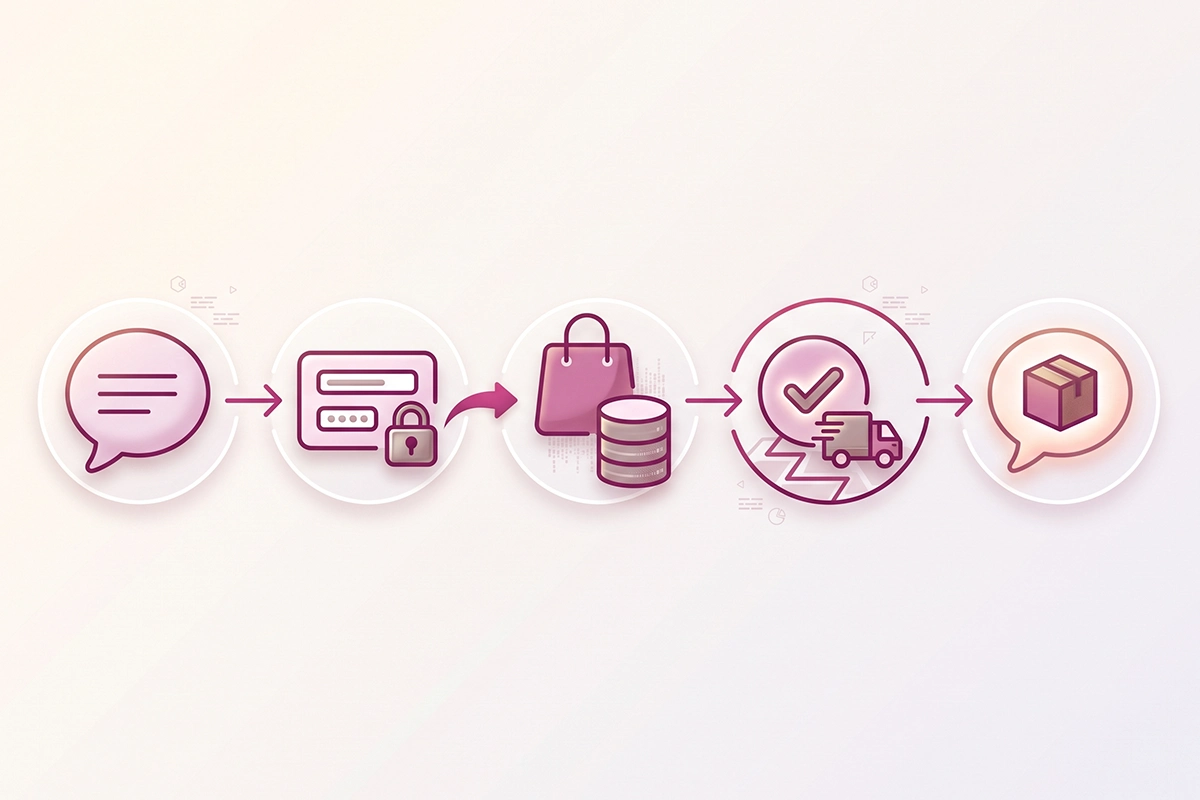
A chatbot that answers order-status questions is doing one specific thing: reading your live order data and turning it into a sentence. It is not guessing, and it should not be.
What the bot actually reads
The connection runs through Shopify's Admin API, the secure back door to your store's data. For order tracking, the bot only needs permission to read orders (the read_orders scope), nothing that lets it change anything. When a customer asks about an order, it looks up that specific record and reads the fulfillment status and tracking details.
Shopify already recognizes tracking numbers from hundreds of carriers and generates a clickable tracking link automatically once a tracking number is on the fulfillment. It moves an order through a small set of plain statuses: confirmed, on its way, out for delivery, delivered, and attempted delivery. The bot's job is to translate that into something human. Instead of "fulfillment status: in transit," the customer reads "Your order shipped Tuesday and is on its way, expected by Friday. Here is your tracking link."
Why the answer has to come from real data
This is what separates a useful bot from an embarrassing one. If a chatbot answers order questions from your FAQ page instead of the live order record, all it can do is recite your general shipping policy. That is not what the customer asked. They want the status of their order, not a reminder that you ship in three to five days.
So the rule is simple: the status comes from the live order lookup, and everything else the bot says (your return window, your delay policy, what happens next) comes from your real, written policies. A bot trained on your own policies and order data answers correctly or says it is not sure. A bot improvising does neither.
The identity check that keeps it safe
Here is the risk nobody mentions when they tell you to "just add a bot." Order numbers are easy to guess. They are often short and run in sequence, so #1043 sits right after #1042. If your chatbot will read out a name, address, and tracking link to anyone who types an order number, you have built a way for a stranger to pull a customer's details. That is a privacy incident waiting to happen.
The fix is a second identifier. The bot should ask for the order number and one more thing the real customer would know: the email address or postal code used at checkout. It cross-references both against the order. If they match, it shows the status. If they do not, it says it could not find that order and offers to connect the person to you. Two matching details raise the cost of a guessing attempt enough to make it not worth trying.
This is not an exotic pattern. It is the same rule Shopify already uses. On Shopify's own order status page, a customer without an account can be asked to confirm their identity with the email or phone number plus the order number before full details show. A good chatbot mirrors that behavior instead of working around it.
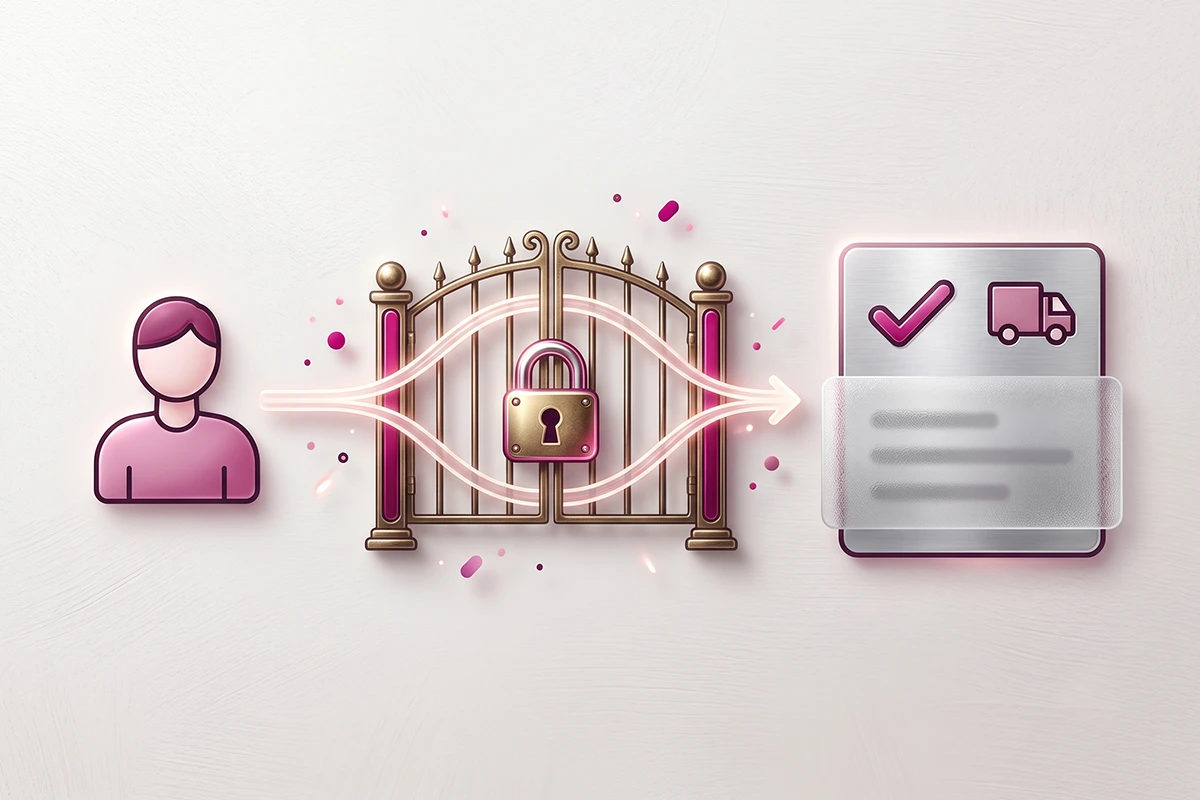
There is a second habit that keeps things tight: only return what the question needs. If someone asks "has it shipped yet," the honest answer is a status and maybe an ETA. It does not need to include their home address. In fact, Shopify redacts sensitive fields like name, address, and tracking number until a viewer is verified, and shows only public order data otherwise. Returning the smallest useful set of fields is both safer and less awkward for the customer.
One more thing if you sell into the UK, EU, or California: your chat transcripts are customer data too. If someone asks you to delete their data, the conversation history counts. It is a small point, but it is the kind of detail that separates a bot set up carefully from one bolted on in an afternoon.
How to word a delay honestly
A chatbot handling order status will eventually meet a delayed order. How it words that moment matters more than almost anything else it says.
The instinct some owners have is to keep the bot vague, as if a soft answer will keep the customer calm. It does the opposite. People can tell when they are being managed. The better move is the one every good support team already uses: say it plainly, give a realistic new date, and name the reason in a sentence.
A realistic new ETA is the single piece of information the customer actually wants. After that, a short reason helps ("a carrier delay in transit," "a warehouse backlog after a busy weekend") so they know you are aware of what is happening. You do not need to over-explain. You need to be clear and upfront.
What a delay message should never do is promise a date the bot cannot stand behind. Breaking a delivery promise costs more trust than the delay itself. So if there is no firm new date yet, the honest script is to say that, tell the customer you are on it, and offer to have a human follow up rather than inventing a timeline.
Here is the difference in practice.
| Instead of this | Have the bot say this |
|---|---|
| Your order is still processing. Thank you for your patience. | Your order is running late. It is stuck in transit with the carrier and now looks likely to arrive by June 16 instead of June 12. I am sorry about that. Want me to have someone check on it directly? |
| Your order will arrive soon. | Your order is delayed and I do not have a firm new date yet. I have flagged it, and someone will follow up today with an update. |
The honest versions are longer, and they work, because they answer the real question (when) and admit the real situation (late). There is a payoff beyond good manners: customers who are told about a delay proactively are far less likely to open a ticket about it than customers who discover it themselves. Honesty is also the lower-volume option.
Where the bot should hand off to a human
The whole system works because there is a clear line between what the bot answers and what it hands to you. Get that line right and the bot is a relief. Get it wrong and it becomes the thing customers complain about.
The line is this: the bot answers questions, and a human makes decisions. Reading a status, sharing a tracking link, confirming a return window, telling someone their order shipped: these are answers, and they are safe to automate because there is one correct response and it comes from your data.
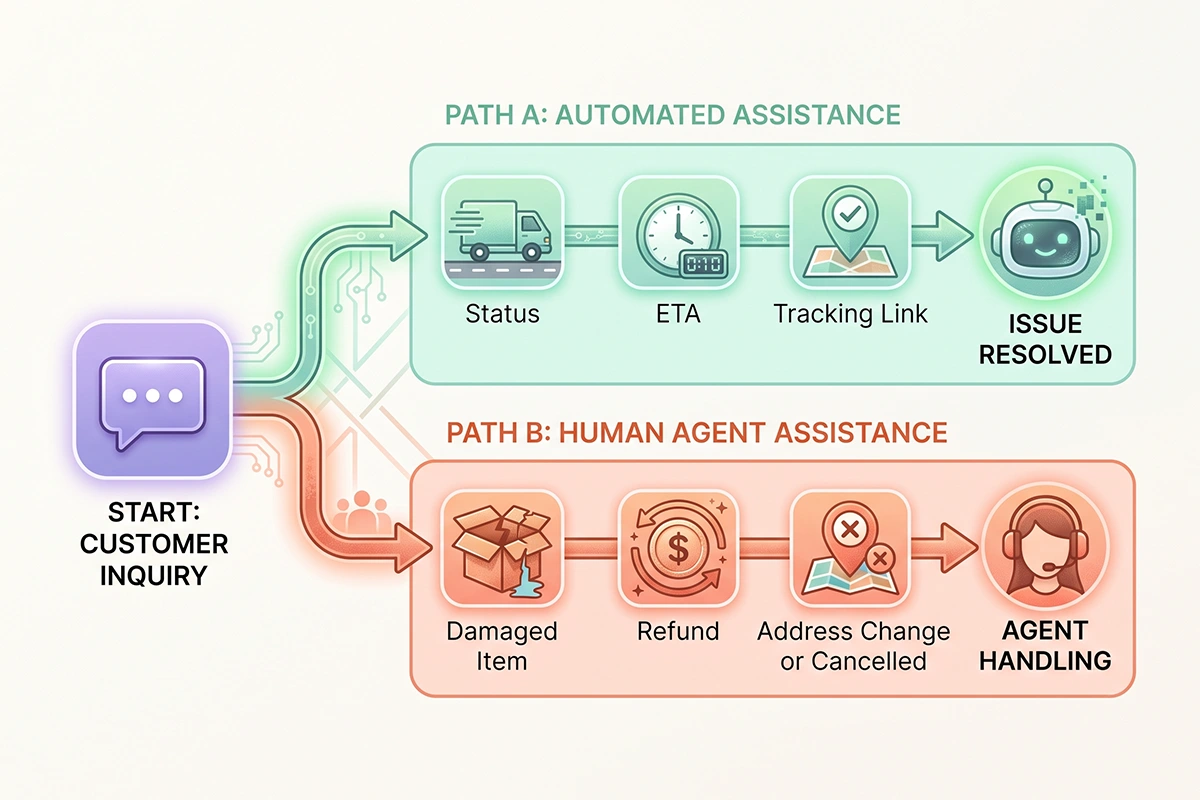
The moment a message involves money, a judgment call, or an upset customer, it should go to you. A few clear triggers to hand off:
- The order is lost, or the tracking has not moved in days.
- It shows as delivered, but the customer does not have it.
- They want to change the shipping address or cancel.
- They are asking for a refund or a replacement.
- The item arrived damaged.
None of these are lookups. They are decisions, and a bot that tries to make them is the bot that issues the wrong refund or promises a reship you did not approve. Let it collect the details, pull up the order, and pass a tidy summary to you. You make the call.
There is one more rule that protects you even on the "safe" questions: a confidence check. If the bot is not sure it has the right answer, it should hand off rather than guess. A confident wrong answer about your return window does more damage than a slightly slower correct one. Handing off is not the bot failing. It is the bot knowing its job.
Mechanically, this lands wherever you already work. The chatbots I set up pass conversations into a live-agent inbox like Gorgias or Zendesk, so the customer moves from bot to human without starting over and you pick up with the full thread in front of you. If you want the full framework, here is how to design when a chatbot should hand off to a human.
How much of the shipping inbox does this clear?
Here is the honest version, because the inflated one helps no one. You will see very high automation rates quoted for order tracking, and for large brands with everything wired in, some of those numbers are real. For a small Shopify store, aim your expectations at a plainer target: a well-scoped order-status flow clears the routine half of your shipping questions.
That framing matters. If "where is my order" is your biggest category, and the bot reliably handles the on-track statuses, the simple "did it ship" checks, and the tracking-link requests, it is taking the largest, most repetitive slice off your plate. The exceptions (lost, damaged, refund, address change) stay with you. Those are the minority by count but the majority of the real work, which is exactly why you want your attention on them and not on copy-pasting statuses.
Two things make the number better without touching the bot. Firm delivery windows at checkout prevent questions before they start. And your Shopify shipping notification emails already do real prevention: every "your order shipped" and "out for delivery" message is one the customer did not have to ask about. Proactive updates are one of the biggest reducers of order-status contacts. The bot handles what slips past those.
When you measure it, watch the difference between two numbers that sound alike. Deflection rate counts conversations that did not reach you. Resolution rate counts the ones the bot actually solved. A customer who gives up on a confusing bot and never messages you counts as "deflected" but was not helped. The number that matters is resolution. I broke that down further in a separate post on resolution rate versus deflection rate.
Set up well, this is the clearest first win automation offers a Shopify store: a big, boring, repetitive category, handled safely, with the hard cases still coming to you.
Wrapping up
If your inbox is mostly "where is my order," you are looking at the best possible place to start with automation. Not because it is impressive, but because it is a lookup, not a decision, and lookups are what a bot does without drama.
Three things you can do this week, even before you decide on a bot. First, count your real numbers: look at your last 100 support messages and mark how many are order status. That percentage tells you how much a bot could actually take, and most owners are surprised how high it is.
Second, tighten the front end. Set firm delivery windows at checkout instead of vague ranges, and make sure your Shopify shipping notification emails are on. A lot of these questions disappear before they reach anyone.
Third, design the safety before the speed. If you do add a chatbot for order tracking, insist on two things from day one: the two-identifier check before it shows any details, and a clear handoff line for lost, damaged, and refund cases. Speed without those two is how a bot embarrasses you.
Done in that order, order tracking becomes the quiet win it should be. The routine half of your inbox handled, honestly, around the clock, with your attention freed for the messages that genuinely need a person.
Want this handled without hiring?
The Studio Niza AI Chatbots service sets up a secure order-status flow on your store, with the identity check, honest delay wording, and a clean handoff to you built in. Setup starts at $599, then $99/month for hosting, monitoring, and tuning.
See how the chatbot works →Or email contact@studioniza.com if you have a specific question about your store. I read every one.
Frequently asked questions
If you're still unsure after reading these, just send the question.
Can a Shopify chatbot track orders without any apps? +
It needs live access to your order data, which comes through Shopify's Admin API or an integration. The free built-in chat tools can answer general questions, but they cannot pull a specific order's live status on their own, so some form of order-data connection is required.
Is it safe to let a chatbot show order details to customers? +
Yes, as long as it verifies identity first and shows only what the question needs. Require the order number plus a second identifier like the email or postal code used at checkout, and return the status rather than the full address unless it is actually needed.
Does chatbot order tracking work for guest checkout customers? +
Yes. The order number and the email from the confirmation are enough to look up and verify an order, so customers do not need an account. This is the same pair of details Shopify itself can use to confirm identity on the order status page.
What does a chatbot say when an order is lost or stuck in transit? +
It should state the real status honestly and then hand the case to a human, because a lost or stuck order needs a decision, not just a lookup. A good bot collects the details, pulls up the order, and passes a clean summary to you rather than inventing an outcome.
How is a chatbot different from Shopify's order status page? +
Shopify's order status page shows carrier tracking data for a single order. A chatbot answers in plain language, verifies who it is talking to, handles related questions like your return window, and can pass the conversation to a human when needed.
Will a Shopify chatbot get rid of WISMO emails completely? +
No, and any tool that promises that is overselling. A well-scoped order-status flow clears the routine half of your shipping questions, while the exceptions like lost packages, damage, and refunds still reach you.