Most new Shopify owners spend a weekend on alt text, hear the words "WebP" and "compression," install an app that promises to fix everything, and move on. Then they wonder why their product images do not show up when someone searches Google for a thing they sell.
Image SEO is not the biggest channel for most stores. Organic Google search still wins that contest. But image search is a real, measurable traffic source that almost no new Shopify store optimizes for, which is exactly why it is worth your weekend. Google Lens alone processes roughly 20 billion visual searches per month, and about 4 billion of those carry shopping intent, according to data compiled by Imagga in 2026.
This post is the practical version: what Shopify product image SEO actually means, how the platform helps you (and where it does not), how to write alt text that works, when WebP matters, and a 7-step checklist you can run through this weekend. If you want the broader picture first, start with the broader Shopify SEO checklist for new stores and come back here when you reach the image step.
The hidden traffic channel: why image search matters for Shopify
Two numbers frame the opportunity. Organic Google search drives roughly 43 percent of ecommerce traffic, according to aggregated ecommerce SEO statistics for 2026. And image-based searches now make up a meaningful share of all Google queries, with Google Lens at around 20 billion visual searches per month and roughly one in five carrying shopping intent.
For a content site, that ratio does not matter much. For a Shopify store selling physical products, it matters a lot. When someone snaps a photo of a friend's necklace and uploads it to Google Lens, the matching results are powered by image metadata: filenames, alt text, page context, and structured data. If your store has none of that done well, you are not in the running.
Here is the honest caveat. Image search is rarely the number-one traffic channel for any single store. It is a long-tail channel that builds slowly and compounds. The reason to invest in it now is the same reason to invest in foundational SEO now: it is cheap, it does not require new tools, and the work you do this month keeps paying you next year.
How Shopify actually handles your images (and what it doesn't do)
Before you worry about what to fix, it helps to know what Shopify already handles. The CDN does a surprising amount of work for you, and also skips several things owners assume it does.
What the Shopify CDN does automatically
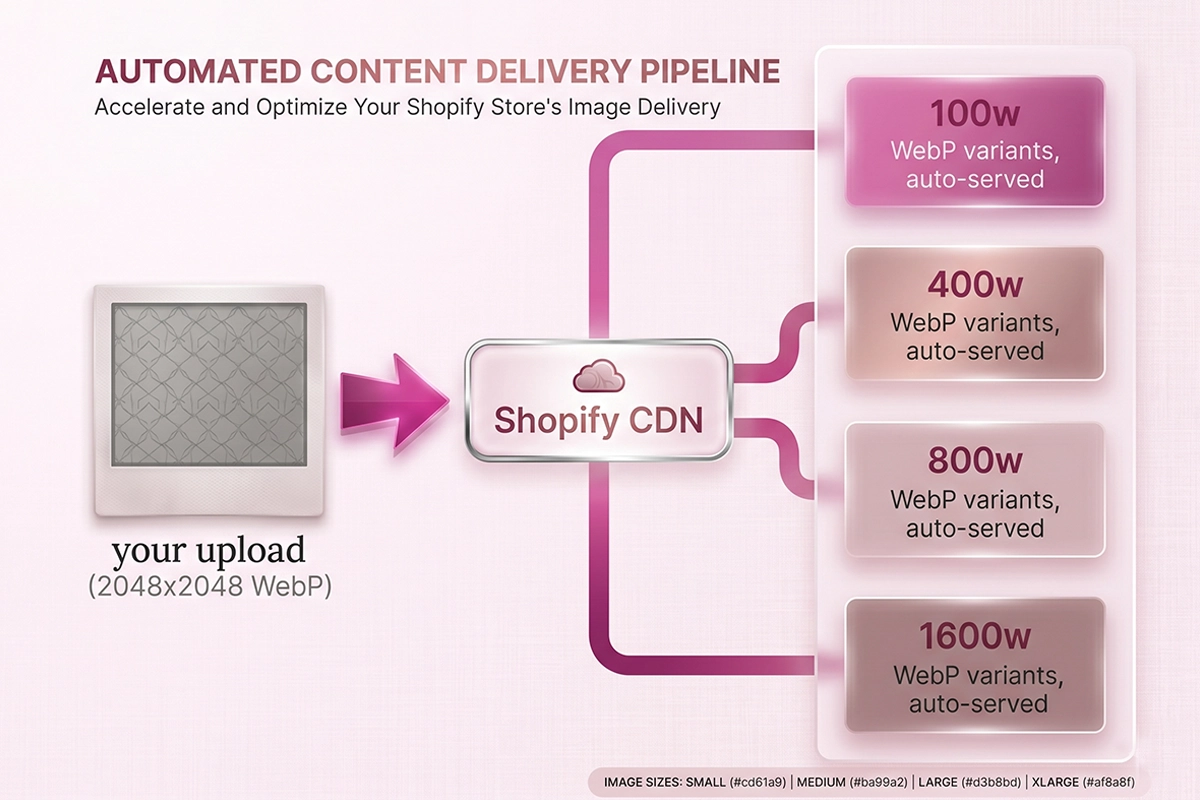
When you upload a single JPEG or PNG, the Shopify CDN does three things behind the scenes. It generates multiple responsive sizes so different devices load the right file. It serves WebP versions automatically to browsers that support the format, which covers about 97 to 98 percent of global traffic in 2026. And it distributes the files globally through a content delivery network, so your images load faster than they would from a single origin server. This is also why you do not need a separate image host or Cloudflare account on top of Shopify.
What Shopify will not do for you
Shopify does not compress your originals. Upload a 5 MB photo from your camera, that 5 MB file becomes the source, and the CDN serves resized copies from it. The resized copies are smaller, but the original still bloats your media library. Compress before you upload.
Shopify also does not fix your filenames. If you upload IMG_4582.jpg, the file stays named IMG_4582.jpg. Google reads filenames as a relevance signal, so a descriptive, kebab-case name like black-leather-tote-front.jpg is a small, free SEO win that no app can do retroactively without re-uploading.
And it does not write your alt text. The field is blank by default on every image you upload. Shopify does not infer it from the product title, the variant, or the filename. That field is one of the highest-impact image SEO signals you have, and filling it is up to you (or a tool).
The "CDN dropped my alt text" question
This one comes up often in the Shopify Community. An SEO audit tool flags missing alt text on image URLs, but you know you wrote alt text on every product image. The tool is usually crawling the CDN URLs for the resized image versions at cdn.shopify.com, not your store domain. Those direct image-file URLs cannot carry alt attributes because alt is an HTML attribute on the <img> tag, not on the image file itself. If your alt text shows up correctly when you inspect the rendered HTML of your product page, you are fine.
How to write Shopify alt text that actually works
Alt text is the single highest-impact product image SEO signal. Google Search Central calls it the most important attribute for providing metadata about an image. It is also the field most stores leave blank or fill badly.
The 5 to 15 word rule
5 to 15 words is the practical range. Long enough to describe the image, short enough that a screen reader does not ramble and Google does not treat it as keyword stuffing. Google's own guidance is to write useful, information-rich content that uses keywords appropriately, and explicitly warns against filling alt attributes with keywords. One word is wasted; forty words is stuffing.
The "describe to a friend" test
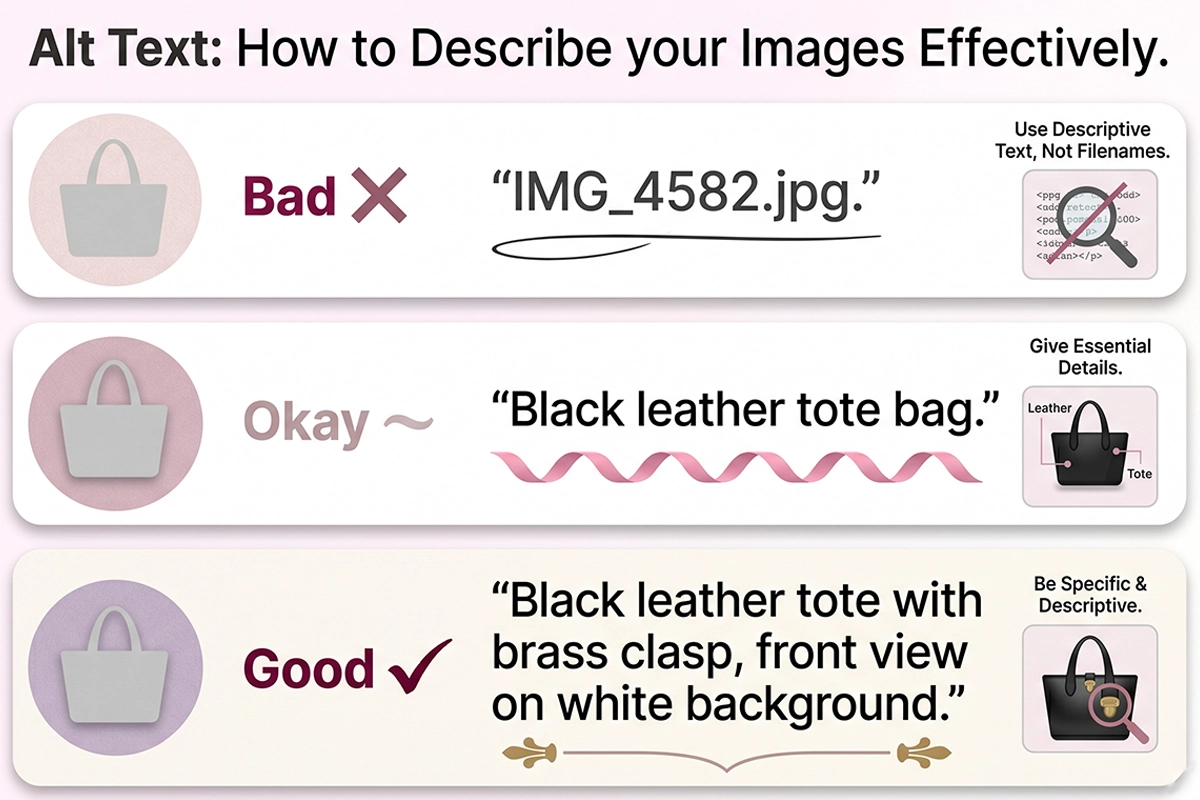
The best test for alt text quality is: would you describe the image this way to a friend who cannot see it? "Black leather tote bag with brass clasp, front view on white background" is something a person would actually say. "Black tote bag SEO ecommerce shoes shoes shoes" is not. That test alone cuts through most bad alt text patterns.
Why pasting the product title hurts you
One of the most common mistakes on Shopify is using the same alt text on all 8 images of one product, usually the product title. Google already knows the page is about that product (from the page title, H1, description, and structured data). Repeating the title on every image adds no new information.
What adds information is what is specifically visible in each image. The front view. The back. The detail of the clasp. The model wearing the bag. Each image gets unique alt text. This is also how images rank for slightly different long-tail queries like "black leather tote front view" or "leather tote brass hardware," the kind of low-competition traffic small Shopify stores can win.
A quick bad, okay, good comparison
| Quality | Alt text example for the same product image | Why |
|---|---|---|
| Bad | (blank, or) IMG_4582.jpg | No signal to Google. No accessibility value. Screen readers announce nothing useful. |
| Bad | black tote bag tote bag leather tote buy tote | Keyword stuffing. Google may flag this. Hostile to screen reader users. |
| Okay | Black leather tote bag | Accurate but generic. Does not describe what is in this specific image versus the other 7. |
| Good | Black leather tote with brass clasp, front view on white background | Specific to this image. Includes natural keywords. Reads like something you would actually say. |
When to leave alt text empty
For purely decorative images (a background pattern, a separator graphic, an aesthetic flourish), an empty alt="" attribute is correct. This tells screen readers to skip the image. Do not delete the attribute entirely. For product images, hero images, and anything with informational value, alt text should never be empty.
Filenames and formats: WebP, JPEG, PNG, and what to upload
If alt text is the highest-impact signal, filenames are the most overlooked one. Shopify keeps whatever filename you upload, and Google reads filenames as a relevance signal, especially when alt text is sparse. Two minutes of renaming before upload pays you back forever.
Rename before you upload
Before you drag images into the Shopify admin, rename them to be descriptive, lowercase, and hyphen-separated. black-leather-tote-front.jpg beats IMG_4582.jpg. blue-running-shoe-side-view.webp beats DSC_0094.jpg. Hyphens, not underscores or spaces.
You cannot bulk-rename images already uploaded to Shopify without re-uploading. So this is a habit to build now, not a project to do later. For your existing catalog, prioritize renaming the hero image of your top-selling products first.
WebP, JPEG, or PNG?
WebP is the default answer for product photos in 2026. Files run roughly 25 to 35 percent smaller than JPEG at equivalent quality, and browser support is around 97 to 98 percent globally. Use PNG only when you need transparency (logos, icons, overlays). Avoid GIF for product imagery entirely.
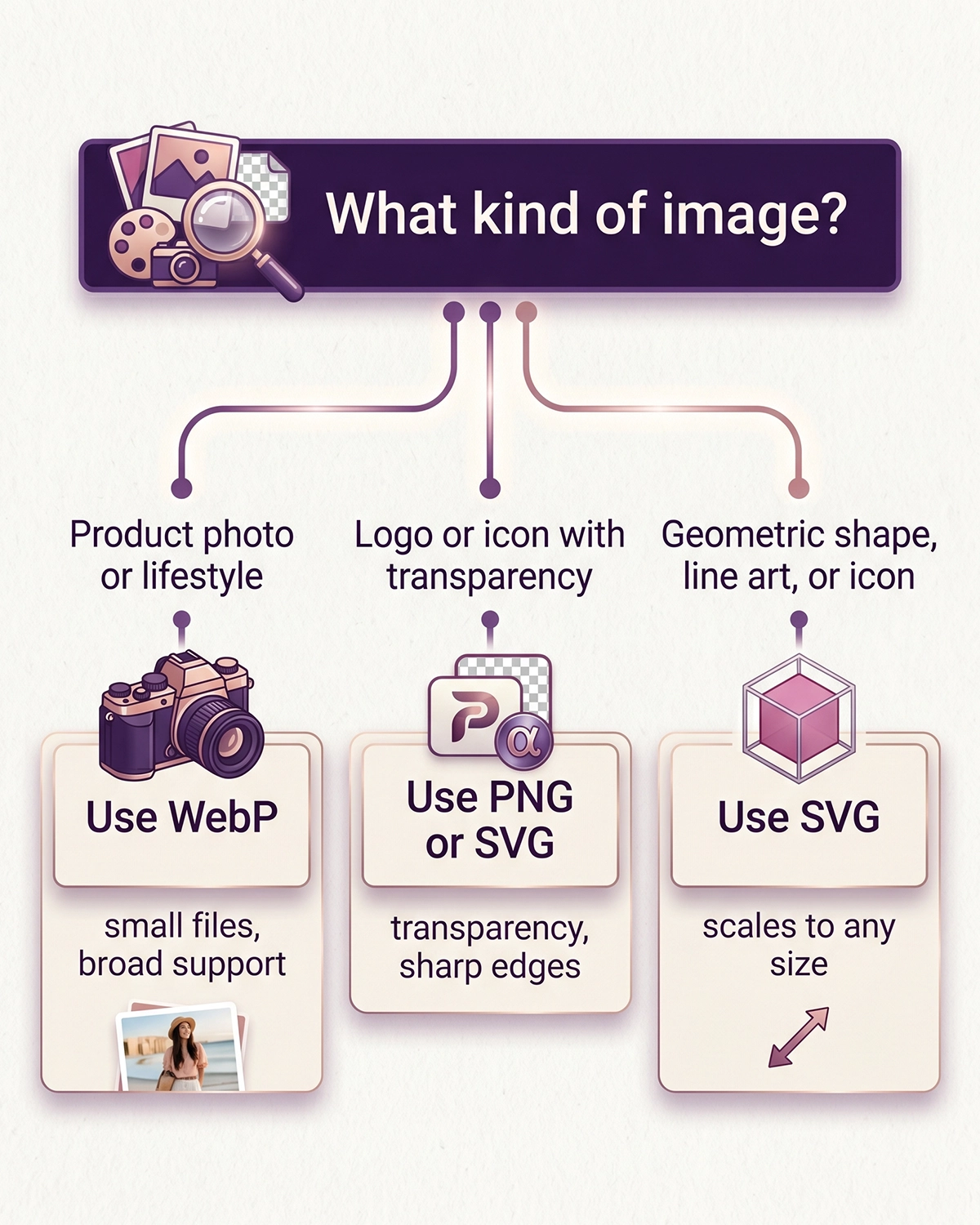
Worth knowing: Shopify's CDN auto-converts uploaded JPEGs to WebP when serving to a supporting browser, so uploading WebP directly is not strictly required. But uploading as WebP gives you more control over the original quality and keeps your media library smaller. A free browser tool like Squoosh can convert and compress a folder in a minute.
Compress to under 200 KB
The practical target for a product image after compression is under 200 KB. Most modern tools hit this without visible quality loss for typical product photography. Quality settings of 75 to 85 on WebP or JPEG are the sweet spot, which Google considers visually indistinguishable from maximum quality.
If your store has 200 product photos at 1.5 MB each, you are carrying about 300 MB of unnecessary weight. Compressing to under 200 KB gets you down to roughly 40 MB. That difference shows up in page load speed, Core Web Vitals, and rankings.
Image dimensions and the Shopify CDN
Shopify recommends 2048 by 2048 pixels as the minimum for a square product image, which is also the practical floor for hero product photography in 2026. The CDN generates the smaller responsive sizes from your original, so uploading too small means there is no source data to scale up from.
For zoom views and Retina displays, 2048 is the working minimum on your top-revenue products. For clearance items or accessories where you do not need zoom, the Shopify-listed floor of 800 by 800 is acceptable.
Reference dimensions for the surfaces that matter
| Surface | Recommended dimensions | Format | Target file size |
|---|---|---|---|
| Hero product image (zoom-capable) | 2048 x 2048 px | WebP | Under 200 KB |
| Standard product gallery image | 1500 x 1500 px | WebP | Under 150 KB |
| Lifestyle / context shot | 1500 x 1875 px (4:5) | WebP | Under 200 KB |
| Logo / icon (transparent) | Source SVG or 1000 x 1000 px | SVG or PNG | Under 50 KB |
Collection pages are the second-most important image surface after the product page, and they are routinely the slowest pages on a small Shopify store. For more on this specific issue, see the post on collection page SEO, which covers the related on-page work.
Should you use an AI alt text app? An honest read
The Shopify App Store has dozens of apps that auto-generate alt text for your catalog. Some are free for small batches. Most are $5 to $20 per month for ongoing work. The honest answer about whether you need one depends on catalog size and how much you trust the output.
What these apps actually do
The good ones use a vision model (typically GPT-4 Vision or Gemini) to look at each image and generate a description. The lazy ones paste the product title, type, vendor, and a keyword or two into a template, which is the same anti-pattern that hurts your rankings when you do it manually. Most cheap alt text services are template work, just like most cheap SEO services. Read the reviews carefully before installing.
When they help, when they hurt
For catalogs over 200 products with 6 to 8 images each, you are looking at 1,200 to 1,600 alt text fields. Even at one minute per image, that is 20 to 27 hours of manual work. A vision-model app for a one-time first pass saves real time. Plan to review and correct the outputs on your top-selling 30 to 50 products, then let the long tail run as-generated.
For a brand-new store with 20 to 80 products, you are not saving meaningful time. You are paying $5 to $20 per month for output that may be lower quality than what you would write yourself in an afternoon. Writing your own alt text also forces you to look at your product photos carefully, which surfaces other issues an app would never flag. Honest scope beats impressive scope. For most new Shopify stores, the right answer is a weekend of manual work, not an app.
A weekend product image SEO checklist
If your catalog is under 100 products and you have a free Saturday, here is the practical order to work in. The first three steps are the high-impact ones. The rest are polish.
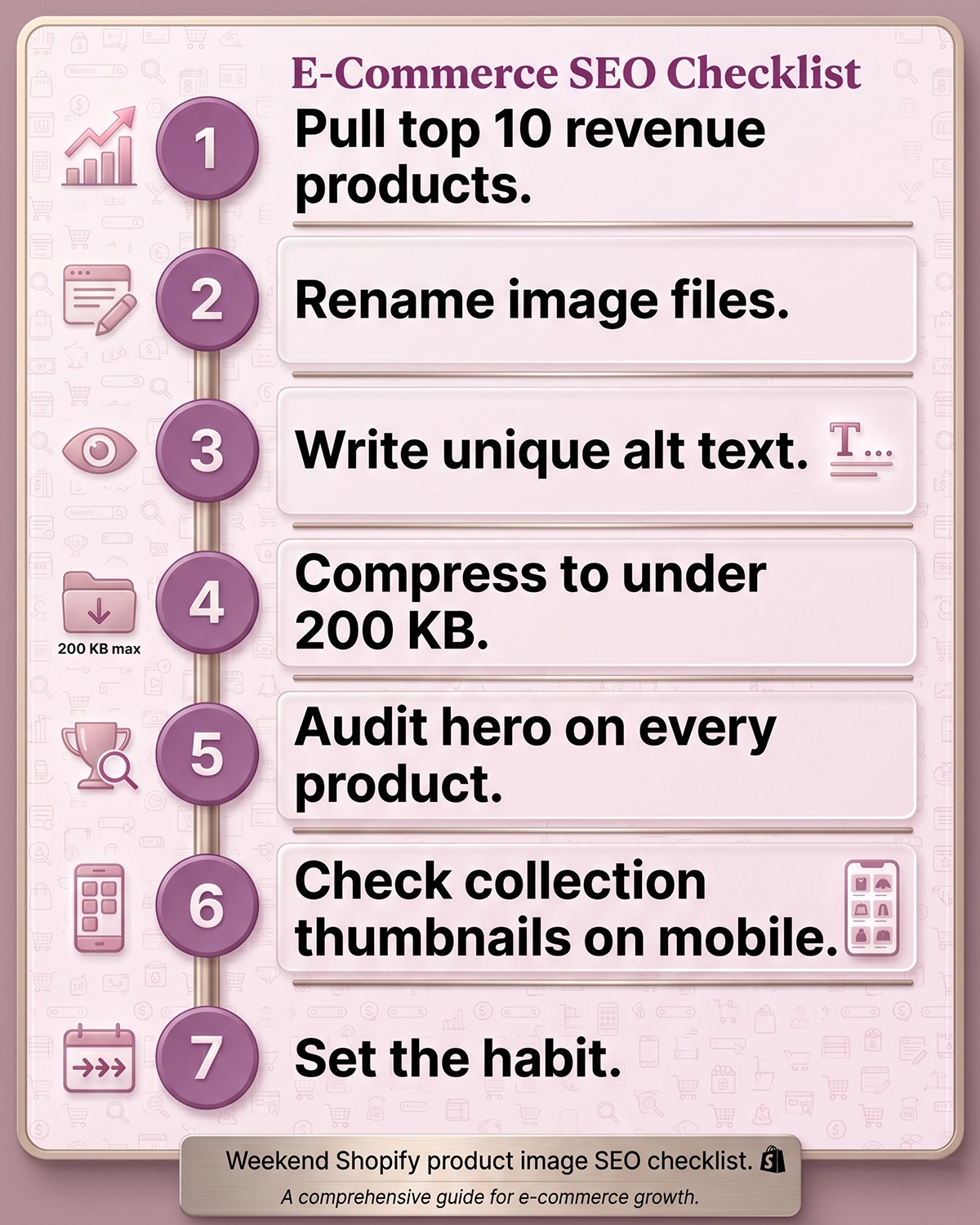
- Pull your top 10 revenue products. These get attention first. Everything else is bonus.
- Rename their image files. Lowercase, hyphenated, descriptive. Front view, back view, detail, lifestyle. Each filename specific to the image, not the product.
- Write unique alt text for every image. 5 to 15 words. Describe what is in the image. Use the "describe to a friend" test.
- Compress and re-upload if originals are over 500 KB. Use Squoosh, TinyPNG, or any compression tool that supports WebP. Target under 200 KB per image.
- Audit the hero image on every other product page. Top to bottom of your catalog. Just the hero. This is the highest-impact 80 percent of remaining work.
- Check your collection thumbnails. Open every collection page on mobile. If load is slow, the culprit is almost certainly the images. See the full Shopify SEO audit checklist for the broader technical pass.
- Set a habit, not a project. Every new product you add from now on follows the same rules at upload time. Renamed filenames. Unique alt text on every image. Compressed sources. Two extra minutes per product, forever.
Run this in order, and a weekend gives you the foundation. The compounding effect kicks in over the following 4 to 8 weeks as Google re-crawls and re-indexes.
And if you want this work tied to the broader on-page system, see how it connects to product description SEO. Image alt text and product copy reinforce the same keywords on the same page. Treating them as one workflow beats treating them as two.
Wrapping up
The whole Shopify product image SEO playbook reduces to a few honest takeaways. Image search is a real but slow channel. It pays back over months, not weeks. Treat it as foundation work.
The highest-impact moves are also the cheapest. Renaming files before upload. Writing unique, 5-to-15-word alt text on every image. Compressing originals to under 200 KB. None of this requires an app subscription.
Shopify already handles the technical heavy lifting (WebP conversion, responsive sizing, CDN delivery), which means the work that remains is editorial. Describe each image accurately, name it descriptively, and treat each product photo as a distinct entry into Google's image index. That is a Saturday of careful work for a brand-new store, and an ongoing habit after that.
Want this done for you, page by page?
Studio Niza's Shopify SEO service handles image SEO as part of the per-page work: filenames, alt text, compression, schema, and indexing. No app subscriptions, no template fills. Pricing starts at $499 for a one-time audit.
See pricing & services →Or email contact@studioniza.com if you have a specific question about your store. I read every one.
Frequently asked questions
If you're still unsure after reading these, just send the question.
Does alt text actually help Shopify SEO? +
Yes, in two ways. It is a direct signal Google uses to rank images in Google Images and Google Lens, and it reinforces the page's keyword context for regular web search. Pages with descriptive alt text rank meaningfully better in image search than pages without it.
What is the ideal alt text length for Shopify product images? +
5 to 15 words is the practical range. Long enough to describe the image, short enough that Google does not treat it as keyword stuffing and screen readers do not ramble. Google does not penalize a specific character count, but it does penalize stuffed alt attributes.
Does Shopify automatically convert my images to WebP? +
Yes, for supported browsers. The Shopify CDN serves WebP versions of uploaded JPEGs and PNGs to any browser that accepts the format, which is about 97 to 98 percent of global traffic. It will not compress an oversized original, however, and it will not fix a bad filename.
Should I rename my image files before uploading to Shopify? +
Yes. Shopify keeps whatever filename you upload, and Google reads filenames as a relevance signal, especially when alt text is sparse. Use lowercase, hyphen-separated, descriptive names like black-leather-tote-front.jpg instead of IMG_4582.jpg.
How big should Shopify product images be? +
2048 x 2048 pixels is the practical floor for hero product photos that need zoom. The Shopify CDN generates smaller responsive sizes from your original, so uploading too small means there is no source data to scale up from. Keep file size under 200 KB after compression.
Do I need to write alt text on every image, including thumbnails and variants? +
On product gallery images and variant images, yes. Each one should have unique alt text describing what is specifically in that image, not the product title repeated. On purely decorative images (backgrounds, separator graphics), an empty alt attribute is correct and tells screen readers to skip the image.
Are AI alt text apps worth it for a small Shopify store? +
For under 100 products, usually not. You can write the alt text manually in an afternoon. For catalogs over 200 products, a vision-model app for a one-time first pass saves real time, but plan to review and correct the outputs on your top sellers rather than trust them blindly.
How long does it take for image SEO changes to affect rankings? +
Google re-crawls and reindexes images within days to weeks. Position changes in image search typically start showing up between week 4 and week 8 after you make the changes. Image SEO compounds slowly, so the work you do this weekend pays back over the following months.