
You switched the Inbox agent on, opened a transcript a few days later, and found it telling a customer their order would arrive by Friday. Nobody at your store said Friday. If you came looking for Shopify Inbox agent help, that moment is probably why.
It matters more than an ordinary support slip. Shopify says about 70% of Inbox conversations are with customers making a purchase decision. A wrong answer there costs you an order, or it wins one on a promise you now have to keep.
Most stores land here at this stage. The agent is free, it switches on in a few clicks, and the Inbox AI agent setup guide covers the tone, the rules, and the questions it should never answer alone. What setup can't show you is how the agent behaves once real customers start asking.
This post is the troubleshooting half. It covers the 12 wrong answers that show up once the agent is live, why each one happens, and the fix. The title says "rule," but only three of the twelve are fixed mainly by a rule. Seven are fixed by correcting what the agent reads, and two by a setting. Knowing which is which saves you an afternoon of rewriting a persona that was never the cause.
Why does the Shopify Inbox agent give wrong answers?
The agent rarely invents something from nothing. Shopify's documentation says it uses information from your store: your product catalog, policies, pages, and Knowledge Base. It can also cite web search results as a secondary source for product-adjacent content.
The same page says you are responsible for the accuracy of what it tells customers. So the useful question is which of your sources taught it the wrong answer.
The three causes
A missing fact. The customer asked something none of your sources answer, and the agent filled the gap with the most helpful-sounding guess.
Two facts that disagree. Your return settings say 14 days and an old page says 30. The agent picks one.
A fact filed in the wrong place. You typed your return window into the persona box. Shopify says store facts added only to the persona aren't treated as source information and might not be used consistently.
The three kinds of fix
Each cause has its own repair. A source fix edits what the agent reads: a policy, a product page, or a Knowledge Base FAQ. A persona rule goes in the service style field and tells the agent how to handle a type of request. A setting changes how Inbox or your catalog behaves.
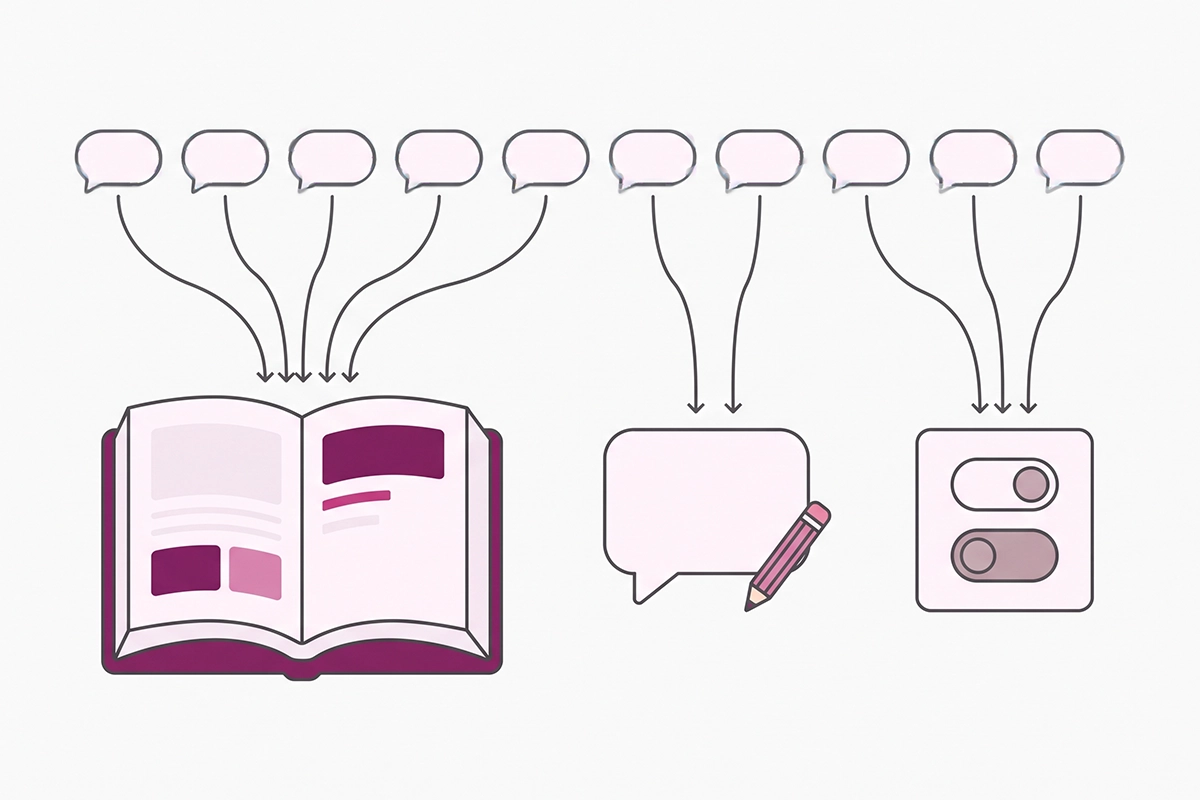
Rules are the weakest of the three. Shopify states that a persona can't override Inbox settings or built-in safety behavior, and that conflicting instructions might not be followed. Use a rule to shape how the agent answers. Use a source to change what it knows.
Can you fix a wrong answer by rating it?
No. Under Sales channels, Inbox, Training, you can rate real conversations with a thumbs up or down, and Shopify turns those ratings into a suggested persona update. But the documentation is plain that training doesn't change what the agent knows about your store.
A thumbs down on a wrong return window teaches the agent nothing about your return window. I flagged this in the Shopify Inbox review: the tool is generous for a free one, and the correcting is still your job.
Shipping and policy answers it gets wrong
Owners who have tested the agent report it missing shipping answers that were written in the shipping policy, then getting them right once the same fact became a short question and answer in the Knowledge Base app. Long policy prose is your weakest source. A one-question FAQ is the strongest.
1. It promises a delivery date
Why it happens. Your policy says 3 to 5 business days. A range plus today's date looks like enough to name a day. It isn't, because the policy doesn't carry your dispatch cutoff, your weekends, or the carrier's backlog.
The fix (rule). Add this to the service style field: "Never state a specific delivery date. Give the shipping range from the shipping policy and say it is an estimate that starts after processing." Then add your processing time to the shipping policy, so the range the agent quotes is complete.
2. It says you ship to a country you don't
Why it happens. Your policy says "we ship internationally" or says nothing, and the agent takes the friendliest reading. The Knowledge Base app also generates FAQs from your shipping and delivery settings, so a zone you set up once and stopped serving still reads as a yes.
The fix (source). Go to Apps, Knowledge Base, and add an FAQ that names the countries you ship to in one or two sentences. Add a second line on who pays duties and taxes. Then delete the shipping zones you no longer serve. The Knowledge Base app guide walks through the screens.
3. It quotes the wrong return window
Why it happens. Shopify keeps returns in two places. Your return rules live under Settings, Policies, and your written policy is a separate document. Shopify notes that the generated policy doesn't automatically include the return rules you set. Change one from 30 days to 14, forget the other, and the agent has two facts to choose from.
The fix (source). Make the number match in the return rules, the written policy, and the Knowledge Base. The auto-generated return FAQ has an Override option if its wording is off. If some items are final sale, say so in an FAQ of its own.
4. It quotes a policy from an old page
Why it happens. Pages are a source. Last year's holiday shipping page, a retired FAQ page, and a blog post announcing free returns you later ended are all still true to the agent for as long as they stay published.
The fix (source). Search your own site for the old number and update or unpublish every page that carries it. Put the season and year in the title of any temporary page, and take it down when the season ends.
Discount and loyalty answers it invents
5. It offers or confirms a discount code
Why it happens. Shopify's documentation describes staff sharing discount codes from the conversation view. It doesn't describe the agent issuing codes by itself, so I can't name the exact mechanism. What I can say: "is there a discount?" is a missing-fact question in most stores, and a code printed on an old page is content the agent can read.
The fix (rule). Service style: "Never offer, invent, or confirm a discount code. If a customer asks, say current offers are shown on the site and that our team can share a code if one applies." Back it with a Knowledge Base FAQ that states your real position, even if that is "we don't run discount codes." Then remove expired codes from published pages.
6. It guesses at loyalty points
Why it happens. Point balances live in a third-party loyalty app. A balance is in none of the agent's documented sources, so it can only answer from a general idea of how loyalty programs work.
The fix (source, partial). Add FAQs for the parts that don't change: how points are earned, what they're worth, and where a customer checks their balance. Add a rule that balance questions go to the account page or to your team. Beyond that, there is no clean fix.
Product answers it guesses at
7. It predicts which size will fit
Why it happens. If your size chart is an image or sits inside an app popup, the measurements aren't text in your catalog or pages. The agent has nothing to quote, so it reasons from the customer's description to a confident "go with the medium."
The fix (source). Put the size chart on the product page or a sizing page as real text, with measurements. Add a rule as backup: "Never tell a customer which size will fit. Share the measurements and let them choose."
8. It says an item is in stock when it isn't
Why it happens. The agent answers availability from your catalog. If a product doesn't track quantity, or is set to continue selling when out of stock, the catalog says available. The agent is right about your settings and wrong about your shelf.
The fix (setting). Turn on quantity tracking, and switch off overselling for anything you can't actually send. Add one rule: "Never give a restock date."
9. It treats a pre-order like a normal order
Why it happens. The ship date lives in an app badge or a banner image. The catalog shows a product a customer can buy today, so the agent quotes your normal shipping range.
The fix (source). Write the ship date as plain text in the first line of the product description. Add a Knowledge Base FAQ: "When do pre-orders ship?" Update both on the day the date slips, not the week after.
10. It describes a bundle wrong
Why it happens. What's in the bundle is stored in a bundle app or shown in a product photo. The description says "the starter set." The agent guesses the contents, or tells a customer they can swap an item when they can't.
The fix (source, partial). List every item and quantity in the description text, and state whether substitutions are allowed. Build-your-own bundles stay a question for your team. For a new Shopify store with one or two fixed sets, the text fix is enough.
What happens when the chat itself goes wrong?
11. "Talk to a human" goes nowhere
Why it happens. Inbox availability defaults to always available. When a customer asks for a person during your available hours, the conversation moves to the Unassigned folder for staff to pick up. If your hours say you're there at 3 a.m. and you aren't, the customer waits for someone who is asleep.
The fix (setting). Go to Sales channels, Inbox, Chat settings, Availability, and set the hours you really answer. Outside them, the agent shares your store email instead of promising a person. No setting switches handoff off, and I wouldn't want one. The human handoff guide covers what a good one looks like.
12. It replies in a language you can't support
Why it happens. This one is by design. The agent replies in the language the customer uses, while product titles and catalog details might still show in your store's language. A policy written only in English gets paraphrased into Spanish, and the handoff lands on a founder who can't read the thread.
The fix (rule, partial). Shopify documents no setting that limits the agent's languages. Service style: "If the customer writes in a language other than English, keep answers short and say that our team replies in English." It may not always be followed, so check these transcripts first each week.
All 12 Shopify Inbox agent fixes in one table
Keep this open while you read transcripts. "Partial" means the fix reduces the wrong answer and Inbox can't remove it fully.
| # | Wrong answer | Cause | Fix type | Where to fix it |
|---|---|---|---|---|
| 1 | Promises a delivery date | Turns a shipping range into a calendar day | Rule | Persona, service style |
| 2 | Says you ship to a country you don't | Vague policy, or a zone you no longer serve | Source | Knowledge Base FAQ; delete dead zones |
| 3 | Quotes the wrong return window | Return rules and written policy disagree | Source | Settings, Policies, and the written policy |
| 4 | Quotes a policy from an old page | An outdated page is still published | Source | Update or unpublish the page |
| 5 | Offers or confirms a discount code | No stated position, or a stale code on a page | Rule | Persona, plus a discounts FAQ |
| 6 | Guesses at loyalty points | Balances live in an app it doesn't read | Source (partial) | Knowledge Base FAQ; balances go to your team |
| 7 | Predicts which size will fit | Size chart is an image or app popup | Source | Size chart as page text |
| 8 | Says an item is in stock when it isn't | Quantity untracked, or overselling allowed | Setting | Product inventory settings |
| 9 | Treats a pre-order like a normal order | Ship date sits in a badge or banner | Source | Product description and a FAQ |
| 10 | Describes a bundle wrong | Contents live in an app or an image | Source (partial) | Product description |
| 11 | Hands off to a human who isn't there | Availability left on the default | Setting | Inbox, Chat settings, Availability |
| 12 | Replies in a language you can't support | Mirrors the customer's language by design | Rule (partial) | Persona, service style |
The weekly transcript check
Fixing twelve answers once is the easy part. Policies change, products launch, and each change can open a new gap. Fifteen minutes a week keeps the list from growing back.
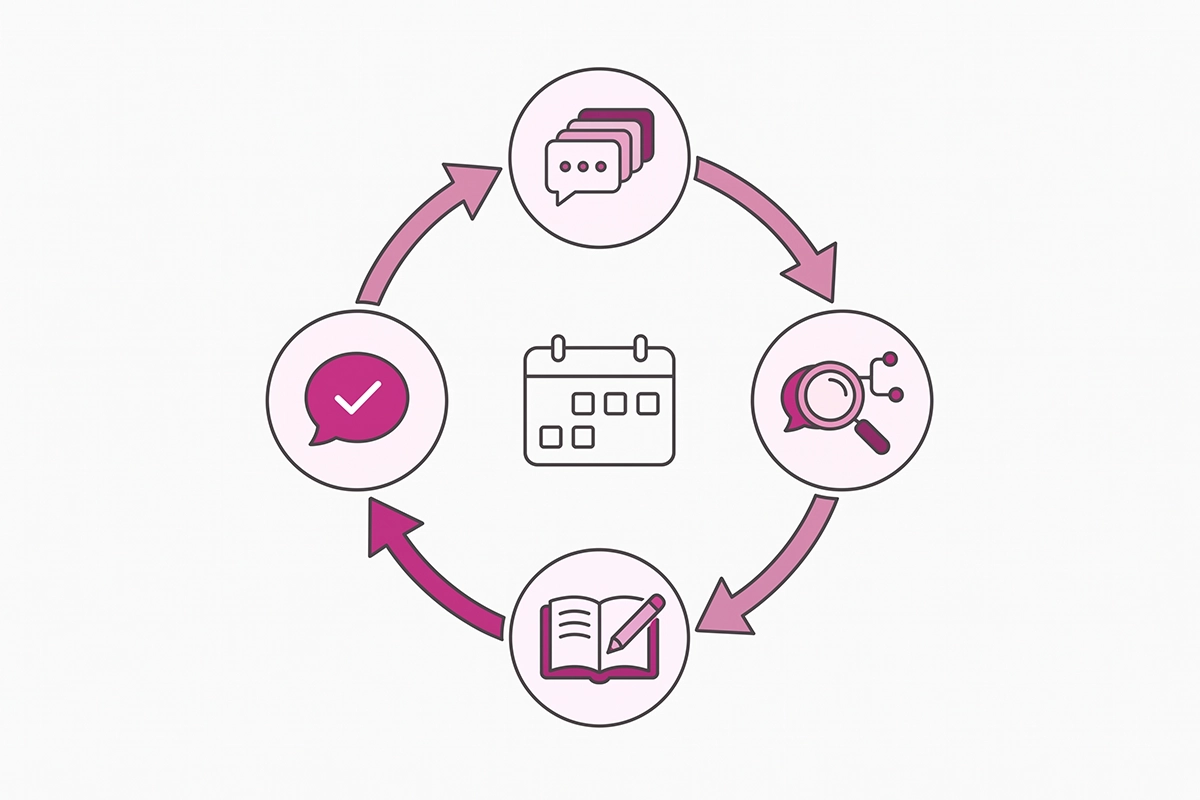
Step 1: read. Open Inbox and read last week's closed agent conversations. Inbox tags them Sales, Support, and Store Policies. Start with Store Policies, because that's where a wrong answer costs the most.
Step 2: name the cause. For each wrong answer, write one word beside it: missing, conflicting, or misfiled.
Step 3: fix the source. Edit the policy, page, or FAQ. Then open the Knowledge Base app's FAQ query log, type the customer's exact question into the test box, and see what it matches. Check the top unanswered questions list while you're there.
Step 4: ask it yourself. Open your storefront in a private window and put the same question to the agent.
Once a month, run the full 25-question chatbot test. The same transcripts double as research, which I covered in how to read chatbot transcripts.
Wrapping up
If you take one thing from this post, make it the sorting step. Most Shopify Inbox agent help you'll find online tells you to write better instructions, and for nine of these twelve answers the instructions were never the cause. The agent repeated what your store told it, or filled a gap your store left open.
Make your facts agree with each other first: return rules, written policies, old pages. Then fill the gaps with one-question FAQs in the Knowledge Base app. Then add the three or four rules that shape how the agent handles dates, discounts, sizing, and languages. Last, set your real availability hours so a request for a person lands somewhere.
Three of the twelve don't have a full fix inside Inbox: loyalty balances, custom bundles, and languages your team can't read. For a first-year store, that's usually fine. Send those questions to a person and move on. If they make up most of your chats, the free agent has reached its limit for your store.
The work that remains is the weekly read. Nobody else will tell you the agent said Friday. Fifteen minutes with last week's transcripts is how you find out before the customer emails on Saturday.
Rather have someone else read the transcripts?
The Studio Niza AI Chatbots service builds a custom bot on your products and policies, and I review its conversations every week. Setup from $599, then $99/month.
See how the chatbot service works →Or email contact@studioniza.com if you have a specific question about your store. I read every one.
Frequently asked questions
If you're still unsure after reading these, just send the question.
Where do I get Shopify Inbox agent help when an answer is wrong? +
Start with your own store sources, not a support ticket. The Inbox agent answers from your product catalog, policies, pages, and Knowledge Base, so a wrong answer almost always traces back to a missing or conflicting fact in one of those. Fix the source, then ask the same question again. Contact Shopify Support when the agent misbehaves in a way no source explains.
Can I turn off human handoff in the Shopify Inbox agent? +
No setting in Inbox switches handoff off. Shopify's documentation says a persona can't override Inbox settings or built-in safety behavior, so an instruction telling the agent never to hand off may not be followed. What you can control is where the handoff lands: set your real availability hours, and outside them the agent shares your store email instead.
Can the Inbox agent give out discount codes on its own? +
Shopify's documentation describes staff sharing discount codes from the Inbox conversation view, and it doesn't describe the agent issuing codes by itself. If a code shows up in an agent transcript, look for it on a published page or an old blog post, because that is content the agent can read. Add a Knowledge Base FAQ that states your real discount position, plus a rule telling the agent not to offer or confirm codes.
How long does a Knowledge Base fix take to show up in the agent's answers? +
Shopify doesn't publish a timing. After you save an FAQ, type the customer's exact question into the test box in the Knowledge Base app's FAQ query log and check what it matches. Then ask the same question in a live chat on your storefront before you call it fixed.
Can staff jump into an Inbox agent conversation and correct it? +
Shopify's documentation describes handoff starting when a customer asks for a person or a conversation needs staff attention. It doesn't describe staff taking over an agent chat mid-conversation, and store owners have been asking Shopify for that. Plan around it: read transcripts weekly and fix the source, so the next customer gets the right answer.
Is the free Shopify Inbox agent accurate enough for a small store? +
For catalog and policy questions, yes, once your sources are clean and your facts agree with each other. It stays weak on anything stored in a third-party app, such as loyalty balances and custom bundles. Refunds, cancellations, and address changes aren't among its documented abilities, so if most of your chats need those, you have outgrown the free tool.