
An AI assistant can now put your product in a cart, fill in the shipping address, and pay, and the person buying may never load your storefront. That is what AI agent checkout on Shopify means in October 2026. For many stores it was switched on without a single click from the owner.
Three things happened in September. Shopify added Meta as an AI channel in the admin on September 8. Google emailed merchants around September 22 to say native checkout was live in AI Mode and Gemini. On September 28, Shopify extended a standard called WebMCP to checkout, so agents that run in a shopper's browser can finish an order on your own checkout.
Most coverage treats all of this as one story. It is two different mechanisms, with different rules, different countries, and different off switches. If you sell only to customers in the UK or Australia, a good part of it doesn't apply to you yet.
This post covers what each route is, which assistants can use it, what the agent reads, where the orders land, what you can turn off, and which product fields decide whether you get offered at all. It ends with a question I can't fully answer yet: who helps a customer who never saw your site.
What AI agent checkout on Shopify actually is
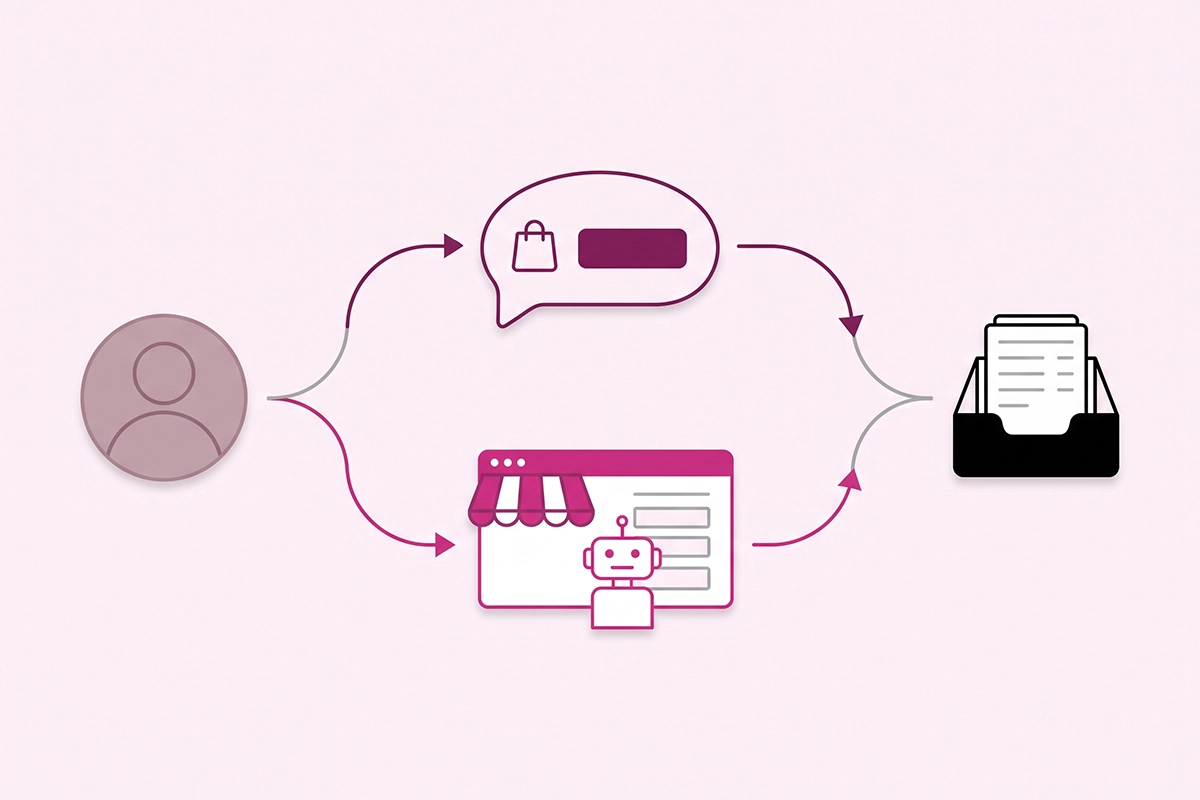
There are two doors. They get mixed up constantly, so it's worth separating them before you touch a setting.
Door one: direct checkout inside the chat
This is the one in the headlines. A shopper asks Copilot, Gemini, or Meta's assistant for a product, sees yours, and taps Buy. A Shopify-powered checkout opens inside the assistant. They enter shipping and payment details, tap Pay now, and never visit your store.
The product data comes from Shopify Catalog, and the rules the agent follows come from the Universal Commerce Protocol. I covered that layer in the Universal Commerce Protocol post.
Door two: browser agents on your own checkout (Shopify WebMCP checkout)
This one is newer and quieter. Some assistants run inside the shopper's browser and act on real web pages. Until now they worked through a checkout by taking screenshots and guessing where the buttons were.
On September 28, Shopify added WebMCP support for checkout. WebMCP is a way for a web page to hand an agent a short list of labeled actions, so it doesn't have to guess. On checkout, the agent can read the order, update supported fields, and submit once the buyer confirms. Shopify says the tools need no new API and no merchant configuration.
The difference matters. With door two, the agent is on your storefront and your checkout. With door one, it is not.
What does the buyer see?
In direct checkout: a Buy button, a short form, a Pay now button, then your order confirmation email. On Meta, Shop Pay shows up as a payment option when it's available. If the checkout needs something extra, the shopper is sent to your store in Meta's in-app browser with the cart intact.
With a browser agent, the buyer hands over the typing while the agent fills in your normal checkout. Search Engine Journal's read of the documentation is that the agent needs the buyer's explicit go-ahead before it places the order, and that a Shop Pay login or a 3D Secure check hands control back to the human. The agent can't enter a new card number. It works with payment methods already saved in Shop Pay.
Which assistants can check out on your store today?
Here is the state of play as of early October 2026, taken from Shopify's own help pages.
| Assistant | How the order is placed | Who can buy this way | Default |
|---|---|---|---|
| Microsoft Copilot | Direct checkout inside the chat | Customers in the United States | On for eligible stores |
| Google AI Mode and Gemini | Direct checkout inside the chat | US customers, US-based store, products in Merchant Center | On for eligible stores |
| Meta, including Muse | Direct checkout on Meta surfaces, with Shop Pay when available | Customers in the United States, Canada, or Mexico | On while Shopify manages your settings |
| ChatGPT | Sends the buyer to your own store checkout | Customers in the United States | No direct checkout |
| Browser agents using WebMCP | Completes your own checkout in the buyer's browser | Buyers paying with Shop Pay on standard checkout | No setup, no documented switch |
Two things in that table surprise people. ChatGPT, the assistant most owners think of first, has no direct checkout on Shopify stores. And every direct checkout channel is limited by country.
Google has one more condition. Your products have to be approved in Merchant Center, and a product that is disapproved there can't be bought there. The fix list is in the Merchant Center disapprovals post.
For WebMCP, the agents named at launch were Meta's Muse and a personal agent called Instinct.
How big is this right now?
Smaller than the headlines, and growing. Shero Commerce's September benchmark looked at 96.4 million sessions across 73 stores, 42 of them on Shopify. AI visits were flat year over year, but orders from those visits rose 2.74 times. About half of AI visits (51 percent) started on a product page.
Read that with two cautions the authors state themselves. These are the agency's own client stores, so there is selection bias. And the tracking is GA4, which misses in-chat checkouts.
In the same data, ChatGPT sent 88 percent of AI visits, and ChatGPT is the one without direct checkout. For a store in its first year, in-chat orders will likely be a trickle this quarter. The same product data feeds every door, and that is the reason to care.
What does the agent read before it offers your product?
An agent can't sell a product it can't describe.
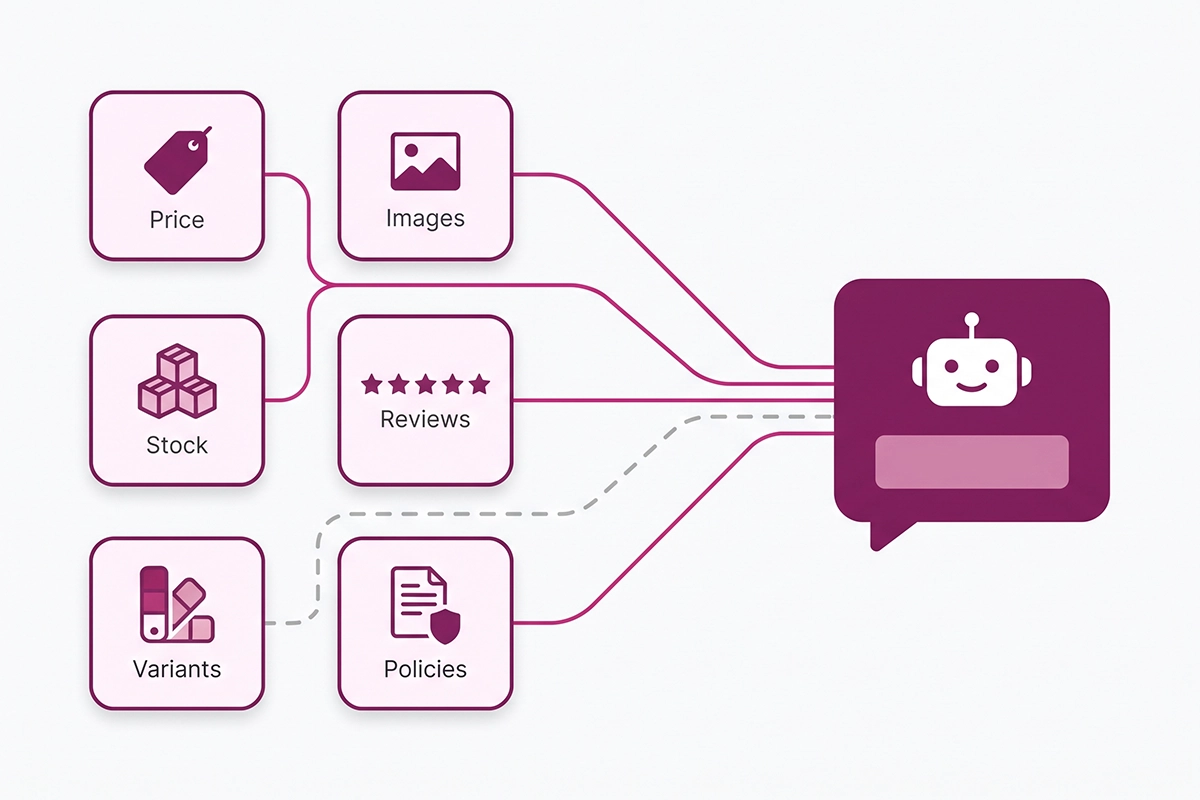
Through Shopify Catalog, AI channels receive your title, description, options, images, price, and availability. Shopify says inventory and pricing are updated continuously across channels. In practice the agent has to get five things right:
- Price. The current price of the exact variant the shopper asked about.
- Stock. Whether that variant is available right now.
- Variants. Option names and values. "Color: Sage" is readable. "Option 1: SG-02" is not.
- Shipping. Rates and delivery options are worked out at checkout from your shipping settings. Local delivery and pickup aren't offered in direct checkout.
- Returns. Your published return and refund policy.
Policies are a hard gate here. Every direct checkout channel requires a terms of service, a privacy policy, and a return and refund policy published under Settings, then Policies. Store facts that don't fit a policy page, like how you handle exchanges or how long made-to-order items take, belong in the Knowledge Base app.
One thing that trips people up: this is a feed, not a crawl. Your robots.txt rules shape what AI crawlers read on your pages. They don't decide what goes through Catalog. Both matter, for different reasons, and I split them out in the AI crawlers post.
Where AI agent checkout orders show up in your admin
In the same Orders list as everything else. Shopify's help pages say orders from AI channels display with channel or referrer attribution, and that you remain the merchant of record.
For a channel-level view, go to Sales channels, then Agentic. Each AI channel reports sales, orders, online store sessions, and online store conversion. The sales figure combines referral sales (the buyer came to your store) and direct checkout sales (the buyer didn't).
Orders placed by a browser agent through WebMCP are different. They go through your regular online store checkout, and the documentation doesn't say whether they are labeled separately in reports. Assume they look like normal online store orders for now.
What doesn't fire in direct checkout
This is the part to read twice. According to Shopify's page on AI channels with built-in checkout:
- Custom pixels and Google Analytics do not fire. The order exists in Shopify and not in GA4.
- Many checkout blocks don't load, including upsells, loyalty programs, and marketing consent collection.
- Local delivery, in-store pickup, and pickup points aren't available.
- You can't require customer sign-in.
- Subscriptions, bundles, customizable products, and B2B-only products can't be sold this way.
Discount codes and automatic discounts are supported. So if your October numbers in GA4 and Shopify stop matching, check the Agentic report before you assume your tracking has a fault.
What you can switch off, and what you can't
All of the direct checkout controls live in one place: Sales channels, then Agentic. Shopify's Agentic Storefronts help page describes the setting that matters most. It's called Allow Shopify to manage for me.
When it's on, every AI channel gets Catalog access, direct checkout is active wherever it's supported, and you're enrolled automatically in any new channel Shopify adds. That last part is how Meta appeared in admins in September. The changelog entry says products are shared with Meta by default.
Turn it off and you get manual controls:
- Shopify Catalog access, overall and per channel. Switching it off can take up to seven days to take effect.
- Direct checkout, overall and per channel. With it off, shoppers still find the product and are sent to your store to buy.
- Auto-enroll in new storefronts, so a new channel waits for your yes.
What you can't switch off, as far as the documentation shows, is WebMCP on checkout. There is no documented toggle for it. I don't think that's a concern for a small store. The agent is completing your real checkout page, the one your pixels and checkout blocks already run on.
Should a new store turn direct checkout off?
For most stores in their first year, no. There's no extra fee, you keep the order and the customer record, and an order you can't upsell is still an order.
I'd turn it off, per channel, in three cases. Your margin depends on a checkout upsell or a required add-on. Your product needs a choice the short form can't capture. Or you rely on pixel data to run paid ads and can't afford blind spots.
If you sell only outside the supported countries, there's nothing to decide yet. Leave the default and spend the ten minutes on your product data.
The product-data fields that decide whether you get offered
Being enrolled isn't the same as being chosen. Start with eligibility, because a product that fails it is never offered at all. A product needs a title, at least one image, a price above zero, and a public URL, and it can't be set to Unlisted. The full list, including the account standing rules, is in the Catalog eligibility post.
Then open the search preview in the Agentic section. It shows raw Shopify Catalog results for a query, with listing insights beside each product. Those insights are the closest thing you have to a list of what agents weigh.
| Field | What the agent needs | The common gap |
|---|---|---|
| Title | What the item is, in plain words: type, material, size | A brand-style name that describes nothing |
| Description | Enough detail to answer a natural question | Two lines of mood, no facts |
| Variants and options | Named options, every variant with its own price and stock | Internal codes as option values |
| Images | More than one, including the product in use | A single image on a white background |
| Reviews | A rating and a verified review count | Reviews trapped in a widget nothing else can read |
| Policies | Shipping, returns, and refunds, published | A template with the placeholder text still in it |
Keep the page and the feed in agreement. A browser agent lands on your product page, and so does the shopper ChatGPT sends over. If the page shows one price and the feed shows another, you look unreliable to both. The product schema post shows how to check a product page in two minutes.
Do this for twenty products, not two hundred. On a new store, a handful of products bring in most of the revenue.
Who helps the customer who never saw your site?
Here is the question nobody has answered well. A shopper buys your candle inside Gemini. They never saw your shipping page, your FAQ, or the note about burn times. Three days later they want to know where it is.
The official answer is clear on one point: you are the merchant of record, so fulfillment, returns, and customer service are yours. What the documentation doesn't say is what the assistant tells that buyer when they ask the assistant and not you. I don't know yet, and I haven't seen anyone show it with real transcripts.
For this customer, the order confirmation email and the parcel are the only two places they meet your brand. Make those two carry the load:
- Put your support email and the order tracking link near the top of the order confirmation email.
- Write the return policy so it makes sense without the rest of your site.
- Add a packing insert with your store name, your URL, and how to reach you.
Hold back on chasing these buyers with upsell emails. Marketing consent isn't collected in direct checkout, and some people buy through an assistant exactly so they can skip all that. The support side deserves its own post, and it gets one later this month.
Wrapping up
AI agent checkout on Shopify is two things. Direct checkout puts a Shopify-powered checkout inside Copilot, Google's AI Mode and Gemini, and Meta's surfaces, for shoppers in a short list of countries. WebMCP lets a browser agent finish your own checkout once the buyer says yes. ChatGPT still sends people to your store.
You control more than the headlines suggest. One screen in your admin decides Catalog access and direct checkout for each channel. What you can't control is whether an agent picks your product, and that comes down to plain things: a title that says what the item is, variants with real names, price and stock that are current, and three published policies.
This week, do three things. Open Sales channels, then Agentic, and read what's switched on. Run the search preview for two queries a customer would type. Fix the weakest field on your five best sellers. That is about an hour of work, and it helps you in Google and ChatGPT too.
The support question is still open, and I'd rather say so than pretend otherwise. Until it's settled, a clear confirmation email and a clear return policy are the cheapest protection you have.
If you'd rather not audit product data yourself, that is the work my SEO service does.
Want your product data checked before an agent reads it?
The Studio Niza SEO service covers titles, variants, schema, and policies on your top products, with custom keyword research and indexing follow-up. Plans start at $499 one-time.
See pricing & services →Or email contact@studioniza.com if you have a specific question about your store. I read every one.
Frequently asked questions
If you're still unsure after reading these, just send the question.
Does AI agent checkout on Shopify cost extra? +
No. Shopify's help pages say there are no fees for selling through direct checkout in Copilot, Google AI Mode and Gemini, or Meta. You pay your standard payment processing fees, the same as any other order.
Does direct checkout work for stores outside the United States? +
It depends on where your customers are. Copilot shows direct checkout to customers in the United States. Google AI Mode and Gemini need a US-based store selling to US customers. Meta covers customers in the United States, Canada, and Mexico.
Can ChatGPT check out on my Shopify store? +
Not inside the chat. As of October 2026, ChatGPT shows your products and then sends the buyer to your own online store checkout, in an in-app browser or a new tab. Those orders run through your normal checkout, so your pixels and checkout blocks work as usual.
Can an AI agent buy something without the customer approving it? +
No. In direct checkout the shopper taps Pay now themselves. With Shopify WebMCP checkout, the agent submits the order only after the buyer confirms, and steps like a Shop Pay login or a 3D Secure check go back to the human.
Do discount codes work in direct checkout? +
Yes. Shopify says the automatic discounts and discount codes you have set up are supported in direct checkout. Checkout upsells and loyalty blocks are a different story and often don't load.
Will GA4 and my pixels track AI agent checkout orders? +
Not for direct checkout. Custom pixels and Google Analytics don't fire there, so the order appears in Shopify and is missing from GA4. Use the Agentic report in your Shopify admin to count those orders.
Do I need to set up Shopify WebMCP checkout? +
No. Shopify says the checkout tools need no merchant configuration. They work on the standard checkout with Shop Pay, and they don't apply to B2B checkouts or draft orders.
How do I turn off direct checkout for one AI channel? +
In your Shopify admin, go to Sales channels, then Agentic, and open the channel. Turn off the Direct checkout toggle and save. Shoppers can still find your products there and are sent to your store to buy.