
A chatbot nobody uses is not a neutral thing sitting quietly in the corner of your store. It takes up screen space, it sets an expectation, and when it fails to meet that expectation the shopper does not email you about it. They close the tab.
That is what makes post-launch chatbot problems so hard to catch. A broken checkout throws an error you can see in your dashboard. A chatbot that gives someone the wrong shipping window just ends the conversation, and the sale ends with it.
The pattern is common enough to have real numbers behind it. Roughly one in five consumers who used AI for customer service got no benefit from the experience, according to the Qualtrics 2026 Customer Experience Trends Report as reported by CNBC, a failure rate about four times higher than AI use in general. Berkeley's California Management Review puts the share of people who have had a bad or frustrating chatbot experience somewhere between 53 and 77 percent, depending on which survey you read.
None of that means chatbots do not work for small stores. I looked at what the 2026 data actually says in more detail elsewhere, and the honest answer is that they work when someone maintains them. Most of them were installed and then left alone, which is the normal path when you are the only person running the store. Setup is a Tuesday afternoon project. Tuning is a habit, and habits are harder.
Here are the seven mistakes I see most often on stores whose chatbot has been live for two or three months, each with the fix. Five of them are settings you can change today. Two require reading something you have been avoiding.
How to tell if your chatbot is quietly losing sales
You do not need a dashboard for this. Open your own store on your phone, as a shopper would, and spend four minutes trying to get an answer out of your chatbot. Ask it something a real customer would ask, like whether a specific item ships to Canada, and then ask it for a human.
What you notice in those four minutes usually maps to one of the seven mistakes below.
| What you notice | What it usually means | Where to go |
|---|---|---|
| Asking for a person goes nowhere | No escalation path is configured | Mistake 1 |
| The chat panel opens on its own and covers the product | Site-initiated greeting, wrong timing | Mistake 2 |
| Answers sound plausible but are vague or wrong | Thin knowledge base | Mistake 3 |
| Evening and weekend chats end with silence | No after-hours path | Mistake 4 |
| You have no idea what people are asking | Transcripts have never been read | Mistake 5 |
| It sounds like a different company than your product pages | Default vendor tone | Mistake 6 |
| It quotes a policy you changed months ago | Stale content | Mistake 7 |
If you want to put numbers behind the hunch afterward, there are six chatbot metrics worth watching and three that mostly flatter the tool. For now, the four-minute walkthrough finds more problems than any dashboard will.
Mistake 1: There is no way out to a human
This is the one that costs money in the moment, so it goes first. A shopper has a question the bot cannot handle, they type something like "talk to a person," and the bot either repeats itself, offers a help article, or asks the question again in different words. The shopper is now stuck in a loop on a store they have no loyalty to yet.
The damage runs past the single lost sale. The California Management Review research notes that chatbot frustration carries into the next interaction, so the customer who finally reaches you by email arrives already annoyed. Baymard's self-service research found that 7 percent of US adults would never buy from a site again after one bad self-service experience, with another 9 percent unlikely to.
The fix: make the exit explicit and make it always available. Add a visible option that says something plain like "Talk to a person," not "Connect with our team." Then decide what happens when it is triggered. If you use Shopify Inbox, the availability settings control this: inside your hours the conversation goes to you, and outside them the customer gets your store's sender email address so they can write to you instead. Both outcomes are fine. Silence is not.
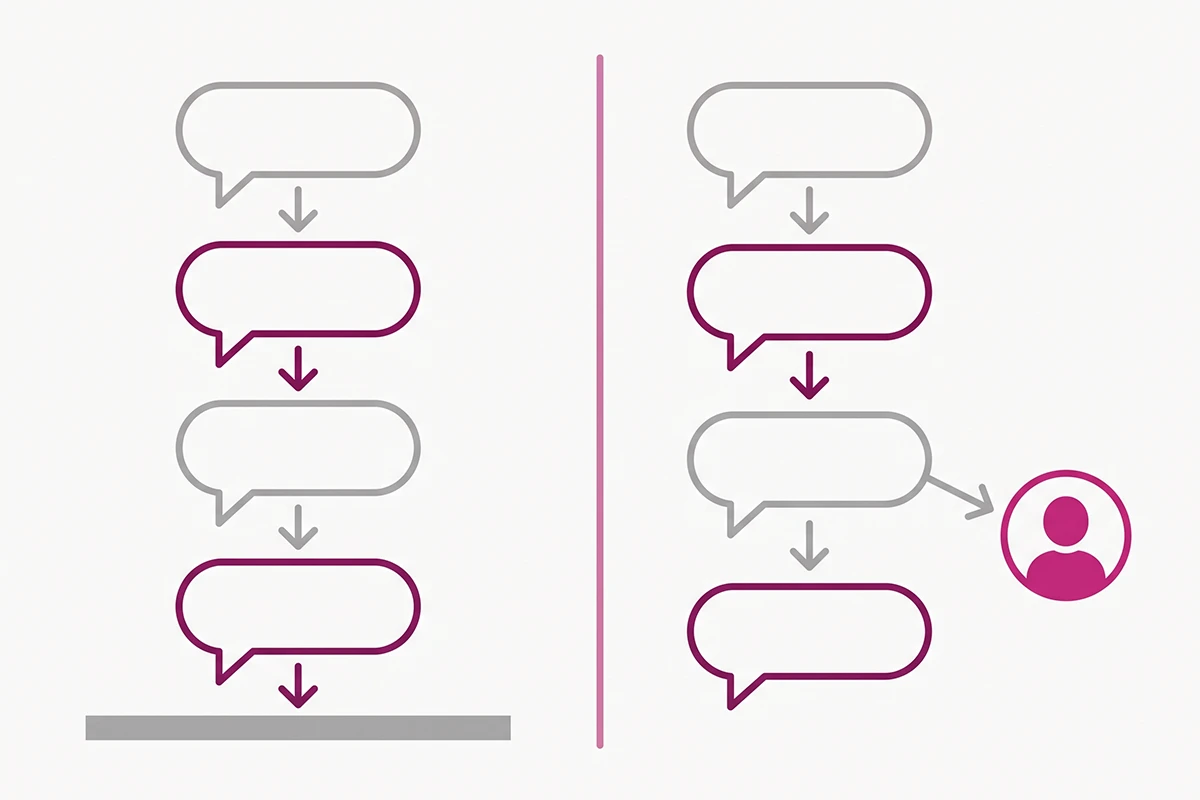
If you want the full version, I wrote about the four triggers that should force an escalation and how to pass context along so the customer does not repeat themselves.
Mistake 2: The greeting interrupts instead of invites
Most chatbots ship with the panel set to open by itself a few seconds after page load. It feels welcoming when you test it on your own desktop. It reads very differently to a shopper who is halfway through comparing two products on a phone.
Baymard Institute's usability testing found that site-initiated chat is experienced by most users as just another interruption, closer to a pushy salesperson than a helpful one. Their testing also found that sticky chat elements on mobile regularly cover the thing the shopper was trying to tap: a filter, a colour swatch, a search suggestion. The same research found that chat performs well when the shopper opens it themselves, which is the whole point.
The fix: turn off auto-open on mobile entirely. On desktop, either turn it off or delay it long enough that the shopper has read the page first, and show it once per session rather than on every page. Exclude the cart and checkout. Then make sure the widget is easy to find for the people who do want it, which usually means a visible button plus a link from your shipping and returns pages.
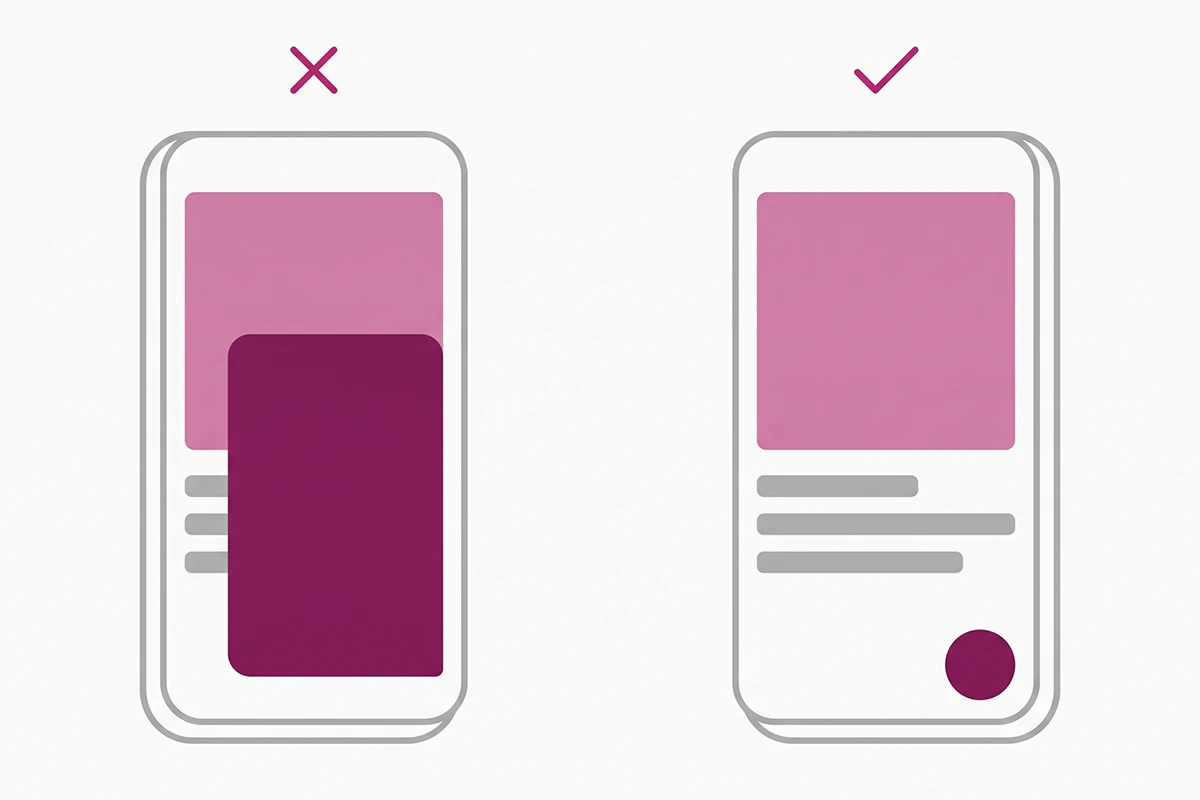
What the greeting says matters as much as when it appears. The four-message welcome flow covers the wording that earns a reply instead of a dismissal.
Mistake 3: It was trained on your homepage and not much else
Most chatbot tools promise they will read your store. What they actually read is narrower than the marketing suggests. Shopify's own documentation is refreshingly direct about this: suggested replies pull from your products, pages, and store content, and it states plainly that your terms of service and privacy policy are not processed for suggested replies.
So the bot ends up confident about your product names and vague about everything a shopper actually hesitates over: sizing, materials, delivery windows, what happens if the item arrives damaged.
Why is my chatbot not working even though it replies?
Because replying and resolving are different things. A bot that answers every message with a paragraph of soft language is producing a 100 percent reply rate and a very low resolution rate. The shopper leaves with the same question they arrived with, which from your side looks like a successful chat and from theirs looks like a waste of two minutes.
The fix: write down the ten questions you personally answer most often, then write real answers with real numbers in them. Not "we ship quickly," but "orders placed before 2pm ship the same business day, and delivery in the US takes 3 to 5 business days." Feed those into the bot's knowledge source. Ten specific answers will outperform a full site crawl.
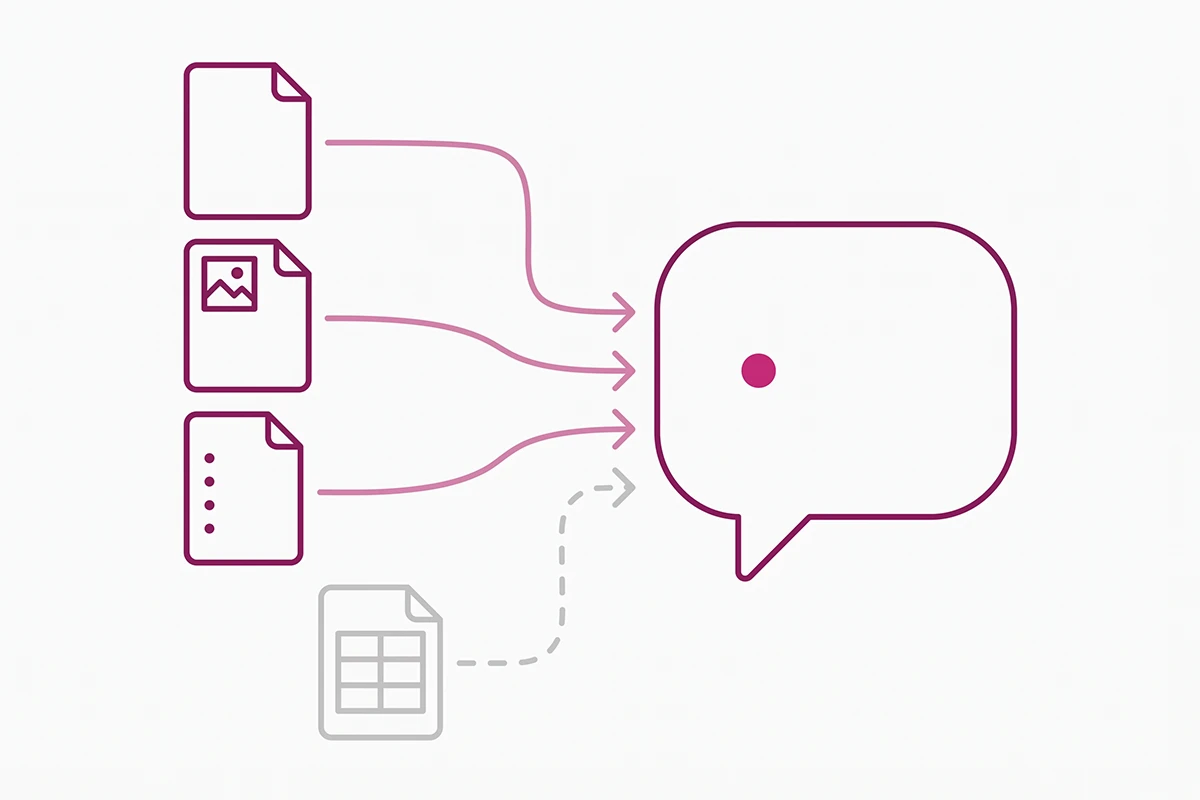
The longer walkthrough covers which four sources to feed it and how to catch a wrong answer before a customer does.
Mistake 4: It dead-ends after hours
A good chunk of ecommerce browsing happens in the evening, which is exactly when you are not at your desk. If your chatbot's only real skill is passing messages to a human, then every night your store has a support channel that quietly does nothing.
The most common after-hours question is also the most automatable one: where is my order. It needs no judgment, no discount authority, and no brand voice. It needs an order number and a tracking link.
The fix: two settings. First, set up instant answers for the questions that never change, which run around the clock whether or not you are online. Shopify Inbox includes a Track my order instant answer by default, and you can add your own for returns, shipping times, and sizing. Second, write an after-hours message that gives a real number: "I am offline until 9am Manila time and reply to everything within one business day." A specific wait time is easier to accept than a vague promise.
If order status is most of your evening volume, it is worth setting up properly. Here is how a chatbot can handle "where is my order" without a human.
Mistake 5: Nobody has read the transcripts
This is the mistake that hides all the others. Every failure above leaves a record in your conversation log, and on most stores that log has not been opened since the week of install.
Reading transcripts is unglamorous work and it is also the highest-value hour in the whole chatbot setup. You find out which product page keeps generating the same sizing question, which policy is worded confusingly enough that people ask about it twice a week, and which questions the bot is quietly getting wrong. Each of those is either a product page edit, a new FAQ entry, or a blog post.
The fix: put 30 minutes in your calendar on the first Monday of every month. Read every conversation from the past four weeks, which for a store doing under 500 orders a month is usually not many. Keep a running list with three columns: questions the bot answered well, questions it fumbled, and questions you did not expect. Fix the middle column, and write content for the third.
This is also the honest reason a managed chatbot carries a monthly fee rather than a one-time build price. Studio Niza charges $599 to set one up and $99 a month after that, and the monthly part is mostly this: someone reads the transcripts, updates the answers, and notices the fumbles before your customers do. A chatbot is not a thing you install. It is a thing you maintain.
There is more in the log than support tickets. Your transcripts are free market research if you read them that way.
Mistake 6: The tone fights your brand
Your product pages took weeks to write. Your chatbot is running on whatever tone the vendor shipped, which is usually a cheerful corporate register with exclamation points and phrases nobody at your store would say out loud.
Shoppers notice the seam, even if they cannot name it. A store that reads as careful and considered on the product page and then chirps at them in chat feels slightly off, and "slightly off" is expensive at the moment someone is deciding whether to trust you with their card details.
The fix: pick three tone attributes and one banned list, then put both into the bot's system instructions. Three attributes might be "plain, warm, brief." The banned list is the phrases that would never appear in your copy. Ten minutes of writing here fixes every future response at once, which is a better return than editing answers one at a time.
The full method, including the guardrails that keep tone from bending accuracy, is in the post on giving your chatbot a real brand voice.
Mistake 7: It never got updated after your policy changed
You extended returns from 14 days to 30. You switched carriers. You raised the free shipping threshold. All of that went onto your policy pages, and none of it reached the chatbot, which is still confidently telling shoppers the old numbers.
This is not only a service problem. In 2024 the British Columbia Civil Resolution Tribunal ordered Air Canada to pay a customer roughly $812 after its website chatbot described a refund process that did not exist. The airline argued the chatbot was responsible for its own answers. The tribunal rejected that outright, holding that a company is responsible for everything on its website regardless of whether it comes from a static page or a chat window. I am not a lawyer and this is not legal advice, but the principle is worth carrying: your bot's answers are your store's answers.
The fix: add one line to whatever process you already use when a policy changes. If you edit a policy page, you update the chatbot's knowledge source the same day. Then test it by asking the bot the question a customer would ask, in a customer's words, not yours. "Can I return this?" not "What is your return policy?"
Returns are the category where stale answers cost the most, because the shopper is already unhappy. The post on returns and refunds covers what to automate and what to route straight to you.
Wrapping up: the 20-minute pass
If you only have one sitting, do them in this order. The escape hatch first, because it is the only mistake that loses a sale while the shopper is still on your site. Then policy accuracy, because wrong answers are worse than no answers. Then greeting timing, since auto-open on mobile annoys far more people than it helps. Then tone, instant answers, and knowledge gaps, which all compound slowly rather than costing you today.
That is roughly 20 minutes for five of the seven. The remaining two, reading transcripts and keeping the knowledge base current, are not tasks you finish. They are a standing 30 minutes a month, and they are what separates a chatbot that earns its place from one that sits in the corner looking like furniture.
One more thing worth saying plainly. If your bot cannot handle a whole category of question well, take that category out of its scope instead of letting it guess. A chatbot that says "I can help with orders, shipping, and returns, and I will pass anything else to Niza" is more useful than one that improvises across everything. Honest scope beats impressive scope, in a service tier and in a support widget.
None of these seven are hard. They are just invisible, which is why they survive for months on otherwise well-run stores. Run the four-minute walkthrough on your own store tonight and you will probably find two of them.
Would you rather someone else ran this pass?
Studio Niza builds and monitors Shopify chatbots, which means the escape hatch, the policy updates, and the monthly transcript read are somebody's actual job. Setup starts at $599, then $99/month all in.
See how the chatbot service works →Or email contact@studioniza.com if you have a specific question about your store. I read every one.
Frequently asked questions
If you're still unsure after reading these, just send the question.
Why is my chatbot not working even though it replies to customers? +
Replying and resolving are two different things. A bot that answers every message with vague, friendly language looks busy in your dashboard while the shopper leaves with the same question they arrived with. Check your resolution rate rather than your reply count, and read ten real transcripts to see how many conversations actually ended with an answer.
What are the most common chatbot mistakes ecommerce stores make? +
The most common chatbot mistakes ecommerce stores make are all post-launch neglect: no path to a human, a greeting that interrupts browsing, a thin knowledge base, no after-hours coverage, unread transcripts, a tone that does not match the brand, and answers that were never updated after a policy changed. Five of the seven are settings you can change in one sitting.
Can a bad chatbot hurt my Shopify conversion rate? +
Yes, in two ways. A chat panel that opens on its own can cover the product a shopper is trying to look at, especially on mobile, and a failed help attempt often ends the session entirely. Baymard's research found that 7 percent of US adults would never buy from a site again after one bad self-service experience.
Should I turn off my chatbot if it is not performing? +
Turning it off is better than leaving a broken one live, but try the fixes first. Add a clear path to a human, correct any outdated policy answers, and give it 30 days. If chats are still ending without resolutions after that, a well-organised FAQ page and a visible contact link will serve shoppers better than a bot that guesses.
How often should I update a Shopify chatbot? +
Read the transcripts once a month and update the knowledge source the same day any policy, price, or shipping window changes. The monthly read takes about 30 minutes for a store under 500 orders a month. The same-day policy update is the one that prevents the most expensive kind of wrong answer.
Do I need a developer to fix these chatbot mistakes? +
No, not for five of the seven. Escalation paths, greeting timing, after-hours messages, instant answers, and tone are all settings inside your chatbot app or your Shopify Inbox configuration. Only deeper knowledge-base work and custom integrations usually need someone technical.
Is my store responsible for what the chatbot tells a customer? +
A Canadian tribunal ruled in 2024 that Air Canada was responsible for a wrong answer its website chatbot gave a customer, rejecting the argument that the bot was a separate entity. That was one case in one jurisdiction and this is not legal advice, but the safe assumption is that your bot's answers are your store's answers. Keep its policy information current.
How much does it cost to fix a chatbot that is not converting? +
Nothing but your time if you do it yourself, and most of these fixes take minutes. Managed monitoring, where someone else reads the transcripts and keeps the answers current, runs roughly $99 to $300 a month depending on the provider. The honest catch is that this is ongoing work, not a one-time repair.